Introduction
The Nokia 5310 XpressMusic is a compact and feature-rich mobile phone designed for communication and music playback. It features a sleek aluminum finish, dedicated music keys, a 2-megapixel camera, and a bright 2-inch QVGA screen. This manual provides essential information for setting up, operating, and maintaining your device.

Figure 1: Front view of the Nokia 5310 XpressMusic phone, showcasing its compact design and screen.
Setup
1. Inserting the SIM Card
The Nokia 5310 requires a SIM card for cellular network access. Ensure the phone is powered off before inserting or removing the SIM card. Locate the SIM card slot, typically under the battery cover. Insert your SIM card into the designated slot until it clicks into place.
2. Installing the Battery
Open the back cover of the phone. Align the battery contacts with the terminals inside the battery compartment. Gently press the battery down until it is securely in place. Replace the back cover.
3. Inserting a MicroSD Card (Optional)
For expanded storage, particularly for music and photos, you can insert a MicroSD card (up to 4 GB). The MicroSD card slot is usually located near the SIM card slot or on the side of the phone. Insert the card with the gold contacts facing down until it locks.
4. Charging the Battery
Connect the charger to the phone's charging port. Plug the charger into a power outlet. The battery indicator on the screen will show charging progress. A full charge provides up to 5 hours of talk time or 300 hours of standby time.
5. Powering On/Off
To power on, press and hold the Power key until the Nokia logo appears. To power off, press and hold the Power key until the power-off options appear, then select 'Power off'.
Operating Instructions
Basic Phone Functions
- Making Calls: Enter the phone number using the keypad and press the Call key.
- Answering Calls: Press the Call key when the phone rings.
- Sending Text Messages (SMS): Navigate to 'Messages', select 'Create new message', type your message, and send it to a recipient.
- Sending Multimedia Messages (MMS): Similar to SMS, but allows adding images, audio, or video.
- Contacts: Store up to 2000 contacts with multiple numbers and text fields.
Music Playback (XpressMusic Features)
The Nokia 5310 is optimized for music with dedicated playback controls on the side of the phone.
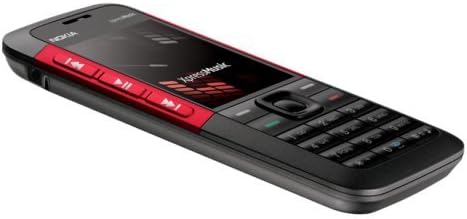
Figure 2: Side view highlighting the dedicated music playback controls.
- Dedicated Music Keys: Use the play/pause, reverse, and forward buttons located on the side for easy music control.
- Supported Formats: MP3, MP4, AAC, eAAc+, and WMA.
- FM Radio: Tune into your favorite radio stations using the integrated FM tuner.
- Bluetooth A2DP: Stream music wirelessly to compatible Bluetooth stereo headphones.
- 3.5mm Headphone Jack: Connect standard wired headphones for private listening.
Camera Functions
The phone features a 2-megapixel camera for capturing still images and video.
- Still Images: Capture photos up to 1600 x 1200 pixels with 4x digital zoom.
- Video Capture: Record short video clips.
Connectivity
- Bluetooth 2.0: For hands-free communication (HFP, HSP), file transfer (OPP, FTP), and stereo audio streaming (A2DP).
- USB Connectivity: Connect to a PC for data transfer and synchronization.
- Email: Supports IMAP4, POP3, and SMTP with attachment viewing (DOC, PDF, XLS, JPEG, 3GP, MP3).
- Web Browser: Utilize the Opera Mini web browser for internet access.
Other Features
- Organizer: Alarm clock, calendar, to-do list, notes, calculator, stopwatch, countdown timer.
- Airplane Mode: Disables wireless functions for safe use in environments requiring cellular connection to be off.
- T9 Predictive Text: Facilitates faster text entry.
Maintenance
Battery Care
- To maximize battery life, avoid extreme temperatures.
- Charge the battery fully before first use.
- Unplug the charger once the battery is full to conserve energy.
Cleaning Your Device
Use a soft, lint-free cloth to clean the phone's screen and body. Avoid using harsh chemicals or abrasive materials, which can damage the surface.
Troubleshooting
Network Compatibility
This unlocked cell phone is compatible with GSM carriers such as AT&T and T-Mobile. It will not function with CDMA carriers like Verizon Wireless, Alltel, and Sprint. Ensure your chosen carrier uses GSM technology and supports the phone's tri-band frequencies (900/1800/1900 MHz).

Figure 3: Carrier compatibility information for the Nokia 5310.
Common Issues
- Phone does not power on: Ensure the battery is correctly installed and charged.
- No network signal: Check SIM card insertion. Verify you are within your carrier's coverage area.
- Poor audio quality: Ensure the speaker/microphone is not obstructed. Adjust volume settings.
Specifications
| Feature | Detail |
|---|---|
| Model Name | Nokia 5310 |
| Dimensions | 4.09 x 1.76 x 0.39 inches |
| Weight | 2.48 ounces (70.3 grams) |
| Display | 2-inch QVGA (240 x 320 pixels), 16.7 million colors |
| Camera | 2-megapixel with 4x digital zoom |
| Internal Memory | 30 MB |
| Expandable Memory | MicroSD up to 4 GB |
| Battery | 860 mAh Lithium-Ion |
| Talk Time | Up to 5 hours |
| Standby Time | Up to 300 hours |
| Connectivity | Tri-band GSM (850/1800/1900 MHz), GPRS/EDGE, Bluetooth 2.0 (A2DP, HFP, HSP, DUN, FTP, HID, OPP, PAN), USB |
| Operating System | Symbian Series 40, 3rd Edition |
| Audio Jack | 3.5 mm |
Warranty and Support
Warranty Information
Please note that this product is an international version and may not include a US warranty, as some manufacturers do not honor warranties for international version phones. For specific warranty details, it is recommended to contact the seller directly at the point of purchase.
Customer Support
For further assistance, technical support, or service inquiries, please refer to the contact information provided by your retailer or visit the official Nokia support website for general product information.