
1. Introduction and Overview
This manual provides comprehensive instructions for the installation, operation, and maintenance of your Sky Link NET-1016 16-Port 10/100 N-Way Fast Ethernet Switch. This device is designed to expand your network connection efficiently and reliably.
The NET-1016 features sixteen 10/100 Mbps Auto Sensing RJ-45 ports, each capable of operating in full or half duplex modes. It also includes one Uplink port for connecting to additional Ethernet hubs or switches, enhancing network flexibility.

Figure 1: Sky Link NET-1016 16-Port Fast Ethernet Switch with included power cord. The switch features multiple RJ-45 ports on the front panel and a power input on the rear.
2. Package Contents
Please verify that all items are present and undamaged upon opening the package. If any items are missing or damaged, contact your vendor immediately.
- Sky Link NET-1016 16-Port 10/100 N-Way Fast Ethernet Switch
- Power Adapter/Cord
- User Manual (this document)
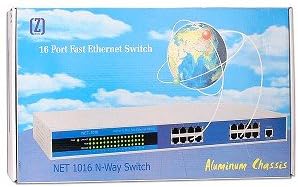
Figure 2: The retail packaging for the Sky Link NET-1016 16-Port Fast Ethernet Switch. The box displays the product name and a graphic of the switch.
3. Key Features
- Sixteen (16) 10/100 Mbps Auto Sensing RJ-45 ports
- One (1) Uplink port
- Compliant with IEEE 802.3 and IEEE 802.3u standards
- Supports Full/Half duplex operation for each port
- Flow control for both full and half duplex modes
- Store and Forward transmission method to prevent packet loss
- Plug and Play installation
- Durable Plastic Case construction
4. Setup and Installation
4.1. Physical Placement
Choose a stable, flat surface for the switch. Ensure adequate ventilation around the device to prevent overheating. Avoid placing the switch near heat sources, in direct sunlight, or in areas with high humidity.
4.2. Connecting Network Devices
- Power Connection: Connect the provided power adapter to the switch's power input port and then plug it into a standard electrical outlet.
- Device Connection: Connect your network devices (e.g., computers, printers, network-attached storage) to any of the sixteen RJ-45 ports using standard Ethernet cables. The switch supports both 10 Mbps and 100 Mbps connections, automatically detecting the speed of the connected device.
- Uplink Connection (Optional): If you need to expand your network further or connect to a main router/modem, use the dedicated Uplink port. Connect one end of an Ethernet cable to the Uplink port on the NET-1016 and the other end to an available port on your router, modem, or another switch.
The switch is Plug and Play, meaning no software configuration is typically required for basic operation. Once connected, the devices should automatically establish network connectivity.
5. Operation
The Sky Link NET-1016 operates automatically once powered on and connected to network devices. It uses a Store and Forward transmission method to ensure data integrity and prevent packet loss.
5.1. LED Indicators
The front panel of the switch features LED indicators that provide status information for each port and the device itself. Refer to the diagram below for typical LED layout (exact layout may vary slightly).
| LED Indicator | Status | Description |
|---|---|---|
| Power | Solid Green | The switch is powered on and operating correctly. |
| Link/Act (Per Port) | Solid Green | A device is successfully connected to the port. |
| Link/Act (Per Port) | Flashing Green | Data is being transmitted or received through the port. |
| Link/Act (Per Port) | Off | No device is connected to the port, or there is a connection issue. |
6. Maintenance
The Sky Link NET-1016 switch requires minimal maintenance. Follow these guidelines to ensure optimal performance and longevity:
- Cleaning: Use a soft, dry cloth to clean the exterior of the switch. Do not use liquid or aerosol cleaners.
- Ventilation: Ensure that the ventilation openings are not blocked. Proper airflow is crucial to prevent overheating.
- Power Cycle: If the switch experiences unusual behavior, try power cycling it by unplugging the power cord, waiting 10 seconds, and then plugging it back in.
- Cable Management: Keep network cables organized and free from kinks or excessive bends to prevent signal degradation.
7. Troubleshooting
If you encounter issues with your Sky Link NET-1016 switch, refer to the following common troubleshooting steps:
- No Power:
- Ensure the power cord is securely connected to both the switch and a working electrical outlet.
- Verify the power outlet is functional by plugging in another device.
- No Link Light on Port:
- Check if the Ethernet cable is securely connected to both the switch port and the network device.
- Try a different Ethernet cable.
- Connect the device to a different port on the switch.
- Ensure the connected device (e.g., computer, router) is powered on and its network adapter is enabled.
- Slow Network Speed:
- Verify that all connected devices are operating at their expected speeds.
- Check for excessive network traffic or bandwidth-intensive applications.
- Ensure cables are not damaged or too long.
- Intermittent Connectivity:
- Check for loose cable connections.
- Ensure the switch is placed in a well-ventilated area to prevent overheating.
- Power cycle the switch and all connected network devices.
If the problem persists after trying these steps, please contact Sky Link customer support for further assistance.
8. Specifications
| Feature | Detail |
|---|---|
| Model | NET-1016 |
| Number of Ports | 16 x RJ-45 (10/100 Mbps Auto Sensing) + 1 x Uplink Port |
| Data Transfer Rate | 10/100 Mbps (per port) |
| Standards | IEEE 802.3, IEEE 802.3u |
| Duplex Mode | Full/Half Duplex |
| Flow Control | Supported for Full and Half Duplex |
| Transmission Method | Store and Forward |
| Switch Type | Unmanaged |
| Case Material | Plastic |
| Compatible Devices | Desktop, Laptop, Network Devices with RJ45 interface |
| UPC | 683728143039 |
| ASIN | B000YJKCNC |
9. Warranty and Support
For warranty information and technical support, please refer to the documentation included with your purchase or visit the official SKYLINK website. Keep your purchase receipt as proof of purchase for warranty claims.
For further assistance, you may contact SKYLINK customer service through their official channels. Please have your product model number (NET-1016) and purchase details ready when contacting support.


