
MXL MXL-Vocalist
MXL 3000 Mic Bundle User Manual
Model: MXL-Vocalist
Introduction
The MXL 3000 Mic Bundle is a professional condenser microphone system designed for high-quality audio capture. It features a 25mm gold sputtered, 6 micron capsule and a Class "A" FET preamplifier, making it ideal for vocals, acoustic guitar, strings, and wind instruments. This bundle includes essential accessories for immediate use.
What's in the Box
Verify that all components are present in your MXL 3000 Mic Bundle package:
- MXL 3000 Condenser Microphone
- 25 ft. Mogami Mic Cable
- Shockmount
- Matching Pop Filter

Image: The complete MXL 3000 Mic Bundle, showing the microphone, pop filter, and shockmount assembled.

Image: A detailed view of the shockmount included with the MXL 3000 microphone, designed to reduce vibrations.
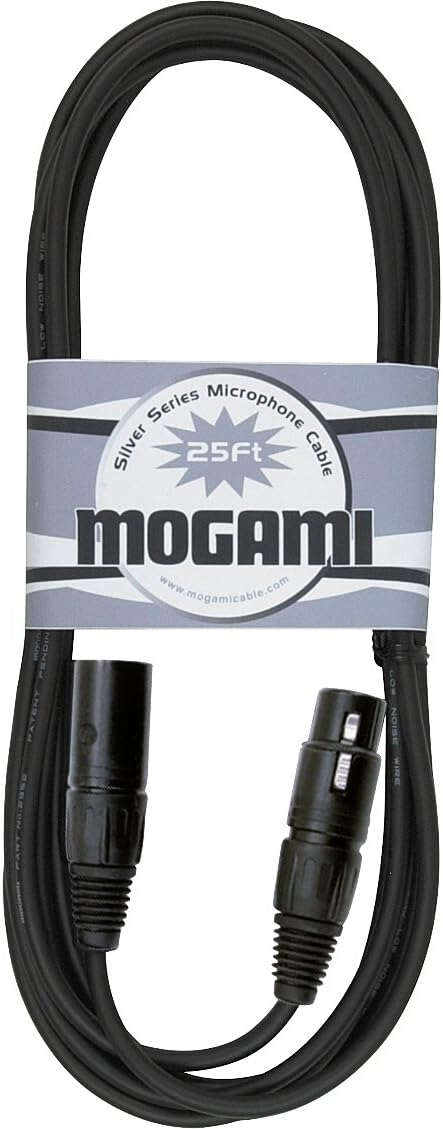
Image: The 25-foot Mogami microphone cable, featuring XLR connectors, included in the bundle.
Setup
- Attach the Shockmount: Secure the MXL 3000 microphone into the provided shockmount. Ensure the microphone is firmly seated within the elastic bands to minimize handling noise and vibrations.
- Mount to a Stand: Attach the shockmount assembly to a standard microphone stand. Tighten the stand's mounting screw to ensure stability.
- Connect the Pop Filter: Position the matching pop filter in front of the microphone capsule. The pop filter helps to reduce plosive sounds (like 'p' and 'b') during vocal recordings.
- Connect the XLR Cable: Use the included 25 ft. Mogami XLR cable to connect the microphone's XLR output to an audio interface, mixer, or preamplifier that provides 48V phantom power. The MXL 3000 requires phantom power to operate.
- Power On: Activate the 48V phantom power on your audio interface or mixer. The microphone is now ready for use.

Image: A user demonstrating proper microphone setup with the MXL 3000, including the pop filter, for vocal recording.
Operating Instructions
Microphone Placement
- Vocals: For optimal vocal recording, position the microphone 6-12 inches from the vocalist, directly in front of their mouth. Use the pop filter to prevent plosives.
- Acoustic Instruments: For acoustic guitars or other stringed instruments, experiment with placement 1-3 feet away, pointing towards the soundhole or bridge for different tonal characteristics.
- Wind Instruments: Place the microphone a few feet away, aiming at the bell or sound projection area, adjusting distance for desired room ambiance.
Gain Staging
Adjust the gain on your audio interface or mixer to achieve a healthy signal level without clipping. Aim for peak levels around -6dB to -3dB on your recording software's meters to allow for headroom.
Phantom Power
The MXL 3000 is a condenser microphone and requires 48V phantom power to operate. Ensure this is supplied by your connected equipment before use.
Maintenance
- Cleaning: Gently wipe the microphone body with a soft, dry cloth. Do not use liquid cleaners or solvents.
- Storage: When not in use, store the microphone in a dry, dust-free environment, preferably in its original packaging or a dedicated microphone case.
- Handling: Always handle the microphone with care. Avoid dropping it or exposing it to extreme temperatures or humidity.
Troubleshooting
| Problem | Possible Cause | Solution |
|---|---|---|
| No Sound Output | No phantom power; faulty cable; incorrect input selection. | Ensure 48V phantom power is enabled on your interface/mixer. Check XLR cable connections. Verify correct input is selected on your recording device. |
| Low Volume / Weak Signal | Insufficient gain; microphone too far from source. | Increase gain on your audio interface/mixer. Move microphone closer to the sound source. |
| Distorted Sound | Input signal too hot (clipping); faulty cable. | Reduce gain on your audio interface/mixer. Ensure peak levels do not exceed 0dB. Try a different XLR cable. |
| Excessive Plosives (P-pops) | No pop filter; microphone too close to mouth. | Ensure the pop filter is correctly positioned. Increase distance between vocalist and microphone. |
Specifications
| Feature | Detail |
|---|---|
| Microphone Type | Condenser |
| Capsule | 25mm gold sputtered, 6 micron |
| Preamplifier | Class "A" FET |
| Polar Pattern | Unidirectional |
| Connectivity Technology | XLR |
| Power Source | Corded Electric (Requires 48V Phantom Power) |
| Signal-to-Noise Ratio | 77 dB |
| Audio Sensitivity | 54 dB |
| Item Weight | 3.96 pounds |
| Product Dimensions | 12.75 x 10.8 x 3.75 inches |
| Model Number | MXL-Vocalist |
| UPC | 801813120202 |
| Color | Gold |
| Recommended Uses | Singing, Voice Recording, Video Recording |
Warranty and Support
For warranty information and technical support, please refer to the official MXL website or contact MXL customer service directly. Keep your proof of purchase for warranty claims.
Online Resources: Visit the MXL Store on Amazon for additional product information and resources.
Related documentsMXL-Vocalist

Ask a question about this manual
Ask about setup, troubleshooting, compatibility, parts, safety, or missing instructions. Manuals+ will review the question and use this page’s manual context to help answer it.