
VideoSecu ML531BE2
VideoSecu ML531BE2 TV Wall Mount User Manual
Full Motion Articulating TV Wall Mount for 26-60 inch TVs
Introduction
This user manual provides detailed instructions for the installation, operation, and maintenance of your VideoSecu ML531BE2 TV Wall Mount. Please read this manual thoroughly before installation to ensure safe and correct usage. Keep this manual for future reference.
The ML531BE2 is a robust, full-motion wall mount designed to securely hold flat panel TVs ranging from 26 to 60 inches. Its articulating arm allows for extensive movement, providing optimal viewing angles.
Product Features
- Heavy-Duty Construction: Made from heavy gauge steel, supporting TVs up to 88 lbs (40 kg).
- Full Motion Capability: Extends up to 20 inches (50.8 cm) from the wall, swivels 180 degrees, and tilts from +5 to -15 degrees.
- VESA Compatibility: Supports VESA patterns from 100x100mm up to 400x400mm.
- Low Profile Design: Retracts to a slim 2.5 inches (6.35 cm) from the wall.
- Integrated Cable Management: Helps organize cables and prevents pinching.
- Included Accessories: Comes with a 6ft HDMI cable and a magnetic stud finder.
Package Contents
Verify that all components are present and undamaged before beginning installation. If any parts are missing or damaged, do not proceed with installation and contact customer support.

Image showing the complete VideoSecu ML531BE2 TV Wall Mount kit, including the mount assembly, HDMI cable, and magnetic stud finder.
- Wall Mount Assembly (Main Unit)
- TV Mounting Brackets (with VESA adapters)
- 6ft HDMI Cable
- Magnetic Stud Finder
- Mounting Hardware Kit (various screws, washers, spacers for TV and wall attachment)
- Socket Tool
Safety Information
WARNING: Failure to read and understand these instructions may result in serious personal injury, property damage, or voiding of warranty. If you have any questions, please contact customer support.
- Do not install this product if you cannot understand the instructions or are unsure about the safety of the installation.
- This mount is designed for installation on wood stud walls or solid concrete/brick walls. Do not install on drywall alone.
- Ensure the mounting surface can safely support the combined weight of the mount and the TV.
- Use the provided hardware. If your TV requires different screws, consult your TV's manual or contact the TV manufacturer.
- Always use a stud finder to locate the center of wood studs.
- Two people are recommended for installation, especially for larger TVs.
- Do not overtighten screws.
Setup and Installation
1. Pre-Installation Checks
- Check TV VESA Pattern: Measure the horizontal and vertical distance between the mounting holes on the back of your TV. This mount supports VESA patterns: 100x100mm, 150x150mm, 200x100mm, 200x200mm, 300x200mm, 300x300mm, 400x200mm, 400x300mm, 400x400mm.
- Check TV Weight: Ensure your TV weighs no more than 88 lbs (40 kg).
- Identify Wall Type: Determine if your wall is wood stud or solid concrete/brick.
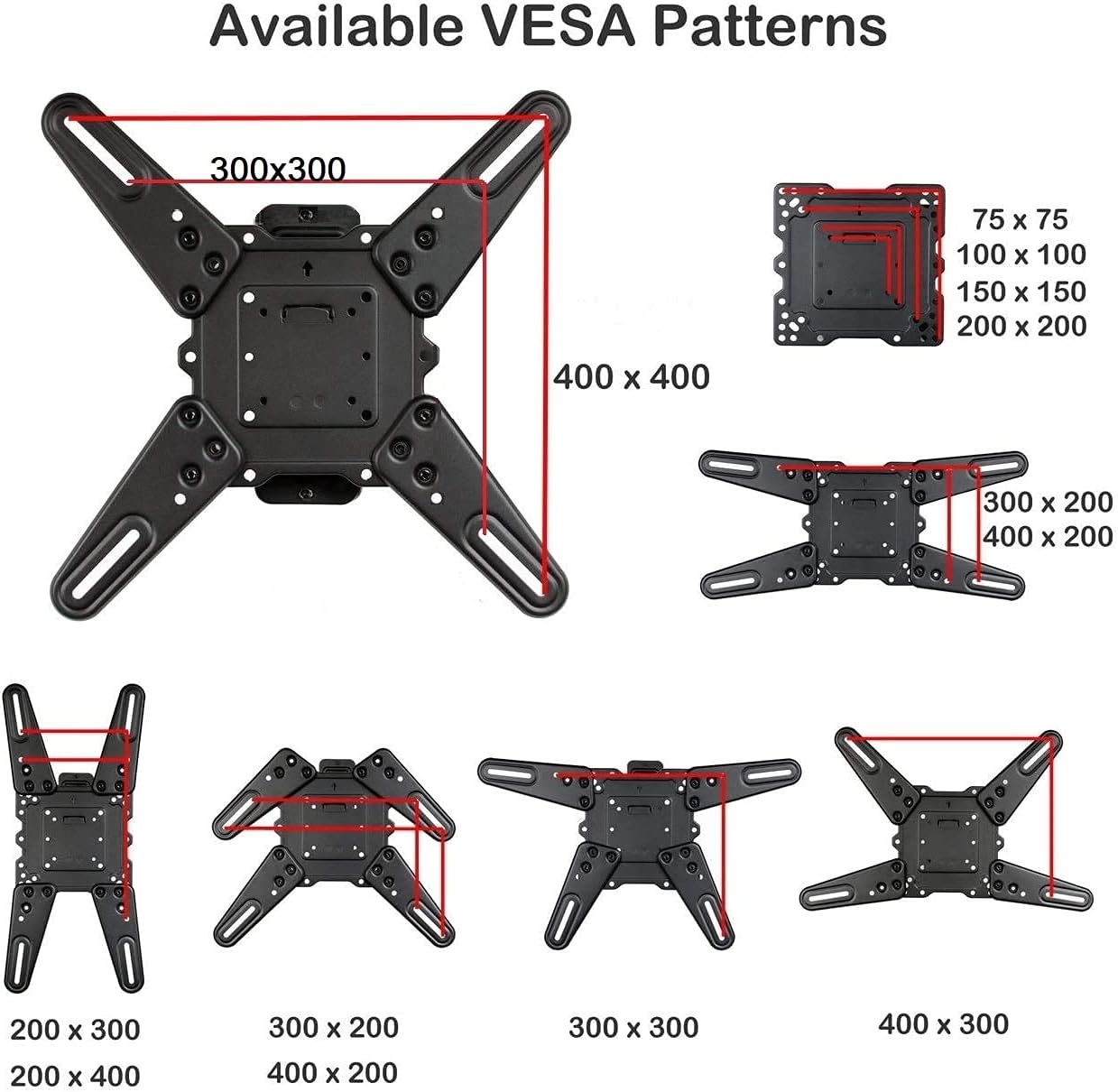
Diagram illustrating various VESA mounting patterns supported by the ML531BE2 mount, including 100x100mm, 200x200mm, 300x300mm, and 400x400mm.
2. Attaching Brackets to TV
- Carefully place your TV face-down on a soft, clean surface.
- Align the TV mounting brackets with the VESA holes on the back of your TV. Use the appropriate screws, washers, and spacers from the hardware kit. Ensure the brackets are level and securely fastened.
3. Mounting the Wall Plate
- Locate Studs (Wood Stud Walls): Use the magnetic stud finder to locate the center of a wood stud. Mark the desired mounting height.
- Drill Pilot Holes: For wood studs, drill pilot holes (e.g., 3/16" or 1/4" diameter, refer to specific hardware instructions) at the marked locations. For concrete/brick, use a masonry drill bit and appropriate anchors (not always included, may need to be purchased separately).
- Attach Wall Plate: Secure the wall plate to the wall using the provided lag screws. Ensure the wall plate is level before fully tightening all screws.

Diagram showing the dimensions of the wall plate and the extension arm, highlighting the 20-inch extension capability and various swivel and tilt angles.
4. Hanging the TV
- With assistance, carefully lift the TV and hook the brackets onto the wall plate.
- Secure the TV to the wall plate using the safety screws or locking mechanisms provided.

Side view of the VideoSecu ML531BE2 TV Wall Mount showing its low profile of 2.5 inches when fully retracted.
Operating Instructions
Adjusting TV Position
- Extension: Gently pull the TV forward to extend the arm up to 20 inches (50.8 cm) from the wall.
- Swivel: Rotate the TV left or right to achieve the desired viewing angle. The mount allows for up to 180 degrees of swivel.
- Tilt: Loosen the tilt lock nuts (if applicable, refer to diagram) to adjust the vertical tilt from +5 degrees (upward) to -15 degrees (downward). Retighten the nuts to secure the tilt angle.
- Level Adjustment: The mount offers a ±5 degree screen level adjustment. Use the provided socket tool to adjust the level lock nuts for fine-tuning the horizontal alignment of your TV.
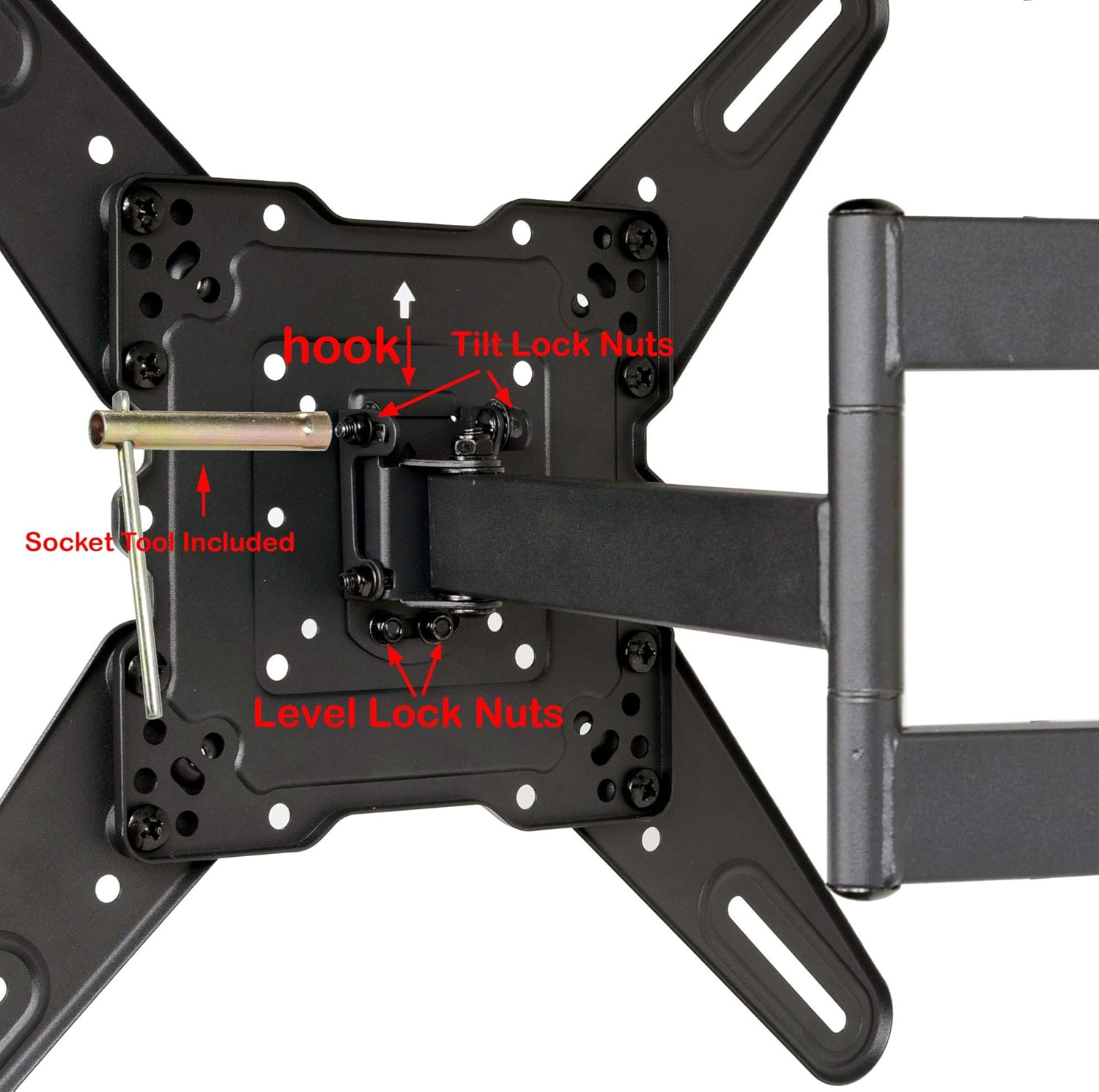
Close-up view of the VideoSecu ML531BE2 mount showing the tilt lock nuts and level lock nuts, along with the socket tool for adjustments.
Cable Management
Route your TV cables through the integrated cable management clips or channels on the articulating arm to keep them organized and prevent tangling or pinching. This also contributes to a cleaner aesthetic.

Detailed view of the VideoSecu ML531BE2 mount highlighting its VESA compatibility, extension arm, adjustment capabilities (tilt, swivel, level), heavy-duty steel construction, and integrated cable management system.
Maintenance
- Regular Inspection: Periodically check all screws and connections to ensure they remain tight and secure.
- Cleaning: Clean the mount with a soft, dry cloth. Do not use abrasive cleaners or solvents.
- Lubrication: If the articulating arm becomes stiff, a few drops of silicone-based lubricant can be applied to the pivot points.
Troubleshooting
| Problem | Possible Cause | Solution |
|---|---|---|
| TV is not level after installation. | Wall plate not level, or level adjustment nuts need fine-tuning. | Use the ±5 degree level adjustment feature. Loosen the level lock nuts slightly, adjust the TV, and retighten. If the wall plate itself is significantly off, re-installation may be required. |
| Mount feels stiff or difficult to move. | Lack of lubrication or initial stiffness. | Apply a small amount of silicone-based lubricant to the articulating joints. Movement will become smoother with use. |
| TV seems unstable or wobbly. | Screws not fully tightened, or incorrect installation. | Immediately check all mounting screws on both the TV and the wall plate. Ensure they are securely tightened. Verify that the wall type is appropriate and studs were properly located. If issues persist, consult a professional installer. |
| Missing hardware. | Packaging error. | Do not proceed with installation. Contact VideoSecu customer support for replacement parts. |
Specifications
- Model: ML531BE2
- Material: Heavy Gauge Steel
- Color: Black
- TV Size Compatibility: 26 - 60 inches (most flat panel TVs)
- Weight Capacity: Up to 88 lbs (40 kg)
- VESA Compatibility: 100x100mm, 150x150mm, 200x100mm, 200x200mm, 300x200mm, 300x300mm, 400x200mm, 400x300mm, 400x400mm
- Extension from Wall: 2.5 inches (retracted) to 20 inches (extended)
- Tilt Angle: +5° to -15°
- Swivel Angle: Up to 180° (depending on TV size)
- Level Adjustment: ±5°
- Product Dimensions: 13 x 10.6 x 2.5 inches (when retracted)
- Item Weight: 8.8 pounds
Warranty and Support
VideoSecu products are designed for durability and performance. For warranty information or technical support, please refer to the contact details provided on the product packaging or the official VideoSecu website. Please have your model number (ML531BE2) and purchase information ready when contacting support.
For additional resources and frequently asked questions, visit the VideoSecu Official Website.
Product Videos
The following videos provide additional visual guidance and demonstrations related to the product. Please note that some videos may be user-generated and not official product demonstrations.
No official seller videos are available for this product at this time.
Ask a question about this manual
Ask about setup, troubleshooting, compatibility, parts, safety, or missing instructions. Manuals+ will review the question and use this page’s manual context to help answer it.