
1. Introduction
The Behringer V-AMP2 is a virtual guitar amplifier and multi-effects processor designed to provide a wide array of guitar tones. It utilizes advanced amp modeling technology to simulate 32 different amplifier types and 15 speaker cabinet configurations. Additionally, it features a high-resolution 24-bit stereo multi-effects processor, including separate wah-wah and reverb effects, for comprehensive sound shaping.
This unit is equipped with an effective 3-band EQ, a chromatic tuner, tap tempo functionality, and comprehensive MIDI implementation for real-time control and data transfer. The V-AMP2 offers 125 onboard presets, organized into 25 banks, providing a versatile platform for guitarists.
2. Safety Instructions
Please read and follow all safety instructions before operating the V-AMP2 to prevent electric shock, fire, or injury.
- Power Supply: Use only the specified AC adapter. Ensure the voltage matches the requirements of your region.
- Water and Moisture: Do not expose the unit to rain, moisture, or any liquids. Do not place objects filled with liquids on the unit.
- Ventilation: Ensure adequate ventilation. Do not block ventilation openings.
- Heat Sources: Do not place near heat sources such as radiators, heat registers, stoves, or other apparatus (including amplifiers) that produce heat.
- Cleaning: Clean only with a dry cloth.
- Servicing: Do not attempt to service this product yourself. Refer all servicing to qualified service personnel.
- Cables: Protect power cords from being walked on or pinched, particularly at plugs, convenience receptacles, and the point where they exit from the apparatus.
3. Setup
3.1 Unpacking and Included Components
Carefully unpack your V-AMP2 and check for any signs of damage. The following components should be included:
- Behringer V-AMP2 Unit
- Dual Footswitch
- AC Adapter
- Carrying Bag
3.2 Connections
Before making any connections, ensure the V-AMP2 and all connected devices are powered off.
- Power Connection: Connect the supplied AC adapter to the 'DC IN' jack on the V-AMP2 and then to a suitable power outlet.
- Guitar Input: Connect your guitar to the 'INPUT' jack using a standard 1/4-inch instrument cable.
- Audio Outputs:
- Line Out: For connecting to a mixing console, audio interface, or power amplifier, use the 'LEFT (MONO)' and 'RIGHT' 1/4-inch jacks. These outputs feature speaker simulation.
- Headphones: Connect stereo headphones to the 'PHONES' jack for private practice.
- Footswitch: Connect the included dual footswitch to the 'FOOTSWITCH' jack for preset selection and tuner control.
- MIDI Connections: Use standard MIDI cables to connect the 'MIDI IN' and 'MIDI OUT' ports to other MIDI devices for remote control, automation, and data transfer.
- Auxiliary Input: Connect an external audio source (e.g., CD player, MP3 player) to the 'AUX IN' stereo 1/8-inch jack for playing along with music.
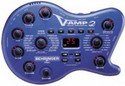
Image: Front panel of the Behringer V-AMP2, showing the input, output, and control layout. This image illustrates the physical connections and controls discussed in the setup and operating sections.
4. Operating the V-AMP2
4.1 Powering On and Basic Navigation
After making all connections, power on the V-AMP2. The unit will display the last used preset. Use the 'UP' and 'DOWN' buttons or the connected footswitch to navigate through the 125 presets.
4.2 Amp and Speaker Simulation
The V-AMP2 features 32 amp models and 15 speaker simulations. These can be selected independently. Use the dedicated 'AMP' and 'SPEAKER' controls to cycle through the available models. Each selection will alter the fundamental tone of your guitar.
4.3 Effects Processor
The integrated 24-bit stereo effects unit offers a range of effects. Use the 'EFFECTS' knob to select different effect types. The V-AMP2 also includes separate controls for a wah-wah effect and 9 stereo reverb types, which can be combined with other effects, amp, or speaker settings.
4.4 Equalization and Volume
An effective 3-band EQ (Bass, Mid, Treble) allows for fine-tuning of your tone. The characteristics of the EQ are dependent on the selected amp model. Use the 'MASTER VOLUME' control to adjust the overall output level of the unit.
4.5 Chromatic Tuner
The V-AMP2 includes an integrated chromatic tuner. Activate the tuner via a dedicated button or the footswitch. Play a single note on your guitar, and the display will indicate if the note is sharp, flat, or in tune.
4.6 Tap Tempo Function
For time-based effects, the tap tempo function allows real-time adjustment of the effect's speed parameter. Simply tap the designated button or footswitch at your desired tempo.
4.7 MIDI Implementation
The V-AMP2 offers comprehensive MIDI capabilities. This allows for remote control of parameters, automation within a DAW, data transfer (e.g., backing up presets), and access to additional hidden parameters not directly available on the front panel.
4.8 Saving Presets
Once you have created a desired sound, you can save it to one of the 125 user memory locations. Refer to the detailed manual for specific instructions on the saving procedure, typically involving holding down a 'STORE' or 'SAVE' button.
5. Maintenance
Proper care will ensure the longevity of your V-AMP2.
- Cleaning: Use a soft, dry cloth to clean the exterior of the unit. Do not use abrasive cleaners, solvents, or waxes.
- Storage: When not in use for extended periods, store the V-AMP2 in its carrying bag in a cool, dry place, away from direct sunlight and extreme temperatures.
- Transportation: Always use the provided carrying bag or a suitable protective case when transporting the unit to prevent damage.
6. Troubleshooting
If you encounter issues with your V-AMP2, consult the following common troubleshooting steps:
- No Sound:
- Check all cable connections (guitar, output, headphones).
- Ensure the 'MASTER VOLUME' is turned up.
- Verify that the connected amplifier or mixing console is powered on and its volume is adjusted.
- Check if the tuner is active (it mutes the output).
- Distorted/Unwanted Sound:
- Adjust the 'GAIN' control on the V-AMP2.
- Check the input level of your connected amplifier or mixer.
- Ensure your guitar's volume knob is not causing excessive input.
- Controls Not Responding:
- Power cycle the unit (turn off, wait a few seconds, then turn on).
- If using MIDI, ensure there are no conflicting MIDI messages.
- Footswitch Not Working:
- Ensure the footswitch cable is securely connected.
- Test the footswitch with another compatible device if possible.
If the problem persists, contact Behringer customer support or a qualified service technician.
7. Specifications
| Feature | Description |
|---|---|
| Model | V-AMP2 |
| Amp Models | 32 |
| Speaker Simulations | 15 |
| Effects Processor | 24-bit Stereo Multi-effects |
| Special Features | Mute Control, Chromatic Tuner, Tap Tempo |
| Connectivity | Aux Input, Stereo Line Out, Headphones Out, MIDI In/Out |
| Included Components | AC Adapter, Carrying Bag, Dual Footswitch |
| Supported Standards | MIDI |
| UPC | 689076752671 |
8. Warranty and Support
For detailed warranty information and terms, please refer to the warranty card included with your product or visit the official Behringer website. Technical support and service inquiries can be directed to Behringer customer service through their official channels.


