
Introduction
This manual provides detailed instructions for the safe and effective use of your IGIA CelluLift Massage System. Please read all instructions carefully before operating the device and retain this manual for future reference.
The IGIA CelluLift Massage System is designed to provide deep massage cycles, referred to as Cellumtion, to target specific areas. It includes a CelluLift Gel and a convenient carrying case for storage.
Product Overview
The IGIA CelluLift Massage System is an electric massager featuring several controls and indicators for a customized experience.
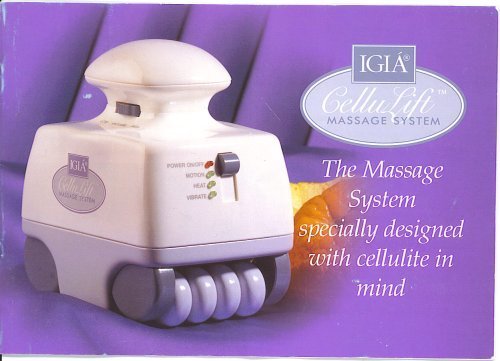
Image: The IGIA CelluLift Massage System, showing the main device, various attachments, and the CelluLift Gel pump dispenser.
Key Features:
- Active Air Vacuum Level Control: Adjusts the intensity of the vacuum function.
- 4-Way Control Switch: Manages different operational modes.
- Power ON/OFF Indicator Light: Illuminates when the device is powered on.
- Motion Function Indicator Light: Indicates when the motion function is active.
- Vibrate Function Indicator Light: Indicates when the vibration function is active.
Setup
- Unpack: Carefully remove all components from the White Vinyl Zippered Carrying Case.
- Power Connection: Connect the power adapter to the device and then plug it into a standard 120V 60Hz electrical outlet. Ensure the output is 9V AC 1.0A.
- Apply Gel: Before use, apply a sufficient amount of the provided CelluLift Gel from the pump dispenser to the skin area you intend to massage. This helps the device glide smoothly and enhances the massage effect.
- Attach Head: Select the desired massage head and securely attach it to the device.
Operating Instructions
- Power On: Turn on the device using the Power ON/OFF switch. The Power ON/OFF indicator light will illuminate.
- Select Mode: Use the 4-Way Control Switch to select your desired operational mode. This switch typically controls combinations of motion and vibration functions. Observe the Motion Function Indicator Light and Vibrate Function Indicator Light to confirm your selection.
- Adjust Vacuum Level: Use the Active Air Vacuum Level Control to adjust the intensity of the vacuum massage. Start with a lower setting and gradually increase to a comfortable level.
- Begin Massage: Gently place the massage head onto the skin area where the CelluLift Gel has been applied. Move the device in slow, circular motions, following the recommended Cellumtion cycles as described in the accompanying guide (if provided separately).
- Duration: Use the device for recommended durations per area, typically 5-10 minutes per session. Avoid prolonged use on a single area.
- Power Off: After your session, turn off the device using the Power ON/OFF switch and unplug it from the power outlet.
Important: Always ensure the skin is clean and moisturized with the CelluLift Gel before use to prevent discomfort and ensure optimal performance.
Maintenance
Cleaning:
- After each use, unplug the device and wipe the massage heads and the main unit with a soft, damp cloth.
- Do not immerse the device in water or use abrasive cleaners.
- Ensure the device is completely dry before storing.
Storage:
- Store the IGIA CelluLift Massage System and its accessories in the provided White Vinyl Zippered Carrying Case.
- Keep the device in a cool, dry place, away from direct sunlight and extreme temperatures.
Troubleshooting
| Problem | Possible Cause | Solution |
|---|---|---|
| Device does not power on. | Not properly plugged in; power outlet issue; faulty power adapter. | Ensure the power adapter is securely plugged into both the device and a working electrical outlet. Test the outlet with another appliance. If the issue persists, contact customer support. |
| Weak or no massage sensation. | Incorrect mode selected; low vacuum level; insufficient gel. | Check the 4-Way Control Switch to ensure the desired mode (motion/vibration) is active. Adjust the Active Air Vacuum Level Control to a higher setting. Apply more CelluLift Gel to the skin. |
| Device stops during operation. | Overheating; loose connection. | Unplug the device and allow it to cool down for 15-20 minutes. Check all connections. If the problem continues, discontinue use and contact support. |
Specifications
- Model: B000WWXB5M
- Manufacturer: IGIA` Direct Inc.
- Input: 120V 60Hz
- Output: 9V AC 1.0A
- Included: CelluLift Gel (6 fl oz.), White Vinyl Zippered Carrying Case
- Date First Available: October 7, 2007
Warranty and Support
For information regarding warranty coverage, product support, or replacement parts, please refer to the warranty card included with your purchase or contact IGIA` Direct Inc. customer service directly.
Keep your purchase receipt as proof of purchase for any warranty claims.
For further assistance, please visit the Igia Store on Amazon.