
Introduction
Thank you for choosing the TRIXIE Automatic Fish Feeder Model 86200. This device is designed to provide reliable and convenient feeding for your aquarium fish, ensuring they receive their meals even when you are away. Please read this manual carefully before initial use to ensure proper setup and operation.
Safety Instructions
- Ensure the feeder is securely mounted to prevent it from falling into the aquarium.
- Do not immerse the feeder in water. It is not waterproof.
- Keep out of reach of children and pets.
- Use only the specified battery type (not included). Rechargeable batteries may not function correctly with this device.
- Do not mix old and new batteries, or different types of batteries.
- Remove batteries if the feeder will not be used for an extended period.
Package Contents
- TRIXIE Automatic Fish Feeder (Model 86200)
- Mounting bracket
- Instruction Manual
Setup
1. Battery Installation
- Locate the battery compartment on the underside of the feeder.
- Open the battery compartment cover.
- Insert the required batteries (not included), ensuring correct polarity (+/-).
- Close the battery compartment cover securely.
- Note: The device requires batteries to operate. Rechargeable batteries are not recommended as they may cause malfunctions.
2. Mounting the Feeder
The feeder can be mounted on the edge of your aquarium. Ensure it is positioned directly above the water surface where the food will dispense freely.
- Attach the mounting bracket to the feeder.
- Place the feeder with the bracket onto the rim of your aquarium.
- Adjust the position to ensure the food dispensing opening is clear and directly over the water.
- Tighten any screws or clamps on the bracket to secure the feeder firmly in place.
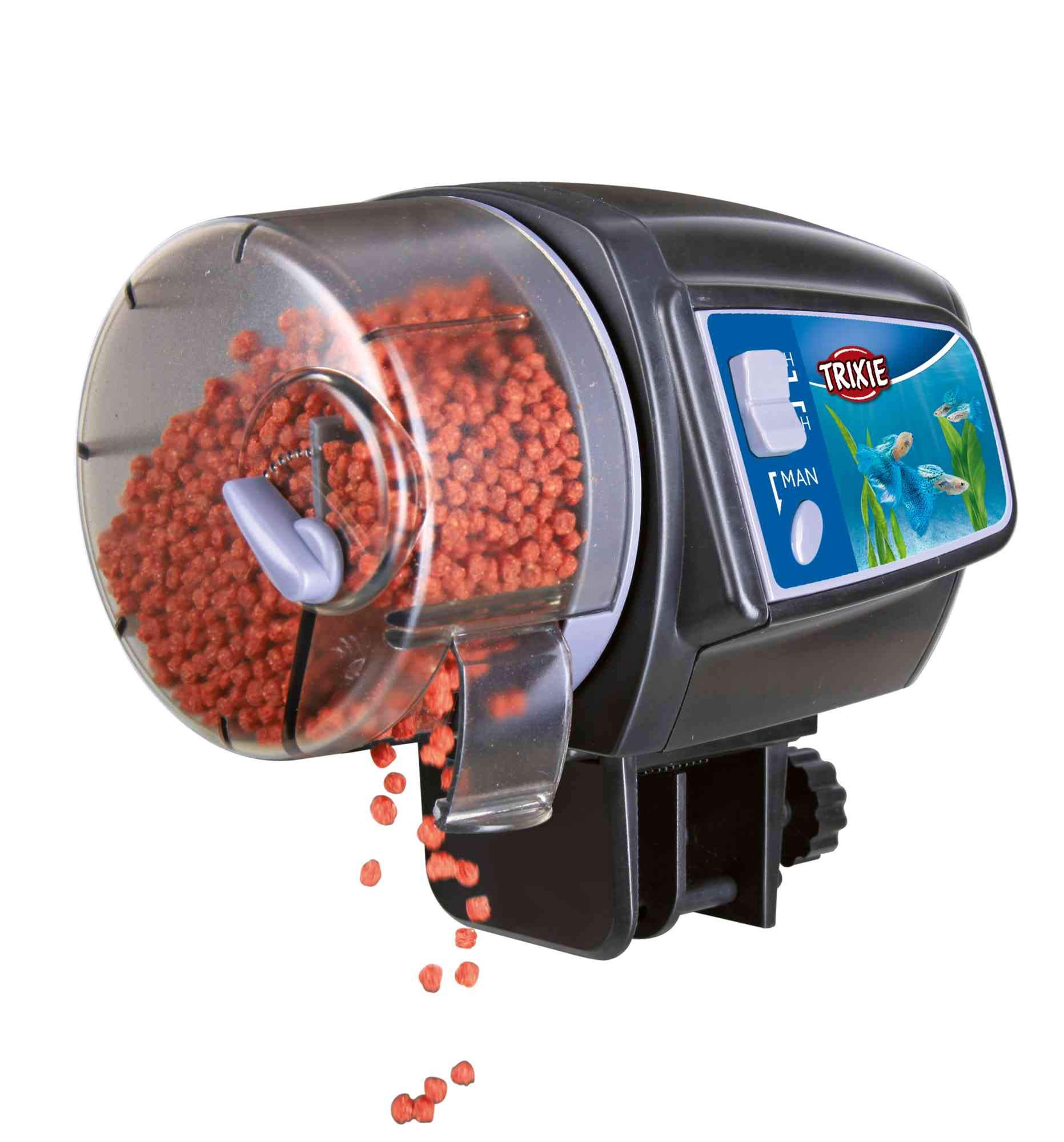
Image: The TRIXIE Automatic Fish Feeder Model 86200 securely mounted on the edge of an aquarium, with the food drum visible and fish swimming below.
3. Filling the Food Container
- Open the lid of the food container.
- Fill the container with dry fish food, such as flakes or granules.
- Important: Do not overfill the container. Fill it to a maximum of two-thirds capacity to ensure proper dispensing.
- Close the lid securely to protect the food from moisture.
Operating Instructions
1. Setting Feeding Times
The TRIXIE Automatic Fish Feeder allows you to set feeding intervals for either 12 or 24 hours.
- Locate the timer switch on the feeder.
- Select the desired feeding interval:
- 12H: The feeder will dispense food every 12 hours.
- 24H: The feeder will dispense food every 24 hours.
- The first feeding will occur at the time you set the timer. For example, if you set it to 24H at 8:00 AM, the next feeding will be at 8:00 AM the following day.
2. Adjusting Food Quantity
The amount of food dispensed can be controlled to suit the needs of your fish.
- There is an adjustable slider or opening on the food drum.
- Slide the control to increase or decrease the size of the opening, which directly affects the amount of food dispensed per rotation.
- Recommendation: Test the dispensing quantity over a few cycles before relying on the feeder for extended periods. Observe your fish to ensure they are not being overfed or underfed.
3. Manual Feeding
A manual feeding function is available for immediate dispensing of food outside of the programmed schedule.
- Press the "MAN" button (Manual) on the feeder.
- The feeder will dispense one portion of food immediately.
- This will not affect the set automatic feeding schedule.
Maintenance
1. Cleaning the Food Container
Regular cleaning prevents food clumping and ensures hygienic feeding.
- Remove the food container from the main unit.
- Empty any remaining food.
- Wash the container with warm water and a mild, non-toxic detergent. Rinse thoroughly to remove all soap residue.
- Allow the container to dry completely before refilling and reattaching to the feeder. Moisture can cause food to clump.
2. Battery Replacement
Replace batteries when the feeder's operation becomes inconsistent or stops. Low battery power can lead to missed feedings.
- Follow the battery installation steps outlined in the "Setup" section.
- Dispose of old batteries responsibly according to local regulations.
3. General Care
- Wipe the exterior of the feeder with a damp cloth as needed.
- Do not use abrasive cleaners or solvents.
- Ensure the feeder is kept dry and away from direct splashes from the aquarium.
Troubleshooting
| Problem | Possible Cause | Solution |
|---|---|---|
| Feeder does not dispense food automatically. |
|
|
| Too much or too little food is dispensed. |
|
|
| Food gets wet or clogs. |
|
|
Specifications
| Feature | Detail |
|---|---|
| Model Number | 86200 |
| Brand | Trixie |
| Dimensions (L x W x H) | 16 x 15.19 x 15.19 cm |
| Weight | 600 g |
| Target Species | Fish |
| Recommended Use | Indoor Aquariums |
| Special Feature | Adjustable food quantity |
| Operating Mode | Automatic, Manual |
| Feeding Intervals | 12 hours, 24 hours |
| Batteries Required | Yes (not included) |
| GTIN | 04011905862002 |
Warranty Information
TRIXIE products are manufactured to high-quality standards. For specific warranty details regarding your Automatic Fish Feeder Model 86200, please refer to the warranty card included with your purchase or visit the official TRIXIE website. Keep your proof of purchase for any warranty claims.
Customer Support
If you encounter any issues or have questions not covered in this manual, please contact TRIXIE customer support. You can find contact information on the official TRIXIE website or through your retailer.
- Online: Visit the official TRIXIE website for FAQs and support contact details.
- Retailer: Contact the store where you purchased the product.