
Introduction
This manual provides essential information for the safe and efficient operation of your Canton DM 2 Home Cinema System. The DM 2 is a 2.1 channel system designed to enhance your audio experience with powerful sound. Please read these instructions thoroughly before installation and use, and retain them for future reference.
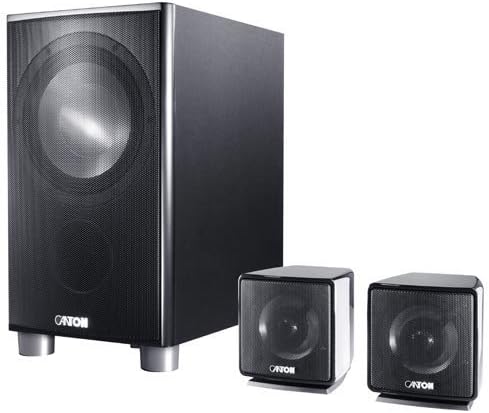
Image: The Canton DM 2 Home Cinema System, featuring a large black subwoofer on the left with silver feet, and two smaller black satellite speakers on the right, each with a mesh grille. This image illustrates the primary components of the 2.1 channel system.
Safety Instructions
- Power Supply: Connect the system only to the specified power supply voltage. Ensure the power cord is not pinched or walked on.
- Ventilation: Do not block any ventilation openings. Maintain adequate space around the units for proper airflow.
- Water and Moisture: Do not expose the system to rain, moisture, dripping, or splashing. Keep liquids away from the units.
- Heat Sources: Keep the system away from heat sources such as radiators, heat registers, stoves, or other apparatus that produce heat.
- Cleaning: Unplug the system from the wall outlet before cleaning. Use a dry cloth for cleaning.
- Servicing: Do not attempt to service this product yourself. Refer all servicing to qualified service personnel.
Package Contents
Upon unpacking, please verify that all the following components are present:
- 1x Canton DM 2 Subwoofer
- 2x Canton DM 2 Satellite Speakers
- 1x Power Cable
- Speaker Cables (for connecting satellites to subwoofer)
- Remote Control (if applicable, not specified but common for home cinema systems)
- Instruction Manual (this document)
Setup
1. Physical Placement
- Subwoofer: The subwoofer can be placed almost anywhere in the room, preferably near a wall or in a corner for enhanced bass response. Avoid placing it directly against a wall or in a cabinet without proper ventilation.
- Satellite Speakers: Position the two satellite speakers equidistant from your primary listening position. For optimal stereo imaging, place them at ear level and angle them slightly towards the listener. Ensure they are placed on a stable surface.
2. Connections
- Connect Satellite Speakers: Use the provided speaker cables to connect the two satellite speakers to the corresponding speaker outputs on the subwoofer. Ensure correct polarity (positive to positive, negative to negative).
- Connect Audio Source: Connect your audio source (e.g., television, DVD player, streaming device) to the audio input on the subwoofer. Common input types include RCA stereo or optical digital. Refer to your subwoofer's rear panel for available input options.
- Connect Power: Plug the power cable into the subwoofer's power input, then connect the other end to a wall outlet.
Note: Ensure all connections are secure before powering on the system.
Operating Instructions
1. Basic Operation
- Power On/Off: Press the power button on the subwoofer or remote control (if included) to turn the system on or off.
- Volume Control: Adjust the master volume using the dedicated controls on the subwoofer or remote control.
- Input Selection: If your subwoofer has multiple audio inputs, use the input selector button to choose the desired audio source.
2. Audio Modes
The Canton DM 2 operates as a 2.1 channel system, providing stereo sound with enhanced bass from the dedicated subwoofer. The system is designed to deliver a surround-like audio experience for movies and music.
Maintenance
- Cleaning: Use a soft, dry cloth to clean the surfaces of the subwoofer and satellite speakers. Do not use liquid cleaners, aerosols, or abrasive materials.
- Dust: Regularly dust the units to prevent accumulation, which can affect performance and aesthetics.
- Ventilation: Ensure that the ventilation openings remain clear of dust and obstructions.
Troubleshooting
| Problem | Possible Cause | Solution |
|---|---|---|
| No power | Power cable not connected; wall outlet not active. | Ensure power cable is securely plugged in. Test the wall outlet with another device. |
| No sound | Incorrect input selected; volume too low; audio cables not connected properly. | Select the correct input source. Increase volume. Check all audio cable connections. |
| Distorted sound | Volume too high; poor audio source quality; damaged cables. | Reduce volume. Test with a different audio source. Inspect and replace damaged cables. |
| Subwoofer not working | Subwoofer volume too low; incorrect settings. | Increase subwoofer volume. Check subwoofer settings on the unit or remote. |
If the problem persists after attempting these solutions, please contact Canton customer support.
Specifications
- Model: Canton DM 2 (02306)
- System Type: 2.1 Channel Home Cinema System
- Audio Output Mode: Surround
- Speaker Maximum Output Power: 175 Watts
- Subwoofer Weight: Approximately 15.1 kg
- Speaker Size: 12 Centimetres (referring to driver size, likely for subwoofer)
- Mounting Type: Tabletop Mount
- Color: Black
- Manufacturer: Canton
Warranty and Support
For information regarding warranty coverage, service, or technical support, please refer to the warranty card included with your product or visit the official Canton website. Keep your proof of purchase for warranty claims.
Canton Official Website: www.canton.de


