
Nikon 25434
Nikon D3 FX DSLR Camera
Instruction Manual
1. Introduction
The Nikon D3 is a professional-grade FX-format DSLR camera designed for demanding photographers, including sports photographers and photojournalists. It integrates advanced technologies to deliver high performance and image quality.
Key features include a 12.1-megapixel FX-format CMOS sensor, the EXPEED Image Processing System, and a robust magnesium alloy body. This manual provides essential information for setting up, operating, and maintaining your Nikon D3 camera.
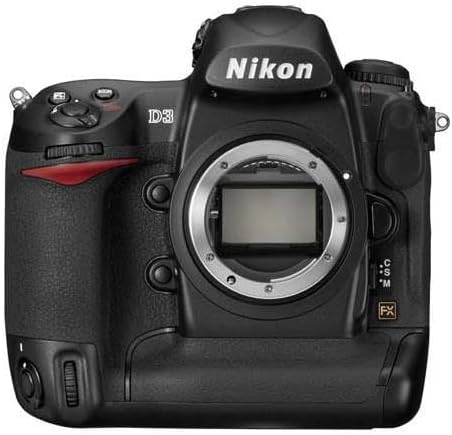
Figure 1.1: Front view of the Nikon D3 FX DSLR Camera body. This image shows the camera's robust build and the lens mount, indicating its professional design.
2. Setup
2.1 Battery Installation
Ensure the camera is powered off before installing or removing the battery. Open the battery chamber cover located at the bottom of the camera. Insert the Lithium Ion battery (EN-EL4a or compatible) as indicated by the diagram inside the chamber, ensuring it clicks into place. Close the battery chamber cover securely.
2.2 Memory Card Insertion
The D3 features dual CompactFlash (CF) card slots. Open the memory card slot cover on the side of the camera. Insert CF cards (Type I or II, UDMA compatible) into the designated slots with the correct orientation until they click into place. Close the cover firmly. The camera supports various recording options across both cards.
2.3 Lens Attachment
The Nikon D3 uses the Nikon F (FX) mount. To attach a lens, align the mounting mark on the lens with the mounting mark on the camera body. Rotate the lens counter-clockwise until it locks into place. To detach, press the lens release button and rotate the lens clockwise.
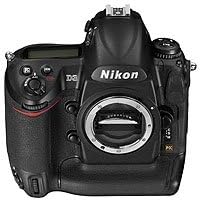
Figure 2.1: Front angle view of the Nikon D3, highlighting the lens mount and grip. Proper lens attachment is crucial for optimal image capture.
3. Operating the Camera
3.1 Power On/Off and Basic Shooting
To power on the camera, rotate the power switch located around the shutter release button. The camera has a fast start-up time of 0.12 seconds. To take a picture, press the shutter release button fully down. The shutter lag is minimal, ensuring quick response.
3.2 Autofocus System
The D3 features a 51-point Multi-CAM 3500FX autofocus sensor module, including 15 cross-type sensors. This system works with all Nikkor lenses. The camera's Scene Recognition System enhances AF accuracy by recognizing the subject and applying appropriate AF points. Focus modes include Continuous-Servo AF (AF-C), Manual Focus (MF), and Single-Servo AF (AF-S).
3.3 LiveView Shooting
The D3 offers two LiveView modes for composing shots using the 3-inch LCD monitor:
- Tripod Mode: Designed for precise focus when the camera is on a stable platform and the subject is stationary. Focus is achieved using focal-plane contrast, and any point on the LCD can be selected as the focus point.
- Handheld Mode: Utilizes the camera's conventional TTL focusing system, with all 51 AF points available. Focusing activates immediately when the shutter button is pressed.
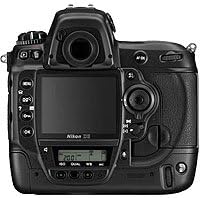
Figure 3.1: Rear view of the Nikon D3, showing the 3-inch LCD monitor and control buttons. The LCD is crucial for LiveView and image review.
3.4 Image Quality and Settings
- ISO Sensitivity: The normal ISO range is 200 to 6400, expandable to Lo-1 (ISO 100 equivalent) and Hi-2 (ISO 25,600 equivalent) for versatile shooting in various lighting conditions.
- Active D-Lighting: This feature provides real-time highlight and shadow correction with optimized image contrast, producing broader tone reproduction. It can shorten image editing time.
- Picture Control System: Allows fine-tuning of rendering options such as tone, sharpening, brightness, and saturation. Settings can be ported to other compatible Nikon cameras for consistent results.
- White Balance: Auto white balance detection is enhanced by the Scene Recognition System.
3.5 Continuous Shooting
The D3 can shoot up to 9 frames per second (fps) at full 12.1-megapixel FX-format resolution. In DX-format mode, it can achieve up to 11 fps with 5.1-megapixel images.
3.6 Virtual Horizon
The camera features a virtual horizon level indicator that uses internal sensors to show the camera's inclination relative to the horizon on the LCD monitor or within the viewfinder, aiding in level composition.

Figure 3.2: Top view of the Nikon D3, showing the mode dial, hot shoe, and top LCD panel. This view highlights key controls for quick adjustments.
4. Maintenance
4.1 Cleaning and Care
To ensure the longevity and optimal performance of your Nikon D3, keep it free from dust and moisture. The camera body is crafted from magnesium alloy and features numerous seals to protect against environmental elements. Use a soft, lint-free cloth to clean the camera body. For the LCD monitor, which is strengthened with tempered glass, use a dedicated screen cleaner and cloth. Avoid harsh chemicals or abrasive materials.
4.2 Shutter Durability
The D3's shutter mechanism, made of a hybrid of carbon fiber and Kevlar, is tested to 300,000 cycles, indicating high durability. The camera also includes a Self Diagnostic Shutter Monitor to maintain accuracy and precision.
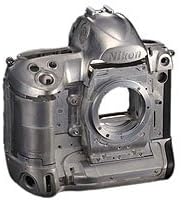
Figure 4.1: Internal chassis of the Nikon D3, showcasing its magnesium alloy construction. This robust design contributes to the camera's durability and resistance to demanding conditions.
5. Troubleshooting
This section provides general guidance for common issues. For detailed troubleshooting, refer to the comprehensive user manual available on the Nikon support website.
- Camera Does Not Power On: Ensure the battery is fully charged and correctly inserted. Check that the battery chamber cover is securely closed.
- Images Not Recording: Verify that a memory card is inserted correctly and has sufficient free space. Check the card's write-protect switch.
- Autofocus Not Working: Ensure the lens is properly attached and the AF/MF switch on the lens or camera is set to AF. Check lighting conditions; extreme low light can affect autofocus performance.
- Image Quality Issues: Review your ISO, aperture, shutter speed, and Picture Control settings. Ensure the lens is clean and free from smudges.
6. Specifications
| Feature | Detail |
|---|---|
| Model Name | Nikon D3 |
| Sensor Type | FX-format (23.9 x 36mm) CMOS |
| Effective Pixels | 12.1 Megapixels |
| ISO Sensitivity | ISO 200-6400 (expandable to Lo-1 (ISO 100) and Hi-2 (ISO 25,600)) |
| Autofocus System | Multi-CAM 3500FX, 51 AF points (15 cross-type) |
| LCD Monitor | 3-inch VGA (920,000 dots), 170-degree viewing angle, tempered glass |
| Shutter Speed | 1/8000 to 30 seconds, Bulb |
| Continuous Shooting Speed | Up to 9 fps (FX-format), 11 fps (DX-format) |
| Storage Media | Dual CompactFlash (CF) Type I/II slots (UDMA compatible) |
| Connectivity | USB, HDMI |
| Body Material | Magnesium Alloy |
| Shutter Durability | Tested to 300,000 cycles |
| Dimensions (H x W x D) | Approx. 6.18 inches (Height) - Note: Full dimensions not provided in source data |
| Power Source | Rechargeable Lithium Ion Battery (EN-EL4a or compatible) |
7. Warranty and Support
7.1 Warranty Information
This product comes with a FULL 14 DAY SATISFACTION GUARANTEE and a FULL 90 DAY PARTS AND LABOR WARRANTY. Please retain your proof of purchase for warranty claims. The specific unit is USA MODEL SERIAL #2005819.
7.2 Customer Support
For further assistance, technical support, or service inquiries, please visit the official Nikon support website or contact Nikon customer service. Detailed contact information can typically be found on the Nikon website or in the full product manual.
Ask a question about this manual
Ask about setup, troubleshooting, compatibility, parts, safety, or missing instructions. Manuals+ will review the question and use this page’s manual context to help answer it.