
Introduction
The Rocketfish Universal Wireless Rear Speaker Kit RF-WHTIB-A is engineered to provide a seamless audio experience by transmitting sound to your rear speakers without the need for physical wires. This system delivers uncompressed CD-quality audio, allowing for a cleaner setup and flexible speaker placement within your home entertainment environment. The kit includes a sender unit that connects to your home theater system and a receiver unit to which your rear speakers connect.
Key Features
- Provides uncompressed CD-quality audio to rear speakers.
- Wireless signal with a range of up to 100 feet.
- Multiple mounting options for the receiver, including horizontal, vertical with the included stand, or wall-mounted.
What's in the Box
Carefully unpack all components and verify that you have received the following items:
- Sender Unit
- Receiver Unit with Stand
- Two 2-inch sections of speaker wire
- AC Adapter
- User Manual (this document)

Image: Retail packaging for the Rocketfish Universal Wireless Rear Speaker Kit, showing the sender and receiver units.
Setup
Follow these steps to set up your Rocketfish Universal Wireless Rear Speaker Kit.
1. Component Identification
Familiarize yourself with the sender and receiver units.
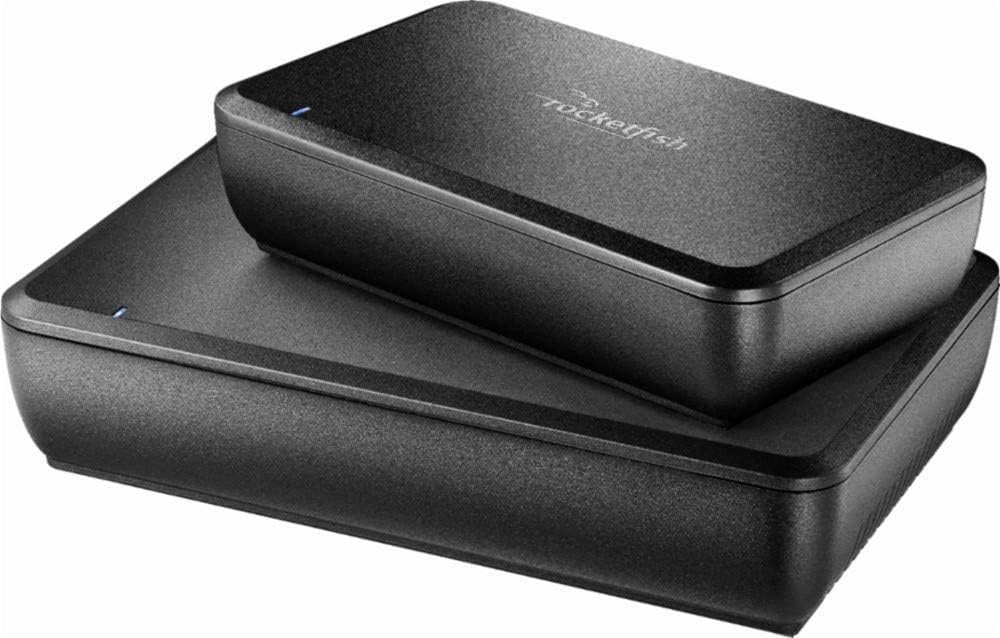
Image: The Rocketfish wireless sender and receiver units, stacked. The top unit is the sender, and the bottom unit is the receiver.
2. Connection Guide
- Connect the Sender Unit: Plug the sender unit into your home theater receiver or amplifier's rear speaker output terminals. Ensure correct polarity (positive to positive, negative to negative).
- Connect the Receiver Unit: Connect your rear speakers to the receiver unit's speaker output terminals using the provided speaker wire or your own speaker wire. Again, observe correct polarity.
- Power Connection: Connect the included AC adapter to the receiver unit's DC 5V input and then plug it into a standard electrical outlet.

Image: Rear view of the Rocketfish wireless receiver, showing the speaker wire input terminals (L and R) and the DC 5V power input, along with the power switch.
3. Mounting Options
The receiver unit offers versatile placement options:
- Horizontal Placement: Place the unit flat on a surface.
- Vertical Placement: Use the included stand to position the unit vertically.
- Wall-Mounted: The unit can be mounted on a wall using appropriate hardware (not included).

Image: The Rocketfish wireless receiver unit, showing its compact design suitable for various placements.
Operating Instructions
Once all connections are secure and power is supplied, the system is ready for operation.
- Power On: Ensure both your home theater system and the Rocketfish receiver unit are powered on. The receiver unit has an ON/OFF switch on its rear panel.
- Signal Transmission: The sender unit will automatically transmit audio signals to the receiver unit. The receiver unit will then amplify and output the sound to your connected rear speakers.
- Wireless Range: The system operates effectively within a wireless range of up to 100 feet (approximately 30 meters) in an open environment. Obstacles such as walls and other electronic devices may reduce this range.
- Audio Quality: The system is designed to deliver uncompressed CD-quality audio. Ensure your home theater system's output settings are configured appropriately for optimal sound.
Maintenance
Proper care and maintenance will ensure the longevity and optimal performance of your Rocketfish Wireless Rear Speaker Kit.
- Cleaning: Use a soft, dry cloth to clean the exterior surfaces of the sender and receiver units. Do not use liquid cleaners or abrasive chemicals, as they may damage the finish or internal components.
- Ventilation: Ensure that the units are placed in a location with adequate ventilation to prevent overheating. Do not block any ventilation openings.
- Storage: If storing the kit for an extended period, disconnect it from power and store it in a cool, dry place away from direct sunlight and extreme temperatures.
- Cable Management: Periodically check all cable connections to ensure they are secure and free from damage.
Troubleshooting
If you encounter issues with your Rocketfish Universal Wireless Rear Speaker Kit, refer to the following common problems and solutions:
| Problem | Possible Cause | Solution |
|---|---|---|
| No sound from rear speakers. | Loose speaker wire connections, power not connected, incorrect input/output. | Verify all speaker wire connections are secure and observe correct polarity. Ensure the AC adapter is properly connected and the receiver is powered on. Confirm the sender is connected to the correct output on your home theater system. |
| Intermittent sound or static. | Wireless interference, unit too far from sender, loose connections. | Move the sender and receiver closer to each other. Ensure no other wireless devices (e.g., Wi-Fi routers, cordless phones) are causing interference. Check all connections for tightness. |
| Low volume or distorted sound. | Insufficient power from receiver, incorrect volume settings. | Ensure your home theater system's volume is set appropriately. Note that the receiver provides 5 Watts per channel; if your speakers require more power, distortion may occur at higher volumes. |
| Unit does not power on. | AC adapter not connected, power outlet issue, unit switch off. | Check that the AC adapter is firmly plugged into both the unit and a working electrical outlet. Ensure the power switch on the receiver unit is in the 'ON' position. |
Specifications
Detailed technical specifications for the Rocketfish Universal Wireless Rear Speaker Kit RF-WHTIB-A:
| Feature | Specification |
|---|---|
| Model Name | RF-WHTIB-A |
| Brand | Rocketfish |
| Mounting Type | Wall Mount (also horizontal/vertical with stand) |
| Speaker Type | Surround Sound |
| Recommended Uses | Home Theater |
| Surround Sound Channel Configuration | 5.1 |
| Color | Black |
| Maximum Wireless Range | 100 Feet (approx. 30 meters) |
| Speaker Maximum Output Power | 5 Watts per channel |
| Frequency Response | 20000 Hz |
| Power Source | Corded Electric (AC Adapter) |
| Item Weight | 2 pounds |
| Package Dimensions | 8.6 x 6.8 x 3.1 inches |
| UPC | 600603112218 |
Warranty and Support
This product is covered by a limited warranty. For specific warranty terms and conditions, please refer to the documentation included with your purchase or contact Rocketfish customer support.
Legal Disclaimer: Buyer pays return shipping. If an item is found to be defective or not as described, return shipping will be refunded. All Used or open box items (shelf pulls included) have been tested for functionality and tagged with tamper-proof serial numbers for identification purposes. Signature Confirmation required upon delivery.
For technical assistance or further inquiries, please visit the official Rocketfish support website or contact their customer service department. Keep your purchase receipt for warranty claims.


