
Starrett H823C/D/E
Starrett Micrometer Head H823C/D/E Instruction Manual
Model: H823C/D/E | Brand: Starrett
1. Product Overview
The Starrett Micrometer Head H823C/D/E is a precision measuring instrument designed for use with Starrett 823C, 823D, and 823E Inside Micrometers. It features a hardened and ground head anvil and a lock nut, enabling quick, easy, and accurate adjustments for various measurement applications. This tool is engineered for durability and reliable performance, upholding Starrett's long-standing commitment to quality and precision in industrial and professional settings.
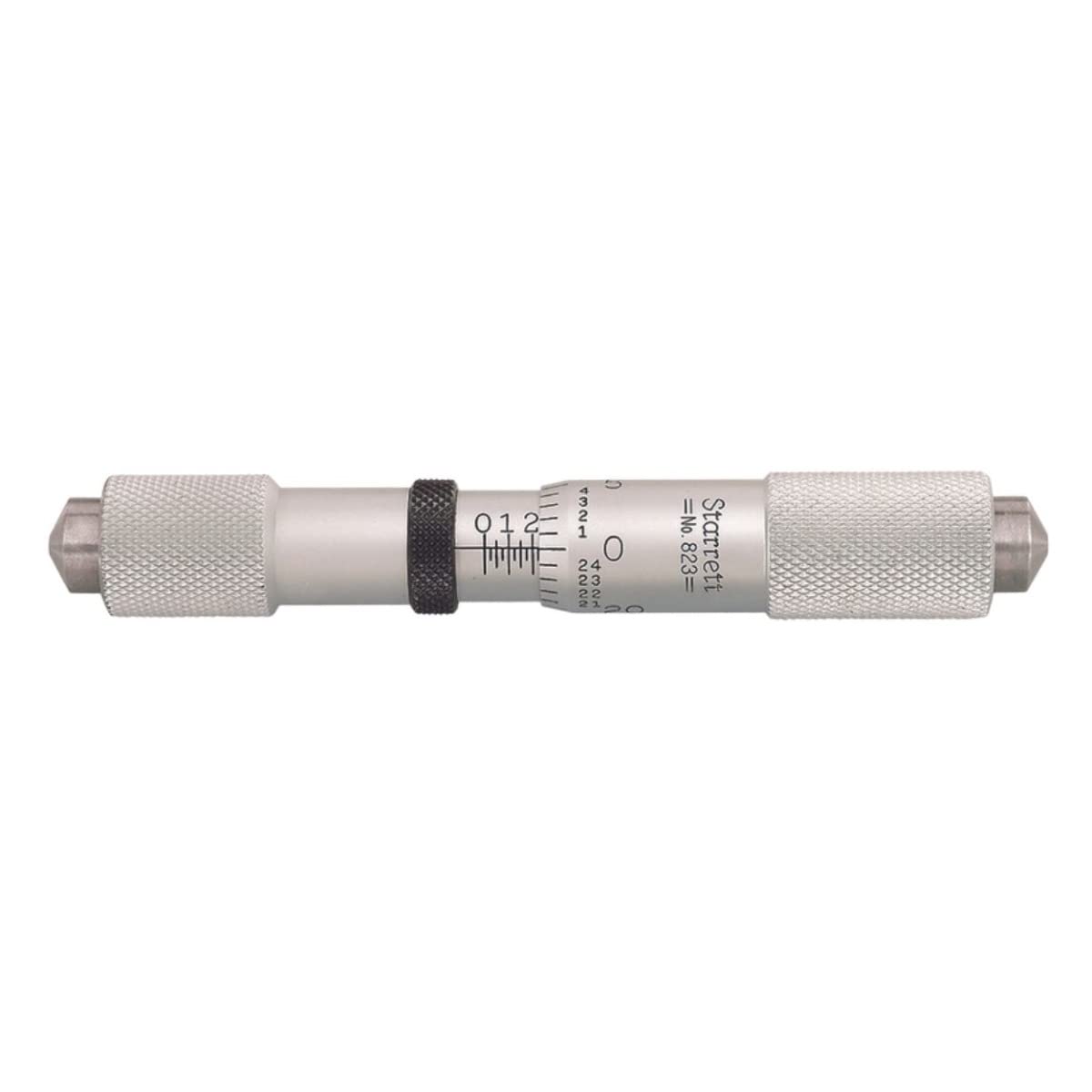
Figure 1: Starrett Micrometer Head H823C/D/E. This image shows the complete micrometer head with its thimble, sleeve, and anvil, ready for integration into an inside micrometer.
2. Safety Information
Always handle precision measuring tools with care to prevent damage and maintain accuracy. Keep the micrometer head clean and free from debris. Avoid dropping the instrument or subjecting it to excessive force, as this can affect its calibration and performance. Store the micrometer head in its protective case when not in use.
3. Setup
The H823C/D/E Micrometer Head is designed to be integrated with Starrett 823C, 823D, and 823E Inside Micrometers. Follow these steps for proper setup:
- Unpacking: Carefully remove the micrometer head from its packaging. Inspect for any visible damage.
- Cleaning: Before first use, gently wipe the micrometer head with a clean, lint-free cloth. A small amount of instrument cleaning fluid can be used if necessary, but avoid harsh chemicals.
- Attachment: Refer to the instruction manual of your specific Starrett 823C, 823D, or 823E Inside Micrometer for detailed steps on how to securely attach the micrometer head. Ensure it is firmly seated and aligned to prevent measurement errors.
- Zero Check: Once attached, perform a zero check according to your inside micrometer's instructions to ensure accurate readings.

Figure 2: Key features of the Starrett Micrometer Head. This image highlights the hardened and ground head anvil and the lock nut, essential components for precise and stable measurements.
4. Operating Instructions
Using the Starrett Micrometer Head for accurate measurements requires careful handling and proper technique. These instructions assume the micrometer head is correctly attached to a compatible Starrett Inside Micrometer.
- Holding the Micrometer: Hold the inside micrometer firmly but gently. Ensure your hands do not obstruct the measuring faces or the thimble.
- Positioning for Measurement: Carefully position the measuring faces of the inside micrometer within the dimension you wish to measure.
- Adjusting the Thimble: Rotate the thimble of the micrometer head to bring the measuring faces into contact with the surfaces being measured. For consistent pressure, use the ratchet stop or friction thimble (if equipped on your inside micrometer) until a slight click is heard or consistent resistance is felt.
- Using the Lock Nut: Once the correct measurement is achieved and the thimble is in position, gently tighten the lock nut (if present on the micrometer head) to secure the spindle and prevent accidental movement. This ensures the reading remains stable while you read the measurement.
- Reading the Measurement: Read the measurement from the sleeve and thimble scales. The main scale on the sleeve indicates whole units and tenths, while the thimble scale provides the thousandths of an inch (.001" graduation).
- Releasing the Lock Nut: After recording the measurement, loosen the lock nut before rotating the thimble again.

Figure 3: Close-up view of the hardened and ground anvils. These precision-machined surfaces are crucial for accurate and repeatable measurements, ensuring long-term reliability.
5. Maintenance
Proper maintenance extends the life and maintains the accuracy of your Starrett Micrometer Head.
- Cleaning: After each use, wipe all surfaces of the micrometer head with a clean, soft, lint-free cloth. If necessary, use a small amount of instrument cleaning fluid. Avoid abrasive materials or solvents that could damage the finish or markings.
- Lubrication: The spindle and thimble mechanism are factory lubricated. Do not over-lubricate. If lubrication is required after extensive use, apply a very thin film of high-quality instrument oil to the spindle, avoiding the measuring faces.
- Storage: Store the micrometer head in its original protective case or a designated storage area when not in use. Ensure it is clean and dry. Avoid storing in environments with extreme temperature fluctuations, high humidity, or corrosive fumes.
- Calibration Check: Periodically check the calibration of your micrometer head in conjunction with your inside micrometer. If discrepancies are found, refer to your inside micrometer's manual for adjustment procedures or contact a qualified calibration service.
6. Troubleshooting
This section addresses common issues you might encounter with your micrometer head.
| Problem | Possible Cause | Solution |
|---|---|---|
| Inaccurate Readings |
|
|
| Thimble is Stiff or Gritty |
|
|
| Lock Nut Not Holding |
|
|
7. Specifications
| Feature | Detail |
|---|---|
| Model Number | H823C/D/E |
| Brand | Starrett |
| Compatibility | Starrett 823C, 823D, 823E Inside Micrometers |
| Graduation | .001" |
| Anvil Type | Hardened and Ground Head Anvil |
| Features | Lock Nut for secure measurements |
| Product Dimensions | 5.4 x 1.7 x 0.8 inches; 1.6 ounces (as per product data) |
| Material | High Speed Steel (Blade Material, but likely refers to components) |
| Power Source | Manual |
8. Warranty and Support
Starrett products are manufactured to the highest standards of quality and workmanship. For specific warranty information, please refer to the documentation included with your original purchase or visit the official Starrett website. For technical support, service, or replacement parts, please contact Starrett customer service directly.
Starrett Official Website: www.starrett.com
Included Components: Product & Instructions Guide
Ask a question about this manual
Ask about setup, troubleshooting, compatibility, parts, safety, or missing instructions. Manuals+ will review the question and use this page’s manual context to help answer it.