
1. Introduction
The Soehnle Comfort F5 Digital Bath Scale provides comprehensive body analysis, measuring weight, muscle, fat, hydration, and energy consumption (Kcal). It features a unique radio-operated display that transmits data up to 10 feet, allowing for flexible placement and easy readability. The display stores long-term data for up to 5 years, enabling trend analysis of your body's data.
This manual provides instructions for the proper setup, operation, and maintenance of your Soehnle Comfort F5 Digital Bath Scale.
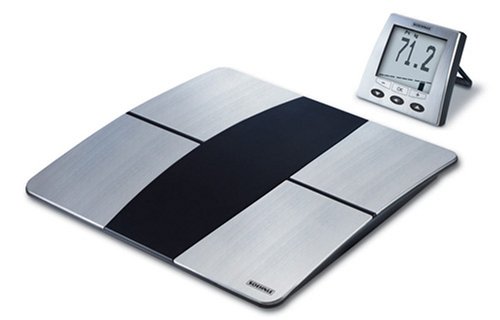
Figure 1: Soehnle Comfort F5 Digital Bath Scale with its remote display unit.
2. Setup
2.1 Unpacking and Battery Installation
- Carefully remove all components from the packaging: the scale platform and the remote display unit.
- For the Scale Platform: Open the battery compartment on the underside of the scale. Insert the required batteries (type and quantity specified in the battery compartment) ensuring correct polarity (+/-). Close the compartment securely.
- For the Remote Display Unit: Open the battery compartment on the back of the display unit. Insert the required batteries, observing correct polarity. Close the compartment securely.
2.2 Initial Pairing and Placement
- Place the scale platform on a firm, flat surface. Avoid carpets or uneven flooring, as this can affect accuracy.
- Position the remote display unit within 10 feet (approximately 3 meters) of the scale platform. The radio signal allows for flexible placement; it can be placed on a counter or wall-mounted.
- The scale and display should automatically pair. If pairing does not occur, refer to the troubleshooting section.
- The display unit may show the current time when not in use. Set the correct time according to the instructions in the operating section.
3. Operating Instructions
3.1 Taking a Measurement
- Step onto the scale barefoot. The scale features an "Auto On" function and will activate automatically.
- Stand still on the scale. The remote display will show your weight first, followed by other body composition measurements (muscle, fat, hydration, Kcal).
- Wait for the measurements to stabilize and appear on the display.
- Step off the scale. The scale will automatically turn off after a short period ("Auto Off" feature).
3.2 Personal Data Input (if applicable)
For accurate body composition analysis, you may need to input personal data such as age, height, and gender. Refer to the display unit's specific buttons and menu for navigating these settings. This information is crucial for the bio-impedance frequency variance measurement to provide personalized results and action recommendations.
3.3 Trend Display and Data Storage
The remote display unit stores your measurement values by day, week, and month for up to 5 years. This allows for long-term tracking and trend analysis of your body data. Use the navigation buttons on the display to review past measurements.
3.4 Setting Time and Units
- Time Setting: When the display is not in use, it functions as a clock. Consult the display unit's buttons (often labeled "SET" or similar) to enter time setting mode and adjust the hours and minutes.
- Unit Selection: The scale can measure in pounds (lbs) and kilograms (kg). Locate the unit selection button or setting on the scale platform or remote display to switch between measurement units.
4. Maintenance
4.1 Cleaning
- Wipe the scale platform and remote display with a damp cloth. Do not use abrasive cleaners or immerse the units in water.
- Ensure the surface of the scale is dry before use to prevent slipping and ensure accurate readings.
4.2 Battery Replacement
- When the battery indicator appears on the display, replace the batteries in both the scale platform and the remote display unit.
- Follow the instructions in Section 2.1 for battery compartment access and replacement.
- Note: The display unit is designed to retain stored data even when batteries are changed.
4.3 Storage
Store the scale and display unit in a dry place, away from extreme temperatures and direct sunlight. The remote display can be stored anywhere in your home when not in use, as it also functions as a clock.
5. Troubleshooting
| Problem | Possible Cause | Solution |
|---|---|---|
| Scale does not turn on. | Dead or incorrectly inserted batteries. | Check battery polarity and replace batteries in both the scale and display unit if necessary. |
| Display shows "Error" or inaccurate readings. | Scale on uneven surface; user movement; incorrect personal data; dirty electrodes. | Place scale on a hard, flat surface. Stand still during measurement. Ensure personal data (age, height, gender) is correctly entered. Clean the scale surface. |
| Remote display not receiving signal. | Display too far from scale; interference; low batteries. | Move display closer to the scale (within 10 feet). Ensure no major obstructions. Replace batteries in both units. |
| Body composition measurements (fat, muscle, hydration) are not displayed. | User not barefoot; personal data not entered; dry feet. | Ensure you are standing barefoot on the scale. Enter personal data as per Section 3.2. Lightly moisten feet if they are excessively dry. |
6. Specifications
- Model: 63697/63687
- Brand: Soehnle
- Functions: Measures weight, muscle, fat, hydration, and energy consumption (Kcal)
- Display: Removable LCD remote display with clock function
- Connectivity: Radio signal transmission up to 10 feet
- Data Storage: Up to 5 years of daily, weekly, and monthly values
- Dimensions: 15 x 12.5 x 3.5 inches (Product Dimensions)
- Weight: 4.85 Pounds (Product Weight)
- Materials: Silver, Steel
- Power Source: Batteries (type not specified in JSON, but implied by "battery replacement")
- Units: lbs / kg selectable
- Auto Features: Auto On/Off
7. Warranty and Support
Warranty: This product comes with a 3-year warranty from the date of purchase. Please retain your proof of purchase for warranty claims.
Manufacturer: Soehnle
For technical support, service, or warranty inquiries, please contact Soehnle customer service. Contact information can typically be found on the product packaging or the official Soehnle website.