Introduction
Thank you for choosing the Casio F-94WA-8DG Digital Watch. This manual provides detailed instructions on how to set up, operate, and maintain your watch. Please read this manual carefully to ensure proper use and to fully utilize all features of your new timepiece.
The Casio F-94WA-8DG is a reliable and practical digital watch designed for everyday use, featuring timekeeping, alarm, and stopwatch functions, along with water resistance suitable for daily activities.
Watch Overview
Familiarize yourself with the buttons and display of your Casio F-94WA-8DG watch.
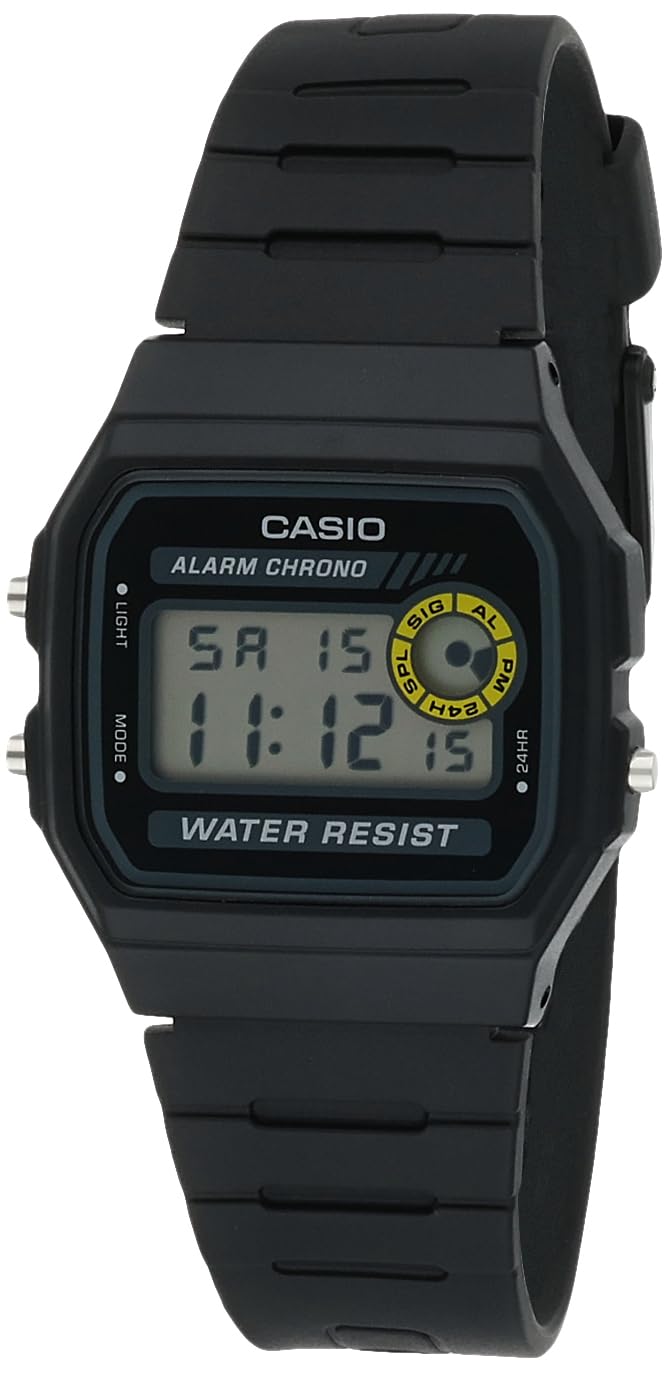
Image: Front view of the Casio F-94WA-8DG digital watch. The display shows the time, day, and date. Buttons are visible on the left and right sides of the watch case.
- Light Button (Top Left): Activates the backlight.
- Mode Button (Bottom Left): Cycles through different modes (Timekeeping, Alarm, Stopwatch).
- Adjust/24HR Button (Top Right): Used for setting adjustments and switching between 12/24-hour format.
- Start/Stop Button (Bottom Right): Used for starting/stopping stopwatch and confirming settings.
Setup
Setting the Time and Date
- In Timekeeping Mode, press the Mode button until the seconds digits begin to flash. This indicates you are in setting mode.
- Press the Adjust/24HR button to cycle through the settings: Seconds → Hour → Minutes → Month → Day → Day of the Week.
- While a setting is flashing, use the Start/Stop button to increase the value. Hold the button down to change the value rapidly.
- Once all settings are correct, press the Mode button to exit the setting mode.
12/24-Hour Format
In Timekeeping Mode, press the Adjust/24HR button to toggle between 12-hour (indicated by 'PM' for afternoon hours) and 24-hour formats.
Operating Instructions
Timekeeping Mode
This is the default mode, displaying the current time, day of the week, and date. Press the Light button to illuminate the display in low-light conditions.
Alarm Mode
From Timekeeping Mode, press the Mode button once to enter Alarm Mode. The alarm time will be displayed.
- To set the alarm, press and hold the Adjust/24HR button until the hour digits flash.
- Use the Start/Stop button to adjust the hour.
- Press the Adjust/24HR button to select the minute digits, then use the Start/Stop button to adjust the minutes.
- Press the Mode button to exit alarm setting.
- To turn the alarm ON/OFF, press the Start/Stop button in Alarm Mode. An alarm indicator will appear/disappear on the display.
- To activate/deactivate the Hourly Time Signal (chime), press the Adjust/24HR button in Alarm Mode. A chime indicator will appear/disappear.
Stopwatch Mode
From Timekeeping Mode, press the Mode button twice to enter Stopwatch Mode.
- Press the Start/Stop button to start the stopwatch.
- Press the Start/Stop button again to stop the stopwatch.
- To reset the stopwatch to zero, press the Adjust/24HR button while the stopwatch is stopped.
Maintenance
Water Resistance
Your Casio F-94WA-8DG watch is water resistant up to 100 meters. This means it is suitable for everyday use and can withstand splashes, rain, and brief immersion in water. However, it is not recommended for diving or prolonged underwater use. Do not operate buttons while the watch is wet or submerged.

Image: Rear view of the Casio F-94WA-8DG watch, highlighting the stainless steel back case with water resistance information.
Cleaning
Wipe the watch with a soft, dry cloth to remove dirt and moisture. For resin bands, you can use a mild soap solution and rinse thoroughly, then dry completely. Avoid using harsh chemicals or abrasive cleaners.
Battery Replacement
The watch is powered by a single C battery (included). When the display becomes dim or functions become erratic, it may be time to replace the battery. Battery replacement should be performed by a qualified watch technician to ensure proper sealing and water resistance.
Troubleshooting
- Display is blank or dim: The battery may be low or depleted. Replace the battery.
- Time is incorrect: Re-set the time and date following the instructions in the "Setup" section. Ensure the 12/24-hour format is set as desired.
- Alarm does not sound: Check if the alarm is activated (alarm indicator on display). Ensure the alarm time is set correctly.
- Buttons are unresponsive: Ensure the watch is not wet. If the issue persists, the watch may require servicing.
If you encounter issues not covered here, please contact Casio customer support.
Specifications
| Brand | Casio |
| Model Number | F-94WA-8DG |
| Display Type | Digital |
| Movement | Japanese Quartz |
| Case Material | Stainless Steel |
| Band Material | Resin |
| Water Resistance | 100 Meters (330 Feet) |
| Case Diameter | 32 mm |
| Case Thickness | 8.5 mm |
| Item Weight | 21 grams |
| Power Source | Battery Powered (1 C battery included) |
| Clasp Type | Buckle |
| Item Shape | Rectangular |
| Watch Glass Material | Resin Glass |
Warranty and Support
Warranty Information
Your Casio F-94WA-8DG watch comes with a manufacturer's limited warranty for two years from the date of purchase. This warranty covers manufacturing defects under normal use. It does not cover damage resulting from misuse, accidents, unauthorized repairs, or normal wear and tear.
Customer Support
For warranty claims, technical assistance, or any other inquiries regarding your watch, please contact Casio customer support. Refer to the official Casio website or your purchase documentation for specific contact details in your region.


