
MAGNETRAINER MagneTrainer-ER
MagneTrainer Exercise Pedal Exerciser User Manual
Model: MagneTrainer-ER
1. Product Overview
The MagneTrainer Exercise Pedal Exerciser is a compact, commercial-grade exercise device designed for both arm and leg workouts. It features a patented magnetic resistance system that provides an ultra-smooth pedaling motion in both forward and reverse directions. Ideal for low-impact exercise, physical therapy, and general fitness, the MagneTrainer is quiet, durable, and built for long-lasting use.
Key features include a wide 15-inch steel base for enhanced stability, adjustable Velcro straps on the pedals to accommodate various foot sizes, and an easy-to-use LCD display for tracking workout metrics.

Figure 1: MagneTrainer Exercise Pedal Exerciser. This image shows the compact design of the MagneTrainer, highlighting its pedals, resistance knob, and LCD display unit.
2. Setup and Assembly
The MagneTrainer is designed for simple assembly. All necessary tools are included with the product.
2.1 Unpacking
Carefully remove all components from the packaging. Verify that all parts are present according to the packing list.
2.2 Base Assembly
Attach the stabilizer bars to the main unit using the provided bolts and wrenches. Ensure all connections are secure to provide maximum stability during use.
2.3 Pedal Installation
Attach the pedals to the crank arms. Note that the pedals are designed for bi-directional use. Ensure they are tightened securely.
2.4 Battery Installation for LCD Display
The LCD display unit requires 2 AA batteries (included). Open the battery compartment on the back of the display unit, insert the batteries, and close the compartment. The display will activate automatically.
2.5 Placement Considerations
The MagneTrainer can be used under a desk for leg exercises or placed on a table for arm exercises. Ensure sufficient clearance for comfortable movement. For under-desk use, a desk height of 34-36 inches (86.4-91.4 cm) is generally recommended, though 33 inches (83.8 cm) may be sufficient if the unit is placed further under the desk and legs are extended.

Figure 2: MagneTrainer dimensions. This diagram illustrates the overall dimensions of the MagneTrainer, including height, width, and depth, which are important for placement.
3. Operating Instructions
The MagneTrainer offers a versatile and quiet workout experience.
3.1 Leg Exercise
Place the MagneTrainer on a flat, stable surface under your desk or in front of your chair. Sit comfortably and place your feet into the pedals, securing them with the adjustable Velcro straps. Begin pedaling in either a forward or backward direction. The bi-directional movement allows for varied muscle engagement.
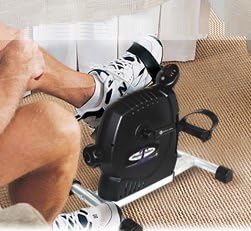
Figure 3: Leg exercise with MagneTrainer. This image shows an individual using the MagneTrainer discreetly under a desk for leg workouts.
3.2 Arm Exercise
Place the MagneTrainer on a sturdy table or elevated surface. Sit comfortably in front of it and grasp the pedals with your hands. You can use the adjustable Velcro straps to secure your hands if desired. Begin pedaling with your hands to engage arm and shoulder muscles.

Figure 4: Arm exercise with MagneTrainer. This image depicts a person using the MagneTrainer on a tabletop to perform arm and upper body exercises.
3.3 Adjusting Resistance
The MagneTrainer features a magnetic resistance dial with 8 calibrated settings, offering a wide range of resistance levels. Turn the knob clockwise to increase resistance and counter-clockwise to decrease it. Adjust the resistance to suit your fitness level and workout goals.

Figure 5: MagneTrainer labeled features. This image highlights key components such as the LCD display, bi-directional stride motion, adjustable Velcro straps, and the resistance settings dial.

Figure 6: MagneTrainer resistance levels. This chart provides a guide for selecting appropriate resistance levels for different workout intensities, from warm-up to muscular toning.
3.4 Using the LCD Display
The integrated LCD display tracks your workout progress. It shows real-time metrics such as:
- Strides Per Minute (RPM): Your current pedaling speed.
- Distance Traveled: The estimated distance covered during your workout.
- Calories Burned: An estimate of calories expended.
- Time Elapsed: The duration of your current exercise session.
Press the button on the display to cycle through the different metrics or to reset the values. The display is powered by the installed AA batteries.

Figure 7: Tracking progress with LCD display. This image shows the MagneTrainer's LCD display providing real-time workout data, including strides per minute and time elapsed.
4. Maintenance
Regular maintenance will ensure the longevity and optimal performance of your MagneTrainer.
4.1 Cleaning
Wipe down the unit with a damp cloth after each use to remove sweat and dust. Avoid using abrasive cleaners or solvents, as these can damage the finish and internal components.
4.2 Inspection
Periodically inspect all bolts and connections to ensure they remain tight. Check the pedals and straps for any signs of wear or damage. The MagneTrainer is built with durable components, including wider 4V belts, heavier flywheels, and high-quality German bearings, designed for years of reliable use.
4.3 Storage
Store the MagneTrainer in a cool, dry place away from direct sunlight and extreme temperatures when not in use.
5. Troubleshooting
If you encounter any issues with your MagneTrainer, refer to the following common solutions:
- LCD Display Not Working: Check the batteries. Ensure they are correctly inserted and have sufficient charge. Replace if necessary.
- Unit Wobbles During Use: Ensure the MagneTrainer is placed on a flat, stable surface. Verify that all assembly bolts, especially those on the stabilizer bars, are securely tightened.
- Resistance Feels Inconsistent: Ensure the resistance knob is properly engaged and turning smoothly. If the issue persists, contact customer support.
For issues not covered here or for more complex problems, please contact MagneTrainer customer support.
6. Specifications
| Feature | Specification |
|---|---|
| Brand | MAGNETRAINER |
| Model Number | MagneTrainer-ER |
| Dimensions (L x W x H) | 22.86 x 40.64 x 40.64 cm (9 x 16 x 16 inches) |
| Weight | 10.43 kg (23 Pounds) |
| Material | Alloy Steel |
| Color | Black |
| Resistance System | Magnetic |
| Resistance Levels | 8 calibrated settings (over 20 magnetic resistance levels) |
| Display Type | LCD |
| Metrics Tracked | Calories Burned, Speed, Time, Distance |
| Power Source | Battery Powered (2 AA batteries included) |
| Special Features | Compact, Lightweight, Adjustable Velcro Straps, Wide 15-inch Base, Electronic Screens |
7. Warranty and Support
For warranty information, product support, or to inquire about optional components, please refer to the manufacturer's official website or contact MagneTrainer customer service directly. Keep your purchase receipt for any warranty claims.
Related documentsMagneTrainer-ER


Ask a question about this manual
Ask about setup, troubleshooting, compatibility, parts, safety, or missing instructions. Manuals+ will review the question and use this page’s manual context to help answer it.