
Introduction
This manual provides detailed instructions for the assembly, operation, and maintenance of your XDrum Pro Double Bass Drum Pedal. Designed for drummers seeking a reliable and responsive double pedal, this unit features a dual chain drive system and multiple adjustment options to suit various playing styles. Please read this manual thoroughly before use to ensure proper setup and to maximize the lifespan of your pedal.
Safety Information
- Always ensure all components are securely fastened before use to prevent injury or damage to the instrument.
- Keep small parts and tools out of reach of children.
- Use the pedal only for its intended purpose with a bass drum.
- Avoid excessive force during adjustments to prevent stripping screws or damaging parts.
Package Contents
Verify that all items listed below are present in your package:
- 1 x XDrum Double Bass Drum Pedal (main unit and slave pedal)
- Beaters (typically 2 or 4-sided)
- Connecting drive shaft
- Tuning key
- Hex keys (various sizes for adjustments)
Product Features
The XDrum Pro Double Bass Drum Pedal incorporates several key features for enhanced performance and durability:
- Dual Chain Drive: Ensures smooth and powerful action with consistent response.
- Four-Sided Beaters: Offers versatility in attack and tone.
- Solid Base Plate: Provides stability and prevents pedal creep during play.
- Multiple Adjustments: Allows for customization of beater angle, spring tension, and footboard height.
- Additional Left Beater: Can be used for a second bass drum setup if desired.
Setup
Follow these steps to assemble and attach your double bass drum pedal:
- Unpack Components: Carefully remove all parts from the packaging.
- Attach Beaters: Insert the beaters into the beater holders on both the main and slave pedals. Secure them tightly using the provided hex key. Ensure the beaters are facing the correct direction for striking the bass drum head.
- Connect Drive Shaft: Connect the drive shaft between the main pedal and the slave pedal. Loosen the set screws on both ends of the drive shaft, slide it onto the pedal shafts, and then tighten the set screws firmly with a hex key.
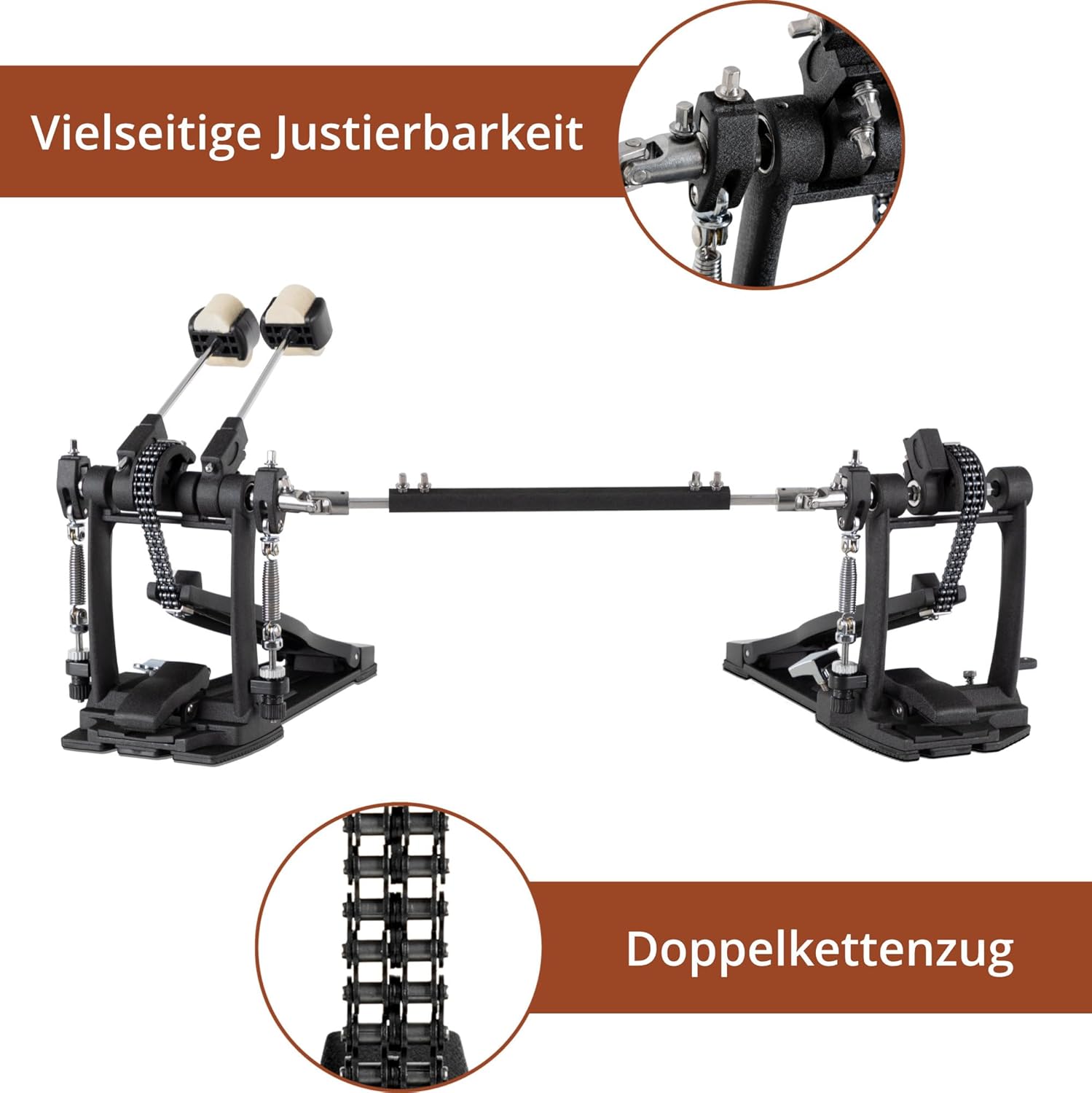
Figure 1: Fully assembled XDrum Pro Double Bass Drum Pedal, showing both pedals connected by the drive shaft.
- Attach to Bass Drum: Position the main pedal's clamp onto the bass drum hoop. Tighten the wing nut or screw mechanism to secure the pedal firmly to the hoop. Ensure the pedal is centered and stable.

Figure 2: The double bass drum pedal securely attached to a bass drum hoop, ready for use.
- Adjust Spring Tension: The spring tension can be adjusted to control the pedal's feel and rebound. Loosen the locking nut at the bottom of the spring assembly and turn the tension adjustment screw to increase or decrease tension. Tighten the locking nut once the desired tension is achieved.
- Adjust Beater Angle: The beater angle can be adjusted by loosening the set screw on the beater hub and rotating the beater shaft to the desired position. Ensure both beaters strike the drum head at a consistent angle and distance.

Figure 3: Detailed view of the main pedal mechanism, highlighting the spring tension adjustment and beater angle adjustment points.

Figure 4: The hex key and tuning key provided with the pedal, essential for making various adjustments.
Operation
Once assembled and adjusted, the XDrum Pro Double Bass Drum Pedal is ready for use. Practice with both feet to develop coordination and control. Experiment with different spring tensions and beater angles to find the setup that best suits your playing style and desired sound.
The dual chain drive system is designed for smooth and consistent action. Ensure that the connecting shaft is properly aligned and secured to prevent any binding or uneven response between the two pedals.

Figure 5: Front view of the main pedal, illustrating the dual chain drive mechanism and the beater.

Figure 6: Side view of the main pedal, providing a clear look at the spring assembly and chain drive.
Maintenance
Regular maintenance will ensure the longevity and optimal performance of your pedal:
- Cleaning: Wipe down the pedal regularly with a soft, dry cloth to remove dust and debris. For stubborn grime, a slightly damp cloth can be used, followed by immediate drying.
- Lubrication: Periodically apply a small amount of light machine oil to the chain links, hinges, and any moving pivot points to ensure smooth operation and prevent squeaks. Avoid over-lubricating.
- Check Fasteners: Regularly check all screws, nuts, and bolts to ensure they are tight. Vibrations from playing can cause them to loosen over time.
- Inspect for Wear: Examine the beaters, chains, springs, and footboards for signs of wear or damage. Replace worn parts as necessary to maintain performance and safety.
Troubleshooting
If you encounter issues with your XDrum Pro Double Bass Drum Pedal, refer to the following common problems and solutions:
- Pedal feels stiff or sluggish:
- Check for debris in the chain or hinge mechanisms. Clean thoroughly.
- Apply lubrication to moving parts.
- Ensure spring tension is not set too high.
- Beaters are not striking the drum head correctly:
- Verify that the beater angle is correctly adjusted and secured.
- Ensure the pedal is clamped securely to the bass drum hoop and not shifting.
- Check the length of the drive shaft and its connection to both pedals.
- Unwanted noise (squeaking, rattling):
- Lubricate all pivot points and spring assemblies.
- Tighten any loose screws or nuts.
- Ensure the pedal is not rubbing against any other drum hardware.
Specifications
| Feature | Specification |
|---|---|
| Model Number | 00007103 |
| Brand | XDrum |
| Body Material | Brass Alloy Steel |
| Finish Type | Lacquered |
| Color | Black |
| Item Weight | 11.02 pounds (5.0 kg) |
| Package Dimensions | 16.06 x 10.87 x 8.86 inches (40.8 x 27.6 x 22.5 cm) |
| Included Components | 1 x XDrum double foot machine (pedal unit) |
| Connector Type | 1/4-Zoll-Buchse (This seems like an error in source data, likely refers to a different product or is irrelevant for a mechanical pedal. Assuming it's not applicable for this product.) |
Warranty and Support
For warranty information or technical support, please refer to the documentation provided at the point of purchase or contact your retailer. Keep your purchase receipt as proof of purchase.