
Introduction
This manual provides comprehensive instructions for the setup, operation, and maintenance of your Bose LIFESTYLE 48 Series IV Home Entertainment System. Please read this manual thoroughly before using your system to ensure proper installation and optimal performance.
System Components
The Bose LIFESTYLE 48 Series IV system includes the following main components:
- Media center with integrated progressive scan DVD player
- Acoustimass module
- Four Jewel Cube speaker arrays
- One horizontal center channel speaker
- Remote control
- Speaker cables (3 front, 2 surround)
- Audio input cable, Stereo audio cable
- Video cables (6 Feet Video Cable, S-video cable, 2 component video adapters)
- Mounting strip, Rubber feet for Acoustimass module and speakers
- 4 AAA batteries
- TV on/off detector
- AM loop antenna, FM antenna
- Discs 1 and 2 (for setup/calibration)
- Optional IR emitter cable
- Media center power supply
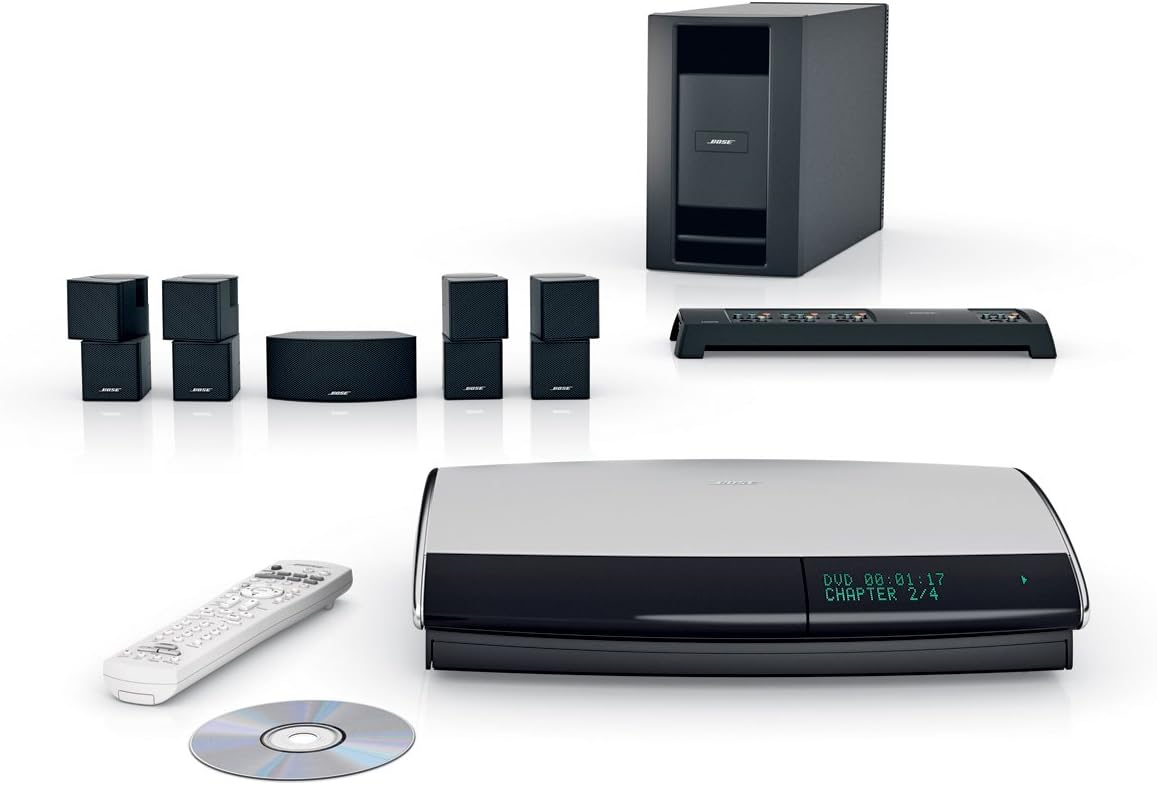
Image: Overview of the Bose LIFESTYLE 48 Series IV Home Entertainment System components, including the media center, Acoustimass module, Jewel Cube speakers, center channel speaker, and remote control.
Setup
Proper setup is crucial for the optimal performance of your Bose LIFESTYLE 48 Series IV system. Follow these steps carefully.
Unpacking and Placement
- Unpack Components: Carefully remove all components from the packaging. Verify that all items listed in the "System Components" section are present.
- Media Center Placement: Place the media center on a stable, level surface near your television. Ensure adequate ventilation around the unit.
- Acoustimass Module Placement: Position the Acoustimass module in a location that allows for optimal bass distribution, typically along a wall or in a corner. Avoid obstructing its vents.
- Speaker Placement: Position the Jewel Cube speakers and the center channel speaker according to your room's layout for optimal surround sound. The center channel speaker should be placed horizontally above or below your TV.
Connections
- Connect Speakers: Use the provided speaker cables to connect the Jewel Cube speakers and the center channel speaker to the Acoustimass module. Ensure correct polarity (+ to + and - to -).
- Connect Acoustimass Module to Media Center: Use the dedicated audio input cable to connect the Acoustimass module to the media center.
- Connect Media Center to TV: Use the appropriate video cable (S-video, component video, or composite video) to connect the media center to your television. For best quality, use component video if available.
- Power Connection: Connect the media center power supply to the media center, then plug it into a wall outlet.
- Antenna Connections: Connect the AM loop antenna and FM antenna to the media center for radio reception.
ADAPTiQ Audio Calibration
The ADAPTiQ audio calibration system customizes the sound of your Lifestyle system to your room's acoustics. This process is essential for achieving the best sound quality.
- Initiate Calibration: Follow the on-screen prompts on your TV to start the ADAPTiQ calibration process.
- Wear Headset: Wear the provided ADAPTiQ headset and sit in your primary listening positions during the calibration.
- Follow Instructions: The system will play a series of tones and measure the room's acoustics. Follow all on-screen instructions carefully.
Operating Instructions
This section details the basic operation of your Bose LIFESTYLE 48 Series IV Home Entertainment System.
Powering On/Off
- Power On: Press the Power button on the remote control or the media center.
- Power Off: Press the Power button again to turn off the system.
Source Selection
Use the remote control to select your desired audio/video source (e.g., DVD, CD, AM/FM radio, auxiliary input).
uMusic Intelligent Playback System
The uMusic system stores and organizes your music, learning your preferences to create personalized playlists.
- Loading Music: Insert a CD into the media center. The system will automatically begin storing the music.
- Training uMusic: As you listen, rate songs using the remote control to help the uMusic system learn your preferences.
- Accessing Playlists: Use the uMusic menu on your TV screen to browse your stored music and access personalized playlists.
DVD Playback
- Insert Disc: Gently insert a DVD into the media center's disc slot.
- Playback Controls: Use the remote control for standard DVD functions such as Play, Pause, Stop, Fast Forward, and Rewind.
Radio Operation
- Select Source: Choose AM or FM as the source.
- Tune Stations: Use the tuning buttons on the remote to find desired radio stations.
- Preset Stations: Store your favorite stations as presets for quick access.
Maintenance
Regular maintenance ensures the longevity and optimal performance of your system.
- Cleaning: Use a soft, dry cloth to clean the surfaces of the media center, speakers, and Acoustimass module. Avoid using liquid cleaners or solvents.
- Ventilation: Ensure that all ventilation openings on the media center and Acoustimass module remain clear of obstructions.
- Disc Care: Handle DVDs and CDs by their edges. Store them in their cases to prevent scratches.
- Remote Control Batteries: Replace the AAA batteries in the remote control when its performance diminishes.
Troubleshooting
This section addresses common issues you might encounter with your Bose LIFESTYLE 48 Series IV system.
No Power
- Check Power Cord: Ensure the power cord is securely plugged into both the media center and a working electrical outlet.
- Test Outlet: Verify the electrical outlet is functional by plugging in another device.
No Sound
- Volume Level: Increase the system volume.
- Mute Function: Check if the system is muted.
- Source Selection: Ensure the correct audio source is selected.
- Speaker Connections: Verify all speaker cables are securely connected to the Acoustimass module and the speakers.
- Acoustimass Module Connection: Confirm the Acoustimass module is properly connected to the media center.
No Video
- TV Input: Ensure your TV is set to the correct input source for the media center.
- Video Cable: Check that the video cable (S-video, component, or composite) is securely connected between the media center and the TV.
- Disc Issue: If playing a DVD, ensure the disc is clean and inserted correctly.
uMusic System Issues (e.g., lost music library)
In rare cases, such as power outages, the uMusic system's stored music library may be affected. If this occurs, you may need to reload your music collection. Contact Bose customer support if persistent issues arise.
Specifications
| Feature | Detail |
|---|---|
| Model Number | 43478 |
| Media Center Dimensions (H x W x D) | 3 3/4 x 15 3/4 x 11 1/2 inches (9.4 x 39.9 x 29.2 cm) |
| Media Center Weight | 9 pounds (4.1 kg) |
| Cube Speaker Dimensions (H x W x D) | 4 1/2 x 2 1/4 x 3 1/4 inches (11.2 x 5.6 x 8.1 cm) |
| Cube Speaker Weight | 1.0 pounds (0.5 kg) |
| Center Channel Speaker Dimensions (H x W x D) | 2 3/8 x 5 1/2 x 2 5/8 inches (6 x 14 x 6.7 cm) |
| Center Channel Speaker Weight | 2.36 pounds (1.07 kg) |
| Acoustimass Module Dimensions (H x W x D) | 13 x 8 x 21 5/8 inches (33 x 20.3 x 54.9 cm) |
| Acoustimass Module Weight | 26.22 pounds (11.9 kg) |
| Manufacturer | Bose |
| Key Technologies | uMusic intelligent playback system, ADAPTiQ audio calibration, Direct/Reflecting speaker technology, Videostage 5 decoding |
| Disc Compatibility | DVD, CD |
| Date First Available | October 2, 2001 |
Warranty and Support
For warranty information, please refer to the documentation included with your purchase or visit the official Bose website. For technical assistance or customer support, please contact Bose directly.
You can find more information and support resources on the Bose Store on Amazon.


