
1. Introduction
Thank you for purchasing the COWON iAUDIO 7 Portable MP3 Player. This device is designed to provide high-quality audio playback, along with additional features such as an FM radio, voice recorder, line-in recorder, and picture viewer. This manual provides essential information for the safe and efficient use of your device. Please read it thoroughly before operation.
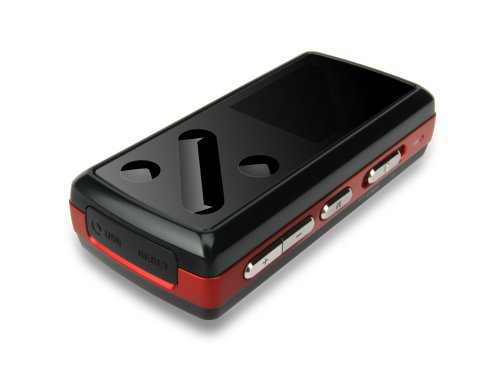
Image: Front view of the COWON iAUDIO 7 Portable MP3 Player, showcasing its compact design and color LCD screen.
2. Product Overview
2.1 Key Features
- Color LCD display for clear navigation.
- Supports multiple audio formats including MP3.
- Integrated FM radio tuner.
- Voice and Line-In recording capabilities.
- Picture viewer functionality.
- 8 GB internal memory for extensive storage.
- USB connectivity for data transfer.
2.2 Components
The iAUDIO 7 features a compact design with a 1.3-inch screen. It includes physical buttons for navigation and control, a USB port for connectivity, and a headphone jack. Specific button functions are detailed in the 'Operating Instructions' section.
3. Setup
3.1 Initial Charging
Before first use, fully charge the iAUDIO 7. Connect the device to a computer's USB port or a compatible USB wall adapter using the provided USB cable. The charging indicator on the device will show its status. A full charge typically takes several hours.
3.2 Powering On/Off
- To Power On: Press and hold the Power button until the COWON logo appears on the screen.
- To Power Off: Press and hold the Power button until the device shuts down.
- Screen Lock: Use the Hold switch to prevent accidental button presses during transport.
4. Operating Instructions
4.1 Basic Navigation
The iAUDIO 7 features a combination of physical buttons for menu navigation and selection. Use the directional buttons to scroll through menus and the 'Play/Pause' button to select items or confirm actions. The 'Menu' button typically returns to the previous screen or main menu.
4.2 Music Playback
- From the main menu, navigate to 'Music'.
- Browse your music by artist, album, genre, or all tracks.
- Select a track and press the 'Play/Pause' button to begin playback.
- Use the volume buttons to adjust audio levels.
- Supported audio formats include MP3, OGG, and FLAC.
4.3 FM Radio
- Connect headphones, as they act as the FM antenna.
- Navigate to 'FM Radio' from the main menu.
- Use the navigation buttons to scan for stations or manually tune to a frequency.
- The device supports recording from the FM radio. Refer to the on-screen prompts for recording options.
4.4 Voice and Line-In Recording
- Select 'Recorder' from the main menu.
- Choose 'Voice Recording' to use the built-in microphone or 'Line-In Recording' to record from an external audio source connected via the line-in port.
- Press the 'Play/Pause' button to start and stop recording.
- Recorded files are saved in a designated folder on the device.
4.5 Picture and Video Viewing
- Navigate to 'Pictures' or 'Videos' from the main menu.
- Browse and select files for viewing.
- Note: Videos may require conversion to a compatible format using COWON's software before transfer to the device.
5. Connecting to a Computer
The iAUDIO 7 connects to a computer via a standard USB cable for data transfer. When connected, the device will appear as a removable disk drive.
- Windows Users: The device is compatible with Windows operating systems. You can drag and drop files directly to and from the device. COWON may provide optional software (e.g., JetAudio) for enhanced management and video conversion.
- Mac Users: The iAUDIO 7 supports data transfer with Mac OS. You can transfer files by dragging and dropping. However, the supplied software for device management and video conversion is primarily designed for Windows.
- Always safely eject the device from your computer before disconnecting the USB cable to prevent data corruption.
6. Maintenance
- Cleaning: Use a soft, dry cloth to clean the device. Avoid liquid cleaners or abrasive materials.
- Storage: Store the device in a cool, dry place away from direct sunlight and extreme temperatures.
- Battery Care: To prolong battery life, avoid fully discharging the battery frequently. Charge the device regularly, even if not in use for extended periods.
- Firmware Updates: Periodically check the official COWON website for any available firmware updates to improve performance and add features.
7. Troubleshooting
- Device does not power on: Ensure the battery is charged. Connect to a power source and try again. If unresponsive, perform a soft reset (refer to the device's specific reset procedure, often a small reset button or holding the power button for an extended period).
- No sound: Check headphone connection and volume level. Ensure the audio file is not corrupted and is in a supported format.
- Computer does not recognize device: Ensure the USB cable is securely connected. Try a different USB port or cable. Restart both the device and the computer.
- Controls are unresponsive or erratic: Ensure the Hold switch is not engaged. If the device is exposed to extreme heat, allow it to cool down. A soft reset may resolve temporary software glitches.
- Cannot play certain files: Verify that the file format is supported by the iAUDIO 7 (e.g., MP3, OGG, FLAC for audio). Video files often require specific conversion.
8. Specifications
| Model Name | COWON iAUDIO 7 |
| Item Model Number | I7-08RD |
| Memory Storage Capacity | 8 GB |
| Screen Size | 1.3 Inches |
| Connectivity Technology | USB |
| Supported Standards | MP3 (and other formats like OGG, FLAC) |
| Special Feature | FM Radio, Voice Recorder, Line-In Recorder, Picture Viewer |
| Product Dimensions | 3 x 1 x 1 inches |
| Item Weight | 4.2 ounces (0.26 Pounds) |
| Manufacturer | Cowon |
9. Safety Information
- Do not expose the device to water or excessive moisture.
- Avoid dropping or subjecting the device to strong impacts.
- Do not attempt to disassemble or modify the device. This will void the warranty.
- Use only approved accessories and chargers.
- Prolonged listening at high volumes can cause hearing damage.
- Dispose of the device and its battery responsibly according to local regulations.
10. Warranty and Support
COWON products are manufactured under strict quality control. For information regarding warranty coverage, terms, and conditions, please refer to the warranty card included with your purchase or visit the official COWON website. For technical support or service inquiries, please contact COWON customer service through their official channels.
For further assistance, please visit the COWON Store on Amazon.