
1. Introduction
This manual provides essential information for the safe and efficient operation of your DAP Audio MC-15 Full Range Passive PA DJ Speaker. Please read these instructions thoroughly before installation and use, and retain them for future reference. The MC-15 is a 2-way passive speaker system designed for various applications, including DJ setups and PA systems, offering robust sound reproduction with a 15-inch woofer.
Safety Information
- Ensure the speaker is placed on a stable surface or securely mounted using appropriate hardware.
- Do not expose the speaker to rain or moisture to prevent electric shock or fire.
- Connect the speaker only to amplifiers that match its impedance and power handling specifications. Overpowering can cause damage.
- Avoid prolonged listening at high volume levels to prevent hearing damage.
- Refer all servicing to qualified service personnel.
2. Package Contents
Upon unpacking, please verify that all components are present and in good condition. The package should contain:
- 1x DAP Audio MC-15 Full Range Passive PA DJ Speaker
- This instruction manual
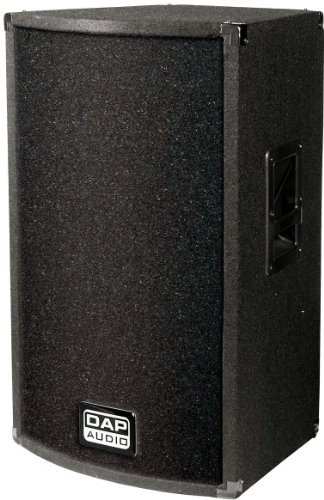
Figure 1: Front view of the DAP Audio MC-15 speaker, showcasing its robust grille and trapezoidal design.
3. Setup
3.1 Placement
The MC-15 speaker features a trapezoidal design, allowing for flexible placement options. It can be used as a floor monitor, mounted on a tripod stand using the integrated tripod adapter, or flush-mounted. Ensure the speaker is placed on a stable, level surface or securely mounted to prevent accidental falls.

Figure 2: Angled view of the DAP Audio MC-15 speaker, highlighting its trapezoidal shape suitable for various placements.
3.2 Connections
The MC-15 speaker is a passive unit and requires an external amplifier. It features two Speakon connectors for input and daisy-chaining to another speaker. Use high-quality Speakon cables for optimal audio transmission and secure connection.
- Ensure your amplifier is turned off before making any connections.
- Connect one end of a Speakon cable to an output terminal on your amplifier.
- Connect the other end of a Speakon cable to one of the Speakon input connectors on the MC-15 speaker.
- If connecting a second speaker, use another Speakon cable to link the first MC-15 speaker's second Speakon connector to the input of the second speaker.
- Verify all connections are secure before powering on your amplifier.

Figure 3: Rear view of the DAP Audio MC-15 speaker, illustrating the Speakon connection ports.
4. Operating Instructions
Once the speaker is properly connected to an amplifier, you can begin operation. The MC-15 is designed for stereo or virtual surround sound audio output, compatible with devices such as laptops, televisions, and home theater systems.
- Turn on your amplifier and connected audio source.
- Start with the amplifier's volume control at its lowest setting.
- Gradually increase the volume to a comfortable listening level.
- Monitor the sound for any distortion. If distortion occurs, reduce the volume immediately to prevent speaker damage.
- The speaker is designed for continuous power handling of 250 Watts RMS and a music output of 350 Watts. Do not exceed these limits.
While the product specifications mention "Afstandsbediening" (Remote Control) as a control method, this typically refers to the amplifier or audio source controlling the overall system, as the MC-15 itself is a passive speaker without integrated controls.
5. Maintenance
Proper maintenance ensures the longevity and optimal performance of your MC-15 speaker.
- Cleaning: Use a soft, dry cloth to wipe down the exterior of the speaker. For the metal grille, a soft brush can be used to remove dust. Do not use liquid cleaners or solvents, as they may damage the finish or internal components.
- Storage: When not in use for extended periods, store the speaker in a dry, dust-free environment. The felt covering provides some protection, but additional covering is recommended.
- Inspection: Periodically check speaker cables for any signs of wear or damage. Replace damaged cables immediately.
- Environment: Avoid exposing the speaker to extreme temperatures, high humidity, or direct sunlight. The speaker is not water-resistant.
6. Troubleshooting
If you encounter issues with your MC-15 speaker, refer to the following common troubleshooting steps:
- No Sound:
- Ensure the amplifier is powered on and functioning correctly.
- Check all Speakon cable connections between the amplifier and the speaker.
- Verify the audio source is playing and its volume is turned up.
- Confirm the amplifier's output is active and not muted.
- Distorted Sound:
- Reduce the volume level on the amplifier and audio source.
- Check if the amplifier's output power exceeds the speaker's maximum power handling.
- Inspect cables for damage or loose connections.
- Ensure the audio source is not sending a distorted signal.
- Intermittent Sound:
- Check for loose Speakon connections at both the speaker and amplifier ends.
- Inspect cables for internal breaks or damage.
If the issue persists after performing these steps, contact qualified service personnel or DAP Audio support for assistance.
7. Specifications
| Model Name | MC-15 |
| Speaker Type | Full-range, 2-way PA Speaker System (DJ, Soundbar) |
| Woofer | 15-inch (MB – 15) |
| Mid/High Driver | Piezo (DP 12) |
| Nominal Impedance | 8 Ohm |
| Power Handling (Continuous) | 250 Watt RMS |
| Power Handling (Music Output) | 350 Watt |
| Maximum Output Power (Speaker) | 1000 Watt (Peak, as per product title) |
| SPL (Sound Pressure Level) | 103 dB |
| Connectivity Technology | Speakon (2 connectors) |
| Audio Output Mode | Stereo or Virtual Surround Sound |
| Product Dimensions (L x W x H) | 80.01 x 50.01 x 48.01 cm |
| Item Weight | 27.02 kg |
| Mounting Type | Flush mounting, Tripod adapter |
| Power Source | Electric with cord (via amplifier) |
| Features | Trapezoidal design, handles, metal front grille, protective corners, felt covering |
| Is Water Resistant | No |
8. Warranty and Support
8.1 Warranty Information
The DAP Audio MC-15 speaker comes with a Limited Warranty. Specific terms and conditions of this warranty may vary by region and retailer. Please retain your proof of purchase for warranty claims. For detailed warranty information, refer to the documentation provided at the time of purchase or contact your retailer.
8.2 Customer Support
For technical assistance, troubleshooting beyond this manual, or service inquiries, please contact your authorized DAP Audio dealer or visit the official DAP Audio website for support resources.
Manufacturer: DAP Audio


