
Miele S168
Miele S168 Universal Mini Upright Vacuum User Manual
Model: S168
Introduction
This manual provides essential information for the safe and efficient operation, maintenance, and troubleshooting of your Miele S168 Universal Mini Upright Vacuum. Please read this manual thoroughly before using the appliance and keep it for future reference.

Figure 1: The Miele S168 Universal Mini Upright Vacuum, showcasing its sleek white design and compact form factor.
Important Safety Instructions
- Always unplug the vacuum cleaner from the power outlet before cleaning or performing maintenance.
- Do not use the appliance if the power cord or plug is damaged.
- Do not vacuum liquids, damp dirt, or hot ashes.
- Keep hair, loose clothing, fingers, and all parts of the body away from openings and moving parts.
- Use only Miele original dustbags and filters.
Setup and Assembly
1. Unpacking
Carefully remove all components from the packaging. Retain the packaging for future storage or transport.
2. Handle Assembly
Insert the handle into the main body of the vacuum cleaner until it clicks securely into place. Ensure the handle is firmly attached before use.
3. Dustbag and Filter Installation
The Miele S168 uses a dustbag system and features HEPA filtration. Ensure a new dustbag is correctly installed before first use. The HEPA filter is pre-installed but should be checked periodically.
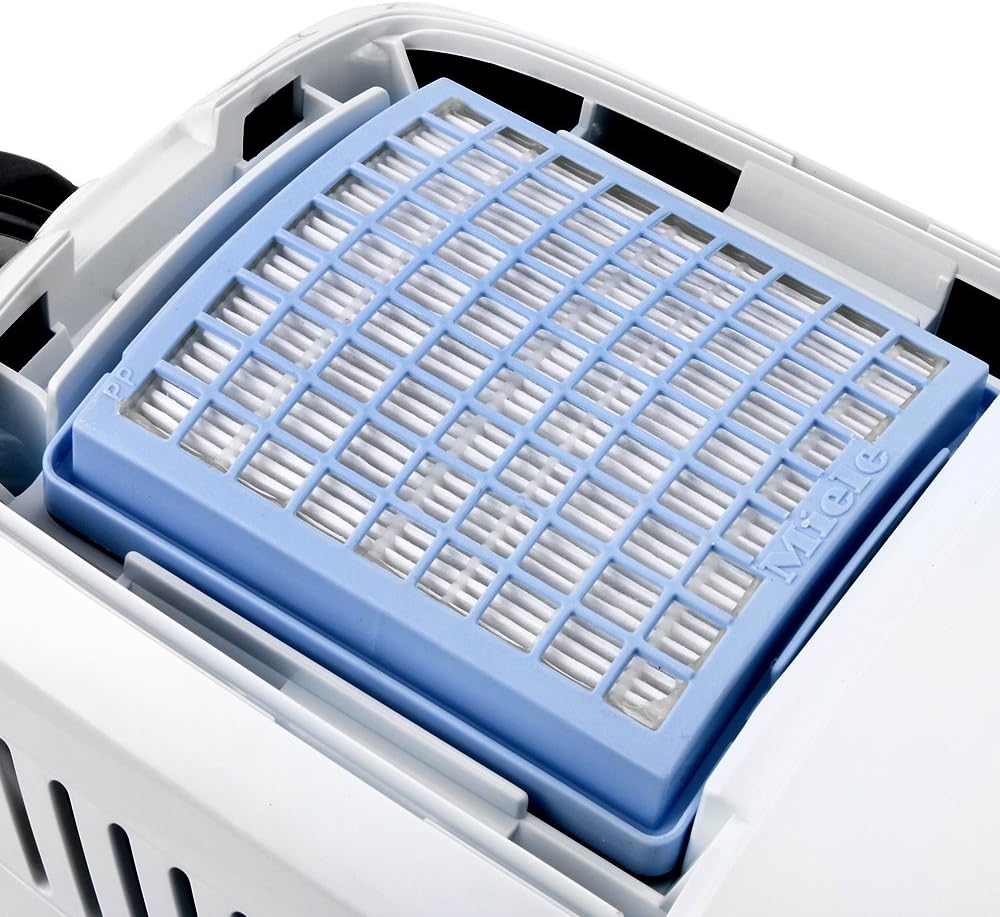
Figure 2: View of the HEPA filter compartment, showing the blue HEPA filter securely in place. This filter is crucial for trapping fine dust and allergens.
Operating Instructions
1. Powering On/Off
Plug the power cord into a suitable electrical outlet. The vacuum cleaner is equipped with power switches. Locate the main power switch, typically on the body or handle, and press to turn the unit on or off.

Figure 3: Detail of the power button located on the handle, allowing for convenient control during operation.
2. Adjusting Suction Power
The Miele S168 features adjustable suction power to suit different cleaning needs. Use the slider control to select between minimum and maximum suction levels.

Figure 4: The suction power control slider, marked "Max." and "Min. 0", enabling users to adjust suction strength for various surfaces and debris types.
3. Using on Different Surfaces
The S168 is recommended for use on hard floors, carpets, and tile floors. Adjust the suction power as needed for optimal cleaning on each surface type.
4. Using Attachments
The vacuum comes with a nozzle and other attachments for specialized cleaning tasks. Attach the desired tool firmly to the end of the wand or hose connection point.

Figure 5: The included crevice tool and upholstery tool, designed for cleaning tight spaces and delicate fabrics respectively. These tools attach to the vacuum's wand for extended reach.

Figure 6: The main floor nozzle, designed for efficient cleaning across various floor types. It features a low profile to reach under furniture.
Maintenance
Regular maintenance ensures optimal performance and extends the lifespan of your Miele S168 vacuum cleaner.
1. Dustbag Replacement
The dustbag should be replaced when the dustbag indicator fills up, or when suction power noticeably decreases. To replace:
- Unplug the vacuum cleaner.
- Open the dustbag compartment.
- Carefully remove the full dustbag, ensuring the sealing flap closes automatically.
- Insert a new Miele original dustbag, ensuring it is correctly seated in the holder.
- Close the dustbag compartment securely.
2. Filter Maintenance
The HEPA filter should be checked periodically and replaced according to the manufacturer's recommendations, typically once a year or as needed based on usage. Refer to the filter's packaging for specific replacement intervals.
3. Nozzle and Attachment Cleaning
Periodically inspect the floor nozzle and other attachments for blockages, tangled hair, or debris. Remove any obstructions to maintain effective cleaning performance. Some attachments may require disassembly for thorough cleaning.
4. General Cleaning
Wipe the exterior of the vacuum cleaner with a soft, damp cloth. Do not use abrasive cleaners or solvents.
Troubleshooting
| Problem | Possible Cause | Solution |
|---|---|---|
| No power | Not plugged in; power outlet faulty; power switch off. | Ensure plug is fully inserted; test outlet with another appliance; press power switch to ON. |
| Loss of suction | Dustbag full; filter clogged; hose/nozzle blocked. | Replace dustbag; clean/replace filter; check hose and nozzle for obstructions. |
| Unusual noise | Foreign object in brush roll or hose; motor issue. | Unplug and check for obstructions; if noise persists, contact Miele service. |
| Vacuum does not stand upright | This model is designed to be lightweight and compact, and may require leaning against a surface or being laid flat for storage. | This is a design characteristic. Store the vacuum by leaning it against a wall or laying it down. |
Specifications
| Feature | Detail |
|---|---|
| Brand | Miele |
| Model Number | S168 |
| Form Factor | Upright |
| Color | White |
| Special Feature | Bagged, HEPA filtration |
| Filter Type | HEPA Filter |
| Included Components | Nozzle |
| Recommended Uses | Hard Floor, Carpet, Tile Floor |
| Noise Level | 69 dB |
| Item Weight | 12.4 pounds |
| Package Dimensions | 23.4 x 10.3 x 9.7 inches |
| Controller Type | Push Button |
| Number of Power Levels | 3 |
| Indoor/Outdoor Usage | Indoor |
Warranty and Support
Warranty Information
For detailed warranty information, please refer to the warranty card included with your product or visit the official Miele website. Warranty terms and conditions may vary by region.
Customer Support
Should you require further assistance, have questions, or need to order replacement parts, please visit the official Miele website or contact Miele customer service directly. Contact details can typically be found on the Miele website or in the product packaging.
Official Miele Website: www.miele.com
Related documentsS168

Ask a question about this manual
Ask about setup, troubleshooting, compatibility, parts, safety, or missing instructions. Manuals+ will review the question and use this page’s manual context to help answer it.