
1. Introduction
The Bee Game for Nintendo DS offers an engaging adventure where players guide Maya the Bee and her friend Willie. Their mission is to locate missing friends after a severe storm in Corn Poppy Meadow. The game involves navigating various environments, completing challenges, and playing mini-games to gather clues and find the other bees.
This manual provides essential information for setting up, playing, and maintaining your Bee Game cartridge.

Image 1.1: The Bee Game for Nintendo DS, showing the game cartridge and packaging.
2. Setup
- Insert Game Card: Ensure your Nintendo DS system is powered off. Open the game card slot cover on your Nintendo DS. Gently push the Bee Game cartridge into the slot until it clicks into place.
- Power On: Close the game card slot cover. Press the POWER button on your Nintendo DS system to turn it on.
- Select Game: On the Nintendo DS menu screen, touch the "Bee Game" icon to start the application.

Image 2.1: An in-game screenshot showing Maya the Bee and other characters in a vibrant meadow environment.
3. Operating Instructions (Gameplay)
3.1 Basic Controls
- Directional Pad (D-Pad): Move Maya or Willie left, right, up, or down.
- A Button: Jump or confirm selections.
- B Button: Perform actions or cancel selections.
- X/Y Buttons: Context-sensitive actions, often used in mini-games.
- L/R Buttons: Used for specific actions or camera adjustments in certain levels.
- Touch Screen: Interact with objects, characters, and menus, especially during mini-games.
3.2 Game Objective
The primary goal is to help Maya and Willie find their missing friends across 30 levels spread across five distinct game worlds: the meadow, dark forest, blue pond, deep caverns, and the garden. Collect clues and complete mini-games to progress.

Image 3.1: Maya and Willie navigating a level, possibly in the blue pond area, with dragonflies.
3.3 Character Selection and Customization
Players can choose to play as either Maya the Bee or her best friend Willie. The game includes a paint and tool book feature, allowing for character customization.
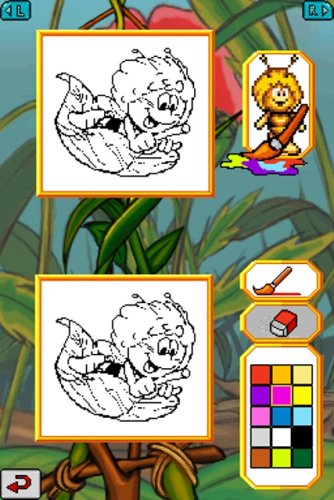
Image 3.2: A screenshot of the in-game coloring book, allowing players to customize characters or images.
3.4 Mini-Games and Unlockables
The game features various mini-games that utilize the Nintendo DS touchscreen. Completing levels and objectives can unlock bonus maps and additional mini-games.

Image 3.3: A mini-game where characters use a slingshot to interact with objects or enemies, possibly worms in a spider web.
4. Maintenance
- Cartridge Care: Keep the game cartridge clean and free from dust and debris. Store it in its original case or a protective holder when not in use.
- Cleaning: If the cartridge contacts appear dirty, gently wipe them with a soft, dry cloth. Do not use liquids or abrasive materials.
- Storage: Avoid exposing the cartridge to extreme temperatures, direct sunlight, or high humidity.
5. Troubleshooting
| Problem | Solution |
|---|---|
| Game does not start or freezes. |
|
| Controls are unresponsive. |
|
| Graphics or sound issues. |
|
6. Specifications
- Product Name: Bee Game
- Platform: Nintendo DS
- Model Number: 19191
- Brand: MIDWAY
- ASIN: B000SFK0SY
- UPC: 031719191918
- Release Date: October 15, 2007
- Compatible Consoles: Nintendo DS, Nintendo DS Lite, Nintendo DSi, Nintendo DSi XL
- Rated: Everyone
- Product Dimensions: 4.75 x 5.25 x 0.5 inches
- Item Weight: 3.2 ounces
7. Warranty Information
Specific warranty information for the MIDWAY Bee Game is not provided in the product details. Please refer to the packaging or contact the manufacturer, Midway, directly for warranty details.
8. Support
For further assistance or technical support regarding the Bee Game, please contact Midway customer service. Contact information may be available on the original product packaging or through their official website.