
Introduction
The Niles HDLCRbx High-Definition Bookshelf Loudspeaker is engineered to deliver superior sound quality and durability, utilizing advanced components and circuitry. This speaker is ideal for integration into multi-channel music or home theater systems, and its design optimizes performance for use as either a center-channel or left/right loudspeaker.
Important Safety Information
Please read all instructions carefully before operating your Niles HDLCRbx loudspeaker. Retain this manual for future reference.
- Do not expose the speaker to water or excessive moisture.
- Ensure proper ventilation around the speaker to prevent overheating.
- Avoid placing the speaker near heat sources such as radiators, heat registers, stoves, or other apparatus that produce heat.
- Use only attachments/accessories specified by the manufacturer.
- Refer all servicing to qualified service personnel. Servicing is required when the apparatus has been damaged in any way.
- This product contains chemicals known to the State of California to cause cancer and birth defects or other reproductive harm.
What's in the Box
Verify that all components are present before proceeding with installation.
- Niles HDLCRbx Speaker (1 unit)
Product Overview
The Niles HDLCRbx features advanced acoustic design for optimal performance in various audio setups. Key components and features include:
- Dual 5-1/4" Injection-Molded TCC Woofers: These woofers are constructed from talc, carbon, and ceramic-filled polypropylene, ensuring extreme rigidity to minimize breakup and lower distortion for clear bass and midrange.
- Long-Throw Voice Coil/Magnet Structure: Designed to extend cone excursion limits, enhancing low-frequency response and dynamic impact for a richer sound experience.
- 1" Teteron Dome Tweeter: Fluid-cooled for durability and delivering ultra-wide dispersion, this tweeter accurately reproduces clear and detailed high frequencies.
- Bass Reflex Design: This acoustic design enhances low-frequency response and improves overall dynamics, providing deeper and more impactful bass.
- Midrange Boost/Dialog Enhance Control: A dedicated control feature that allows for improved movie dialog reproduction, particularly useful when the speaker is used in center channel applications.

Figure 1: Front view of the Niles HDLCRbx High-Definition Loudspeaker, highlighting the dual woofers and central tweeter.
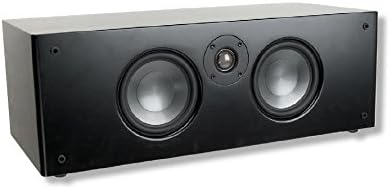
Figure 2: Angled view of the Niles HDLCRbx speaker, illustrating its form factor suitable for bookshelf or cabinet placement.
Setup Guide
Follow these steps to properly set up your Niles HDLCRbx loudspeaker:
- Placement: For optimal sound, place the speaker on a stable, flat surface such as a bookshelf, stand, or cabinet. If used as a center channel, position it directly above or below your television. For left/right channels, ensure they are equidistant from the primary listening position.
- Wiring: Connect the speaker to your amplifier or AV receiver using high-quality speaker wire. Ensure correct polarity (+ to + and - to -) for each connection to avoid phase issues that can degrade sound quality.
- Amplifier Connection: Connect the other end of the speaker wire to the corresponding speaker terminals on your amplifier or AV receiver. Refer to your amplifier's manual for specific connection instructions.
- Initial Power On: Once all connections are secure, power on your amplifier/receiver and select the appropriate input. Start with the volume at a low level and gradually increase it.
- System Calibration: If your AV receiver has an automatic room calibration system (e.g., Audyssey, MCACC, YPAO), run it to optimize the speaker's performance for your listening environment.
Operating Instructions
The Niles HDLCRbx loudspeaker is designed for seamless integration into your home audio system. Once connected, its operation is primarily controlled by your amplifier or AV receiver.
- Volume Control: Adjust the overall system volume using your amplifier or receiver's volume control.
- Source Selection: Select your desired audio source (e.g., Blu-ray player, streaming device, turntable) via your amplifier or receiver.
- Midrange Boost/Dialog Enhance: If your model includes this feature, locate the control on the speaker (typically on the rear or front panel, if accessible) and adjust it as needed to enhance vocal clarity, especially for movie dialogue. Experiment with the setting to find the optimal balance for your content.
- Bass Management: For systems with a subwoofer, ensure proper bass management settings are configured on your AV receiver to direct low frequencies appropriately to the subwoofer while allowing the HDLCRbx to handle its intended frequency range.
Care and Maintenance
Proper care will ensure the longevity and optimal performance of your Niles HDLCRbx loudspeaker.
- Cleaning: Use a soft, dry cloth to wipe the speaker cabinet. Do not use abrasive cleaners, waxes, or solvents as they may damage the finish.
- Grille Care: The speaker grille can be gently removed for cleaning if necessary. Use a soft brush or vacuum cleaner with a brush attachment to remove dust. Reattach the grille carefully.
- Environment: Avoid exposing the speaker to direct sunlight, extreme temperatures, or high humidity.
- Handling: When moving the speaker, always lift it carefully from the base. Avoid touching the speaker cones or tweeter dome directly.
Troubleshooting
If you encounter issues with your Niles HDLCRbx loudspeaker, refer to the following common problems and solutions:
| Problem | Possible Cause | Solution |
|---|---|---|
| No sound from speaker | Loose or incorrect speaker wire connection; Amplifier/receiver not powered on or incorrect input selected; Speaker protection mode activated. | Check all speaker wire connections at both the speaker and amplifier, ensuring correct polarity. Verify amplifier/receiver is powered on and the correct audio input is selected. Power cycle your amplifier/receiver. |
| Distorted or unclear sound | Overdriven amplifier; Loose speaker wire connection; Incorrect audio settings on amplifier/receiver; Damaged speaker component. | Reduce amplifier volume. Recheck speaker wire connections. Review amplifier/receiver settings (e.g., EQ, bass/treble, speaker size). If distortion persists, contact customer support. |
| Weak bass response | Incorrect speaker placement; Phase issue; Amplifier settings. | Experiment with speaker placement. Ensure correct polarity for all speaker connections. Check amplifier/receiver bass management settings and ensure the speaker is set to "Large" or "Full-Band" if not using a subwoofer, or "Small" with proper crossover if using a subwoofer. |
Technical Specifications
Detailed specifications for the Niles HDLCRbx loudspeaker:
| Model Name | HDLCRbx |
| Speaker Type | Surround |
| Special Feature | Bass Boost |
| Recommended Uses | Music, Home Theater |
| Compatible Devices | Desktop, Gaming Console, Television |
| Woofer Diameter | 5.25 Inches |
| Surround Sound Channel Configuration | 1.0 |
| Color | Black |
| Included Components | Niles HDLCRbx Speaker |
| Item Weight | 20 Pounds |
| Impedance | 4 Ohm |
| Is Waterproof | FALSE |
| Warranty Type | Limited |
| Number of Items | 1 |
| Control Method | Touch |
| Power Source | Corded Electric |
| Product Dimensions | 21 x 9.75 x 7.25 inches |
| Manufacturer | Niles |
| UPC | 760514011540 |
| Speaker Maximum Output Power | 25 Watts |
| Connectivity Technology | Wired |
| Audio Output Mode | Surround |
| Mounting Type | Shelf Mount |
Warranty and Support
Warranty Information: The Niles HDLCRbx loudspeaker comes with a Limited Warranty. Please refer to the warranty card included with your product or visit the official Niles website for specific terms and conditions regarding coverage and duration.
Customer Support: For technical assistance, troubleshooting beyond this guide, or warranty claims, please contact Niles customer support. You can typically find contact information on the manufacturer's official website or through your authorized dealer.
For more information, visit the official Niles Audio website.


