
Introduction
The KORG DT-4 is a compact, handheld chromatic digital tuner designed for accurate and easy instrument tuning. It features a bright LED display and a wide detection range, making it suitable for various musical instruments. This manual provides essential information for setting up, operating, and maintaining your DT-4 tuner.
Features
- Includes two AAA batteries for immediate operation.
- Bright LEDs display three distinct tuning modes for clear visual feedback.
- Offers a wide detection range from A0 to C8 (88 notes), accommodating various instruments.
- Adjustable calibration range of 410Hz-480Hz to support diverse concert pitches.
- Built-in condenser microphone for tuning acoustic instruments.
Product Overview
Familiarize yourself with the components of your KORG DT-4 tuner.

Figure 1: Front view of the KORG DT-4 tuner, highlighting its circular LED display and central digital note indicator.
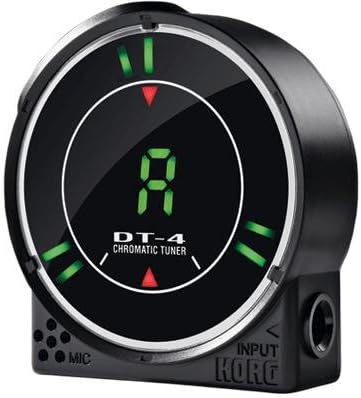
Figure 2: Side view of the KORG DT-4 tuner, illustrating the 1/4-inch input jack and the built-in microphone grille.
Setup
1. Battery Installation
- Locate the battery compartment cover on the back of the DT-4 unit.
- Slide or unclip the cover to open it.
- Insert two AAA batteries, ensuring correct polarity (+/-) as indicated inside the compartment.
- Replace the battery compartment cover securely.
2. Powering On/Off
Press the power button (usually located on the side or front) to turn the tuner on. Press and hold the same button to turn it off. The unit may also feature an auto-off function after a period of inactivity to conserve battery life.
Operating Instructions
1. Connecting an Instrument
- For Electric Instruments: Connect a standard 1/4-inch instrument cable from your instrument's output to the DT-4's INPUT jack.
- For Acoustic Instruments: Place the DT-4 near your instrument. The built-in condenser microphone will detect the sound.
2. Selecting Tuning Mode
The DT-4 offers three types of LED display modes. Refer to the specific button on your unit (often labeled 'MODE' or similar) to cycle through these modes. Each mode provides a different visual representation of pitch deviation, allowing you to choose the one most comfortable for your tuning style.
3. Tuning Process
- Play a single note on your instrument.
- Observe the DT-4's display. The digital display will show the detected note name (e.g., 'A', 'C#').
- The surrounding LEDs will indicate whether the note is sharp, flat, or in tune. Adjust your instrument's pitch until the central LED(s) illuminate, indicating accurate tuning.
4. Calibration
To adjust the reference pitch (A4), use the calibration button (often labeled 'CALIB' or 'A4'). The DT-4 allows adjustment from 410Hz to 480Hz. Press the button repeatedly to cycle through the available frequencies until your desired concert pitch is set.
Maintenance
Battery Replacement
When the display dims or the tuner becomes unresponsive, replace the AAA batteries. Always use fresh batteries and dispose of old ones responsibly.
Cleaning
Wipe the unit with a soft, dry cloth. Do not use abrasive cleaners, solvents, or waxes, as these can damage the finish or internal components.
Storage
Store the DT-4 in a dry place away from extreme temperatures and direct sunlight. If storing for an extended period, remove the batteries to prevent leakage.
Troubleshooting
- Tuner does not power on: Ensure batteries are correctly installed and have sufficient charge. Replace with new batteries if necessary.
- Inaccurate tuning: Verify that the instrument cable is securely connected (for electric instruments) or that the tuner's microphone is positioned close to the sound source (for acoustic instruments). Check the calibration setting to ensure it matches your desired reference pitch.
- No sound detection: For electric instruments, check the instrument's volume and cable connection. For acoustic instruments, ensure there is no excessive background noise interfering with the built-in microphone.
- Display is dim or flickering: This usually indicates low battery power. Replace the batteries.
Specifications
- Model Number: DT-4
- Detection Range: A0 (27.50 Hz) - C8 (4186.01 Hz)
- Calibration Range: A4 = 410 Hz - 480 Hz
- Power Supply: 2 x AAA batteries (included)
- Item Weight: 3.17 ounces (approximately 90 grams)
- Product Dimensions: 2.8 x 3.6 x 1.4 inches (approximately 7.1 x 9.1 x 3.6 cm)
- Input: 1/4-inch monaural phone jack
- Built-in Microphone: Yes
Warranty and Support
For detailed warranty information, product support, or service inquiries, please visit the official KORG website or contact your local KORG distributor. Keep your purchase receipt as proof of purchase.


