
1. Introduction
Thank you for choosing the Calor Pressing Profil steam generator, model 288000. This manual provides essential information for the safe and efficient use, maintenance, and troubleshooting of your appliance. Please read it thoroughly before first use and keep it for future reference.
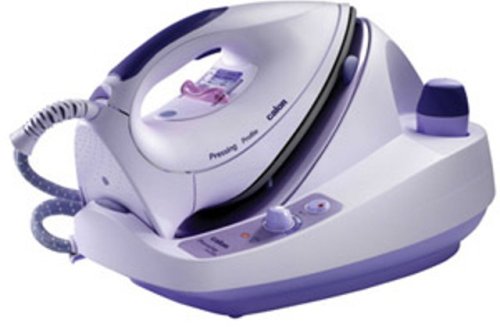
Image 1.1: Calor Pressing Profil Steam Generator. This image displays the overall design of the steam generator unit with its iron and water tank.
Important Safety Instructions
- Always ensure the appliance is connected to a grounded electrical outlet.
- Do not leave the steam generator unattended while it is switched on.
- Keep the appliance out of reach of children and pets.
- Never touch the hot soleplate of the iron or the steam jet. Risk of burns.
- Unplug the appliance from the power outlet before filling the water tank, cleaning, or performing any maintenance.
- Do not immerse the appliance in water or any other liquid.
- If the power cord is damaged, it must be replaced by the manufacturer, its service agent, or similarly qualified persons to avoid a hazard.
- Use only tap water in the water tank. Do not add perfumes, vinegar, starch, descaling agents, or other chemicals, as these can damage the appliance.
2. Setup Guide
2.1 Unpacking
Carefully remove all packaging materials from the steam generator. Retain the packaging for potential future transport or storage. Check that all components are present and undamaged.
2.2 Filling the Water Tank
- Ensure the steam generator is unplugged from the power outlet and has cooled down.
- Locate the ergonomic cap with a silicone ring on the water tank. Unscrew it.
- Fill the water tank with clean tap water up to the maximum fill line. Do not overfill.
- Securely screw the cap back onto the water tank.
2.3 Initial Use
Before first use, it is recommended to iron an old piece of fabric to remove any manufacturing residues from the soleplate. This also helps to prime the steam system.
3. Operating Your Steam Generator
3.1 Powering On
- Place the steam generator on a stable, heat-resistant surface.
- Plug the power cord into a grounded electrical outlet. The power-on indicator light will illuminate.
- Wait for the heating indicator light to turn off, indicating that the appliance has reached the desired temperature and is ready for use. This typically takes a few minutes.
3.2 Adjusting Steam Output
The Calor Pressing Profil features an adjustable steam output up to 90 g/min. Use the steam control dial or button on the iron or base unit to select the appropriate steam level for your fabric type. Higher steam settings are suitable for thicker fabrics like denim, while lower settings are for delicate materials.
3.3 Ironing Techniques
- Dry Ironing: For dry ironing, ensure the steam function is turned off.
- Steam Ironing: For steam ironing, select the desired steam output. The Avantis iron with its inclined soleplate is designed for smooth gliding. Move the iron steadily over the fabric.
- Vertical Steaming: The steam generator can also be used for vertical steaming of hanging garments or curtains. Hold the iron a few centimeters away from the fabric and press the steam button.
4. Care and Maintenance
4.1 Descaling
The Calor Pressing Profil features an anti-scale system with a stainless steel tank and an anti-limescale filter. Regular descaling is crucial to maintain performance and extend the life of your appliance. Refer to the specific descaling instructions provided in the full manual for your model. Generally, this involves flushing the tank or using a recommended descaling solution.
4.2 Cleaning the Iron Soleplate
To clean the soleplate, ensure the iron is cool and unplugged. Wipe the soleplate with a damp cloth and a non-abrasive cleaner if necessary. Do not use abrasive pads or metallic objects, as these can scratch the soleplate.
4.3 Storage
After each use, unplug the appliance and allow it to cool completely. Empty any remaining water from the tank. Store the iron securely on its base or in the designated storage area, ensuring the cord is neatly wrapped.
5. Troubleshooting Guide
| Problem | Possible Cause | Solution |
|---|---|---|
| No steam output | Water tank empty; appliance not heated; steam button not pressed. | Fill water tank; wait for heating indicator to turn off; press steam button. |
| Water leaking from soleplate | Temperature too low for steam; iron held horizontally for too long without steam. | Increase temperature setting; ensure iron is hot enough before using steam. |
| White flakes on fabric | Limescale buildup in the tank or iron. | Perform descaling procedure as per manual. |
| Appliance not turning on | Not plugged in; power outlet fault. | Check power cord connection; test outlet with another appliance. |
6. Technical Specifications
- Model: Calor Pressing Profil 288000
- Brand: Calor
- Adjustable Steam Output: Up to 90 g/min
- Water Tank Autonomy: Approximately 1 hour 30 minutes
- Anti-Scale System: Stainless steel tank with external heating element and anti-limescale filter
- Iron Type: Avantis iron with inclined soleplate
- Dimensions (Package): 44.9 x 34.3 x 27.6 cm
- Weight (Item): 5.12 Kilograms
7. Warranty and Customer Support
This Calor appliance is designed and manufactured to the highest quality standards. In the unlikely event of a defect, please refer to your purchase documentation for specific warranty terms and conditions.
Spare Parts Availability: Spare parts for this product are available for 5 years after the date of purchase.
For further assistance, technical support, or to inquire about spare parts, please contact Calor customer service through their official website or the retailer where the product was purchased. Please have your model number (288000) and proof of purchase ready.
