
Bogen FBA_C10
Bogen Classic Amplifier User Manual
Model: FBA_C10
1. Introduction
Thank you for choosing the Bogen Classic Amplifier, Model FBA_C10. This 10-watt amplifier is designed to provide dependable performance and flexibility for various audio applications. This manual provides essential information for the proper installation, operation, and maintenance of your amplifier.
Please read this manual thoroughly before operating the unit and retain it for future reference.
2. Safety Information
Always observe the following safety precautions to prevent electric shock, fire, or damage to the unit.
- Ensure the amplifier is connected to a power source that matches the specified voltage.
- Do not expose the unit to rain or moisture to prevent fire or shock hazards.
- Do not open the amplifier casing. There are no user-serviceable parts inside. Refer all servicing to qualified service personnel.
- Ensure proper ventilation around the unit to prevent overheating.
- Disconnect power before making any connections or performing maintenance.
- This product is UL and CSA listed, ensuring compliance with safety standards.
WARNING: This product contains chemicals known to the State of California to cause cancer and birth defects or other reproductive harm.
3. Product Overview
3.1 Features
- 10 Watts of output power.
- Transformer isolated 4, 8, 16 Ohm, 25V, and 70V output taps for versatile speaker connections.
- One dedicated Lo-Z balanced MIC 1 input.
- One switchable MIC 2/AUX 1 input.
- Contact muting of AUX input.
- Separate rear panel-mounted TEL volume control.
- Voice-activated muting of AUX input by TEL input with variable trigger threshold.
- Designed with discreet complementary transistor circuitry for maximum reliability.
3.2 Components and Controls
The Bogen Classic Amplifier features a straightforward design for ease of use. Below are images illustrating the unit and its primary controls.

Figure 3.2.1: Front view of the Bogen Classic Amplifier. This image shows the overall design of the amplifier, including the front panel with input controls and the power switch.
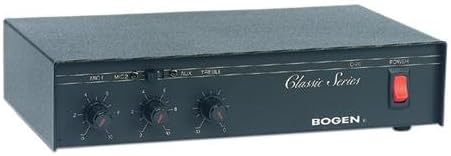
Figure 3.2.2: Close-up of the Bogen Classic Amplifier's front panel. This view highlights the MIC1, MIC2/AUX, and TREBLE control knobs, along with the power switch and "Classic Series" branding.
The front panel includes input level controls for MIC1, MIC2/AUX, and a TREBLE tone control. The power switch is located on the right side of the front panel. The rear panel contains all input and output terminals, including speaker outputs, auxiliary input, and TEL input with its dedicated volume control.
4. Setup and Installation
4.1 Unpacking
Carefully remove the amplifier from its packaging. Verify that all components are present. The package should contain the amplifier unit and this user manual.
4.2 Placement
Place the amplifier on a stable, flat surface, ensuring adequate ventilation. Avoid placing it near heat sources or in direct sunlight. An optional wall mount kit is available for alternative installation.
4.3 Connections
Before making any connections, ensure the amplifier is powered off and unplugged from the electrical outlet.
- Speaker Connections: Connect your speakers to the appropriate transformer isolated output taps (4, 8, 16 Ohm, 25V, or 70V) on the rear panel. Ensure the speaker impedance matches the selected tap.
- Microphone Inputs: Connect your Lo-Z balanced microphone to the dedicated MIC 1 input. For a second microphone or an auxiliary audio source, use the switchable MIC 2/AUX 1 input.
- Auxiliary Input: If using an auxiliary audio source (e.g., CD player, media player) with the MIC 2/AUX 1 input, ensure the input switch is set to AUX.
- TEL Input: Connect your telephone system's audio output to the TEL input on the rear panel. Adjust the TEL volume control as needed.
- Power Connection: Once all audio connections are secure, plug the amplifier's power cord into a standard electrical outlet.
5. Operating Instructions
- Power On: Press the power switch on the front panel to turn on the amplifier.
- Adjusting Input Levels: Use the MIC1 and MIC2/AUX knobs on the front panel to adjust the volume for the respective inputs.
- Tone Control: Use the TREBLE knob to adjust the high-frequency response of the audio output.
- TEL Volume Control: The TEL input has a separate volume control located on the rear panel. Adjust this control to set the desired level for telephone audio.
- Voice Activated Muting (VAM): The amplifier features voice-activated muting for the AUX input when a signal is detected on the TEL input. The variable trigger threshold allows adjustment of the sensitivity for this feature.
- Contact Muting: The AUX input can also be muted via a contact closure. Refer to the wiring diagram (if available in full manual) for specific connections.
- Power Off: Press the power switch again to turn off the amplifier when not in use.
6. Maintenance
The Bogen Classic Amplifier is designed for reliable operation with minimal maintenance.
- Cleaning: Disconnect power before cleaning. Use a soft, dry cloth to wipe the exterior of the unit. Do not use liquid cleaners or aerosols.
- Ventilation: Ensure that the ventilation openings are not blocked by dust or debris. Periodically check and clean if necessary.
- Servicing: Do not attempt to service the unit yourself. Refer all servicing to qualified Bogen service personnel.
7. Troubleshooting
If you experience issues with your Bogen Classic Amplifier, consult the following table before contacting service personnel.
| Problem | Possible Cause | Solution |
|---|---|---|
| No power | Power cord unplugged; Power outlet faulty; Amplifier power switch off. | Check power cord connection; Test outlet with another device; Ensure power switch is in the 'On' position. |
| No sound output | Speaker connections loose or incorrect; Input source not connected or faulty; Input level knobs turned down. | Verify speaker wiring and impedance match; Check input source and cables; Increase MIC/AUX volume knobs. |
| Distorted sound | Input signal too high; Speaker impedance mismatch; Faulty speaker. | Reduce input signal level; Verify speaker impedance matches amplifier tap; Test with a different speaker. |
| AUX input mutes unexpectedly | Voice Activated Muting (VAM) active; Contact muting triggered. | Check for active signal on TEL input; Adjust VAM threshold or disable if not needed; Check contact muting connections. |
8. Specifications
| Model | FBA_C10 |
| Output Power | 10 Watts |
| Output Taps | 4, 8, 16 Ohms, 25V, 70V (Transformer Isolated) |
| Inputs | 1 x Lo-Z Balanced MIC, 1 x Switchable MIC/AUX, 1 x TEL |
| Muting | Contact Muting of AUX, Voice Activated Muting by TEL input |
| Dimensions (L x W x H) | 11.37 x 7.37 x 2.87 inches (28.88 x 18.72 x 7.29 cm) |
| Weight | 5 pounds (2.27 kg) |
| Mounting Type | Wall Mount (Optional Kit) |
| Certifications | UL, CSA Listed |
9. Warranty and Support
For warranty information and technical support, please refer to the official Bogen website or contact Bogen customer service directly. Keep your purchase receipt as proof of purchase for warranty claims.
Manufacturer: Bogen
Date First Available: September 14, 2004
Related documentsFBA_C10


Ask a question about this manual
Ask about setup, troubleshooting, compatibility, parts, safety, or missing instructions. Manuals+ will review the question and use this page’s manual context to help answer it.