
1. Introduction
This manual provides essential instructions for the safe and efficient operation of your Singing Machine Bratz Karaoke Machine, Model SMB552 Bratz Purple. Please read this manual thoroughly before using the product and retain it for future reference.
The Singing Machine Bratz Karaoke Machine is designed for home use, offering an interactive karaoke experience. It includes a USB microphone and functions as a sing-along speaker, compatible with various devices such as smartphones, tablets, and laptops.
2. Safety Information
- Power Source: Use only the specified 9-volt power source or compatible batteries. Ensure correct polarity when inserting batteries.
- Water and Moisture: Do not expose the unit to rain, moisture, or immerse it in water. Keep liquids away from the device.
- Ventilation: Do not block any ventilation openings. Ensure adequate airflow around the unit.
- Heat: Keep the unit away from heat sources such as radiators, heat registers, stoves, or other apparatus that produce heat.
- Cleaning: Unplug the unit from the power source before cleaning. Use a dry cloth only.
- Servicing: Do not attempt to service this product yourself. Refer all servicing to qualified service personnel.
- Children: This product is intended for use by children under adult supervision. Small parts may pose a choking hazard.
3. What's in the Box
Carefully unpack all items from the box. Please ensure all components listed below are present.
- Singing Machine Bratz Karaoke Machine (SMB552 Bratz Purple)
- USB Microphone
- Power Adapter (if included, otherwise battery compartment)
- User Manual (this document)
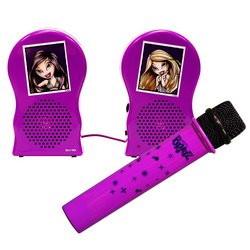
Image 1: The Singing Machine Bratz Purple Karaoke Machine. This image displays the main unit, which is purple and features Bratz branding. It includes a built-in speaker and a microphone input.
4. Setup
4.1 Powering the Unit
The Bratz Karaoke Machine can be powered by batteries or an optional 9-volt power adapter (not always included, check packaging).
- Battery Installation: Locate the battery compartment on the underside of the unit. Insert the required batteries (e.g., C-size, quantity specified on compartment) ensuring correct polarity (+/-). Close the compartment securely.
- AC Power (if applicable): If using an AC adapter, plug the small end into the DC IN jack on the unit and the other end into a standard wall outlet.
4.2 Connecting the Microphone
The included USB microphone connects directly to the karaoke machine.
- Locate the USB port on the karaoke machine.
- Plug the USB connector of the microphone firmly into the USB port.
4.3 Connecting to External Devices (Smartphones, Tablets, Laptops)
To play music from an external device, you will typically use an auxiliary audio cable (not included) or a USB connection for media playback.
- Auxiliary Input: If your unit has an AUX IN jack, connect one end of a 3.5mm audio cable to your smartphone, tablet, or laptop's headphone jack and the other end to the AUX IN jack on the karaoke machine.
- USB Media Playback: The unit supports media playback from USB storage devices. Insert a USB drive containing audio files (e.g., MP3) into the designated USB port.
- SD Card Media Playback: The unit supports media playback from SD cards. Insert an SD card containing audio files into the designated SD card slot.
5. Operating Instructions
5.1 Power On/Off
Locate the Power button or switch on the unit. Press or slide it to the "ON" position to power on the machine. The unit will typically indicate power with an LED light. To power off, press or slide the button to the "OFF" position.
5.2 Adjusting Volume
Use the Master Volume knob or buttons on the unit to adjust the overall sound output. There may also be a separate Microphone Volume control to adjust the microphone's loudness independently.
5.3 Playing Music from External Devices
- Ensure your external device (smartphone, tablet, laptop) is connected as described in Section 4.3.
- Start playing music on your external device.
- Adjust the volume on both your external device and the karaoke machine for optimal sound.
5.4 Playing Music from USB/SD Media
- Insert your USB drive or SD card with audio files.
- The unit may automatically detect the media and begin playback, or you may need to select the "USB" or "SD" input mode using a source button.
- Use the Play/Pause, Skip Forward, and Skip Backward buttons on the unit to control playback.
5.5 Using the Microphone
- Ensure the microphone is connected (Section 4.2).
- Speak or sing into the microphone.
- Adjust the Microphone Volume control to balance your voice with the background music.
- Some units may feature echo or voice effects; refer to specific controls on your machine for these functions.
5.6 Interactive Bratz Karaoke Feature
This unit features an interactive Bratz karaoke experience. Specific functions related to this feature, such as pre-loaded songs or visual effects, will be controlled via dedicated buttons or modes on the unit. Consult the labels on your machine for these specific controls.
6. Maintenance
6.1 Cleaning
- Always unplug the unit before cleaning.
- Use a soft, dry cloth to wipe the exterior surfaces of the machine.
- Do not use liquid cleaners, aerosol sprays, or harsh chemicals, as these may damage the finish or internal components.
6.2 Storage
When not in use for extended periods, store the karaoke machine in a cool, dry place, away from direct sunlight and extreme temperatures. If using batteries, remove them before long-term storage to prevent leakage.
6.3 Battery Care
- Do not mix old and new batteries.
- Do not mix alkaline, standard (carbon-zinc), or rechargeable (nickel-cadmium) batteries.
- Remove exhausted batteries promptly.
- Dispose of batteries properly according to local regulations.
7. Troubleshooting
| Problem | Possible Cause | Solution |
|---|---|---|
| No power | Unit not plugged in; batteries dead or incorrectly inserted. | Ensure power adapter is securely connected or replace/reinsert batteries correctly. |
| No sound from speaker | Volume too low; incorrect input source selected; external device not playing. | Increase Master Volume; select correct input (AUX, USB, SD); ensure external device is playing and its volume is up. |
| Microphone not working | Microphone not connected; Microphone Volume too low. | Ensure USB microphone is firmly plugged in; increase Microphone Volume. |
| Distorted sound | Volume too high (clipping); poor connection. | Reduce Master Volume and/or external device volume; check all cable connections. |
8. Specifications
- Model Name: Bratz Purple
- Model Number: SMB552
- Brand: Singing Machine
- Color: Purple
- Special Feature: Interactive Bratz Karaoke, Compatible with PC
- Included Components: Microphone
- Recommended Uses For Product: Home
- Power Source: Battery Powered
- Number of Speakers: 1
- Connector Type: USB
- Connectivity Technology: USB
- Media Type: SD, USB
- Compatible Devices: Personal Computer, Smartphones, Tablets, Laptops (via AUX if available)
- Format: Digital
- Voltage: 9 volts
- Built-In Media: Microphone
- UPC: 047237005521
- Manufacturer: The Singing Machine
9. Warranty Information
This product is covered by a limited manufacturer's warranty. For detailed information regarding warranty coverage, terms, and conditions, please refer to the warranty card included with your product or visit the official Singing Machine website. Keep your purchase receipt as proof of purchase for warranty claims.
10. Customer Support
If you encounter any issues or have questions not covered in this manual, please contact Singing Machine customer support.
- Online Support: Visit the official Singing Machine website for FAQs, support articles, and contact forms.
- Phone Support: Refer to the product packaging or the official website for customer service phone numbers.
Please have your model number (SMB552) and purchase date available when contacting support.
11. Official Product Videos
No official product videos from the seller were provided for this model in the available data.