
1. Introduction
Thank you for choosing the Mac Audio MPX 4000 4-channel amplifier. This amplifier is designed to provide high-quality audio performance for your car hi-fi system. To ensure safe operation and optimal performance, please read this manual thoroughly before installation and use. Keep this manual for future reference.
2. Safety Instructions
- Power Supply: Connect the amplifier only to a 12 Volt DC car electrical system with a negative ground. Ensure proper fusing of the power cable.
- Installation: Install the amplifier in a dry, well-ventilated location, away from direct sunlight, heat sources, and moisture. Ensure it is securely mounted to prevent movement during driving.
- Wiring: All wiring should be done with the vehicle's battery disconnected. Use appropriate gauge wires for power, ground, and speaker connections. Avoid routing cables near sharp edges or moving parts.
- Ventilation: Do not block the ventilation openings of the amplifier. Adequate airflow is crucial for preventing overheating.
- Professional Installation: If you are unsure about any aspect of installation, consult a qualified car audio professional.
- Hearing Protection: Prolonged exposure to high volume levels can cause hearing damage. Adjust volume to a comfortable level.
3. Package Contents
Please check the contents of the package to ensure all items are present:
- Mac Audio MPX 4000 4-Channel Amplifier
- Mounting Screws
- User Manual (this document)
- Warranty Card (if applicable)
4. Product Overview
The Mac Audio MPX 4000 is a robust 4-channel amplifier designed for versatile car audio setups. It features a durable casing and clearly labeled connections for easy installation.

Figure 4.1: Angled view of the Mac Audio MPX 4000 amplifier, highlighting the brushed metal finish and input/output connections on the side.
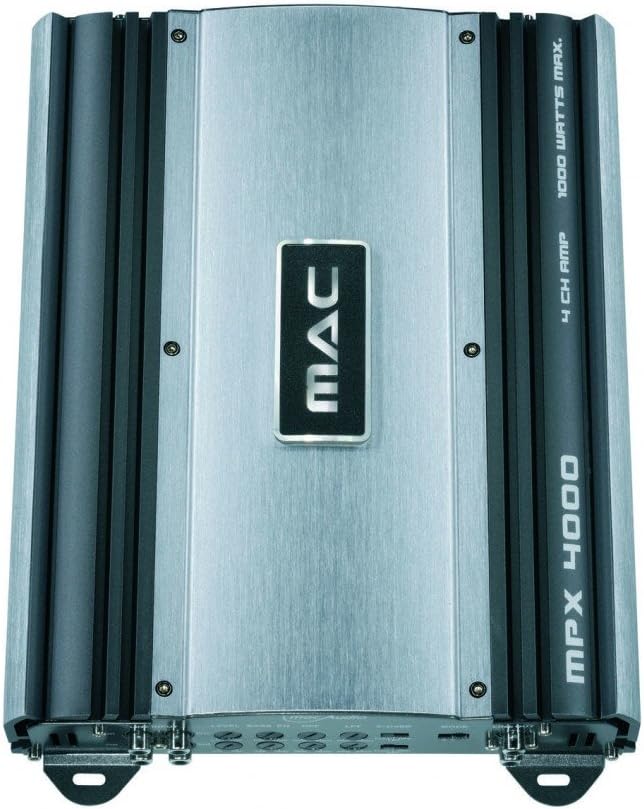
Figure 4.2: Top-down view of the Mac Audio MPX 4000 amplifier, showcasing the central MAC logo and the model designation on the heatsink fins.
5. Setup and Installation
Proper installation is crucial for the performance and longevity of your amplifier. Follow these steps carefully:
- Disconnect Battery: Before starting any wiring, disconnect the negative terminal of your vehicle's battery to prevent short circuits.
- Mounting Location: Choose a secure, dry, and well-ventilated location for the amplifier. Ensure there is enough space around the unit for proper heat dissipation. Avoid mounting on carpet or directly on metal surfaces without insulation.
- Power Wiring:
- Run a heavy-gauge power cable (e.g., 8 AWG or thicker) directly from the positive terminal of the car battery to the amplifier's +12V terminal. Install an in-line fuse holder within 18 inches (45 cm) of the battery.
- Connect a short, heavy-gauge ground cable from the amplifier's GND terminal to a clean, unpainted metal point on the vehicle's chassis. Ensure a solid electrical connection.
- Connect a remote turn-on wire from your head unit's remote output to the amplifier's REM terminal. This wire turns the amplifier on and off with your head unit.
- Audio Input Connections: Connect RCA cables from your head unit's pre-amp outputs to the amplifier's RCA input jacks (FRONT, REAR).
- Speaker Connections: Connect your speakers to the amplifier's speaker output terminals. Ensure correct polarity (+ to + and - to -). This amplifier is stable at 2 ohms, allowing for flexible speaker configurations.
- Gain and Crossover Settings: Initially set all gain controls to minimum and crossover settings to flat or full range. Adjust these after the system is powered on and playing music.
- Reconnect Battery: Once all connections are secure and verified, reconnect the negative terminal of your vehicle's battery.
6. Operating the Amplifier
After successful installation, follow these steps for initial operation:
- Power On: Turn on your car's ignition and head unit. The amplifier should power on automatically via the remote turn-on wire, indicated by a power LED.
- Initial Volume: Start with the head unit's volume at a low level.
- Gain Adjustment: Play a familiar piece of music. Slowly increase the amplifier's gain control until you hear distortion, then back it off slightly. The gain control is not a volume knob; it matches the amplifier's input sensitivity to the head unit's output.
- Crossover Settings: Adjust the high-pass (HPF) or low-pass (LPF) filters as needed for your speaker setup. For full-range speakers, you might use HPF to protect them from low frequencies. For subwoofers, use LPF.
- Fine-tuning: Listen to various types of music and make small adjustments to the gain and crossover settings for optimal sound quality.
7. Maintenance
The Mac Audio MPX 4000 amplifier requires minimal maintenance:
- Cleaning: Periodically wipe the amplifier's exterior with a soft, dry cloth. Do not use harsh chemicals or abrasive cleaners.
- Ventilation: Ensure that the ventilation fins remain free of dust and debris to maintain proper cooling. Use compressed air if necessary to clear dust.
- Connections: Occasionally check all power, ground, remote, and speaker connections to ensure they are secure and free from corrosion.
8. Troubleshooting
If you experience issues with your amplifier, refer to the following common problems and solutions:
| Problem | Possible Cause | Solution |
|---|---|---|
| Amplifier does not turn on (no power LED) | No power, ground, or remote signal; Blown fuse; Loose connections. | Check battery connections, in-line fuse, ground connection, and remote wire connection. Ensure head unit is on. |
| No sound from speakers | RCA cables disconnected; Speaker wires disconnected or shorted; Amplifier in protect mode; Gain too low. | Check RCA and speaker connections. Verify speaker polarity. Check for shorted speaker wires. Increase gain. If in protect mode, turn off system, check wiring, and restart. |
| Distorted sound | Gain set too high; Improper crossover settings; Poor ground connection; Speaker impedance mismatch. | Reduce gain. Adjust crossover settings. Ensure solid ground connection. Verify speaker impedance is within amplifier's limits (2 ohm stable). |
| Amplifier overheats (protect LED on) | Insufficient ventilation; Speaker impedance too low; Prolonged high volume. | Ensure proper airflow around amplifier. Check speaker impedance. Reduce volume. Allow amplifier to cool down. |
If the problem persists after trying these solutions, contact Mac Audio customer support or a qualified service technician.
9. Specifications
Key technical specifications for the Mac Audio MPX 4000 amplifier:
- Model Number: MPX4000
- Channels: 4-channel
- Maximum Power Output: 4 x 180 Watts (Total 1000 Watts Max)
- Impedance Stability: Stable at 2 Ohm
- Operating Voltage: 12 Volts DC
- Item Weight: 3 Kilograms
- Product Dimensions (L x W x H): 22.6 x 31.9 x 5.9 cm (8.9 x 12.6 x 2.3 inches)
- Mounting Type: Freestanding
- ASIN: B000Q9MRME
- GTIN: 04023037041408
10. Warranty and Support
Mac Audio products are designed for quality and reliability. For information regarding warranty coverage, please refer to the warranty card included with your product or visit the official Mac Audio website. For technical support, troubleshooting assistance beyond this manual, or service inquiries, please contact your authorized Mac Audio dealer or customer service department.
Please retain your proof of purchase for any warranty claims.


