
Taylor 5598
Taylor 5598 Glass Body Fat Scale User Manual
Model: 5598
1. Introduction
This manual provides instructions for the proper use and care of your Taylor 5598 Glass Body Fat Scale. This scale is designed to measure body weight, body fat percentage, body water percentage, muscle mass, and bone mass using Bio-electrical Impedance Analysis (BIA) technology. It features a sleek glass design with invisible electrodes and a large 2-line digital display for clear readings.
2. Important Safety Information
- Consult your physician before beginning any weight loss or exercise program.
- Do not use this scale if you have a pacemaker or other internal medical device.
- Do not use this scale if you are pregnant.
- The scale surface can be slippery when wet. Ensure the scale and your feet are dry before use.
- Do not jump on the scale.
- Keep out of reach of children.
- This scale is intended for household use only.
3. Package Contents
Please check to ensure all items are present:
- Taylor 5598 Glass Body Fat Scale
- Lithium Batteries (pre-installed or included separately)
- Instruction Manual (this document)
4. Setup
4.1 Battery Installation
If batteries are not pre-installed, open the battery compartment on the underside of the scale. Insert the included lithium batteries, ensuring correct polarity (+/-). Close the battery compartment securely.
4.2 Scale Placement
Place the scale on a hard, flat surface. Avoid carpets or uneven flooring, as this can affect accuracy.
4.3 User Profile Setup
The scale can store up to 10 user memories. To set up a profile:
- Press the "SET" button to enter setup mode.
- Use the arrow buttons to select a user number (P1-P10). Press "SET" to confirm.
- Enter your height, age, and gender using the arrow buttons and "SET" to confirm each entry.
- Select "Normal" or "Athlete" mode. Athlete mode is for individuals who engage in intense physical activity (e.g., training more than 10 hours per week) and have a resting heart rate of approximately 60 beats per minute or less. Press "SET" to confirm.
- The scale will save your profile and turn off.
5. Operating Instructions
5.1 Taking a Weight Measurement Only
Simply step onto the scale. The scale will automatically turn on and display your weight. Step off the scale, and it will turn off after a few seconds.
5.2 Taking Body Composition Measurements
To measure body fat, body water, muscle mass, and bone mass:
- Ensure your feet are clean and slightly moist for optimal contact with the invisible electrodes.
- Press the "ON" button or gently tap the scale to activate it.
- Select your user profile (P1-P10) using the arrow buttons.
- Step onto the scale barefoot, standing still with your feet evenly placed on the glass surface.
- The scale will display your weight, followed by body fat percentage, body water percentage, muscle mass, and bone mass. The large 2-line display will show these readings sequentially.
- Step off the scale once all measurements are displayed. The scale will automatically turn off.
Important Note: For consistent and accurate body composition readings, take measurements at the same time of day, under similar conditions (e.g., before breakfast, after using the restroom).
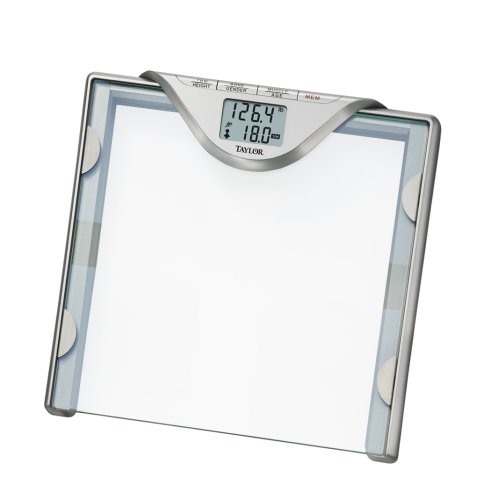
Image: Taylor 5598 Glass Body Fat Scale. This image shows the sleek glass surface of the scale, highlighting the invisible electrodes and the digital display.
6. Understanding Your Measurements
The Taylor 5598 scale provides detailed body composition analysis:
- Body Weight: Measured up to 400 lbs (180 kg) in 0.2 lb (0.1 kg) increments.
- Body Fat Percentage: The proportion of fat to total body weight, measured to 0.1% precision.
- Body Water Percentage: The proportion of water to total body weight, measured to 0.1% precision.
- Muscle Mass: An estimate of the weight of all skeletal muscles in your body.
- Bone Mass: An estimate of the weight of the bones in your body.
Athlete Mode: This setting adjusts the BIA algorithm for individuals with a higher muscle mass and lower body fat percentage, which can influence the accuracy of body composition readings.
7. Maintenance and Care
- Cleaning: Wipe the scale surface with a damp cloth and mild detergent. Do not use abrasive cleaners or immerse the scale in water.
- Storage: Store the scale in a cool, dry place. Avoid extreme temperatures.
- Battery Replacement: When the battery indicator appears on the display, replace the lithium batteries promptly to ensure continued accuracy.
8. Troubleshooting
| Problem | Possible Cause / Solution |
|---|---|
| "Err" or inconsistent body fat/water readings |
|
| Inaccurate or inconsistent weight readings |
|
| Display does not turn on |
|
9. Specifications
- Model: 5598
- Capacity: 400 lbs (180 kg)
- Weight Increments: 0.2 lb (0.1 kg)
- Body Fat/Water Increments: 0.1%
- User Memories: 10
- Power: Lithium Batteries (included)
- Material: Glass
- UPC: 077784000755
- Package Dimensions: 15.2 x 15 x 3 inches; 6.6 Pounds
10. Warranty and Support
This Taylor 5598 Glass Body Fat Scale is backed by a 5-year warranty against defects in materials or workmanship. For warranty claims or technical support, please refer to the contact information provided with your purchase or visit the official Taylor website.
Manufacturer: Taylor
Ask a question about this manual
Ask about setup, troubleshooting, compatibility, parts, safety, or missing instructions. Manuals+ will review the question and use this page’s manual context to help answer it.