
Codelocks CL410-SS
Codelocks 410SS Mechanical Keyless Lock Instruction Manual
Model: CL410-SS
1. Product Overview
The Codelocks CL410-SS is a robust, medium-duty push-button mechanical keyless lock designed for exterior doors. It features a tubular mortise latchbolt mechanism. This lock provides secure access by requiring a correct code entry to retract the latch via the outside lever handle. The spring-loaded latchbolt automatically locks the door upon closure, ensuring continuous security.
Key features include:
- Offers 8,191 possible code combinations for enhanced security.
- Equipped with a durable tubular mortise latch.
- Features full-size lever handles for comfortable operation.
- Constructed from high-quality Stainless Steel for longevity and resistance to elements.
- Compatible with door thicknesses ranging from 35mm to 65mm (1 3/8" - 2 1/2").
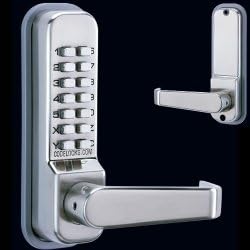
Image 1.1: Front view of the Codelocks 410SS Mechanical Keyless Lock, showcasing the push-button keypad and lever handle in stainless steel finish. A separate view of the interior handle is also visible.
2. Safety Information
Please read all instructions carefully before installation and use. Failure to follow these instructions may result in damage to the product, property, or personal injury.
- Always wear appropriate personal protective equipment (PPE) such as safety glasses and gloves during installation.
- Ensure the door and frame are structurally sound and properly aligned before installation.
- Do not attempt to modify the lock mechanism. Any unauthorized modifications will void the warranty and may compromise security.
- Keep small components out of reach of children to prevent choking hazards.
- If you encounter any difficulties during installation or operation, contact qualified personnel or Codelocks support.
3. Package Contents
Upon opening the package, please verify that all the following components are present:
- Codelocks CL410-SS Exterior Keypad Assembly
- Interior Lever Handle Assembly
- Tubular Mortise Latch
- Mounting Screws and Fixings
- Spindle
- Code Change Pins (if applicable)
- Installation Template
4. Setup and Installation
This section provides a general guide for installing the Codelocks CL410-SS. For detailed, step-by-step instructions, always refer to the specific installation template and guide included with your product. Professional installation is recommended if you are not familiar with door hardware installation.
4.1 Pre-Installation Checks
- Verify door thickness is between 35mm and 65mm (1 3/8" - 2 1/2").
- Ensure the door swings freely and the frame is square.
- Gather necessary tools: drill, tape measure, pencil, chisel, screwdriver.
4.2 Marking and Drilling
- Use the provided template to mark the positions for the latch and through-bolt holes on the door edge and face.
- Drill the necessary holes according to the template. Ensure holes are straight and clean.
4.3 Latch Installation
- Insert the tubular mortise latch into the drilled hole on the door edge.
- Secure the latch faceplate with screws.
4.4 Lock Assembly Installation
- Before installing, set your desired code on the keypad assembly following the instructions in the code change section of the full manual (typically involves removing the back plate and moving pins).
- Insert the spindle through the latch mechanism.
- Position the exterior keypad assembly and interior lever handle assembly onto the door, aligning them with the spindle and through-bolt holes.
- Secure both assemblies together using the provided mounting screws. Do not overtighten.
4.5 Strike Plate Installation
- Close the door and mark the position of the latchbolt on the door frame.
- Chisel out a recess for the strike plate and drill holes for the screws.
- Install the strike plate, ensuring the latchbolt engages smoothly without binding.
5. Operating Instructions
5.1 Opening the Door from the Outside
- Enter your pre-set code by pressing the correct sequence of buttons on the keypad.
- Once the correct code is entered, turn the exterior lever handle downwards. This will retract the latchbolt.
- Push or pull the door open.
Note: The CL410-SS features a "C" button (Clear) which should be pressed before entering a code to clear any previous incorrect entries.
5.2 Opening the Door from the Inside
From the inside, simply turn the interior lever handle downwards to retract the latchbolt and open the door. No code is required for exit.
5.3 Locking the Door
The Codelocks CL410-SS automatically locks when the door is closed. The spring-loaded latchbolt extends into the strike plate, securing the door without any manual action required after closing.
5.4 Changing the Code
The code change procedure for mechanical locks like the CL410-SS typically involves removing the lock from the door or at least the back plate of the exterior assembly. Inside, there are usually a series of numbered pins or tumblers that can be moved to different positions (e.g., 'in' or 'out') to set the code. Refer to the detailed code change instructions provided in the full product manual or on the Codelocks website for your specific model. It is crucial to follow these instructions precisely to avoid damaging the mechanism or rendering the lock inoperable.
6. Maintenance
Regular maintenance will ensure the longevity and smooth operation of your Codelocks CL410-SS.
- Cleaning: Wipe the lock's exterior surfaces with a soft, damp cloth. Avoid abrasive cleaners, solvents, or harsh chemicals, as these can damage the stainless steel finish and internal components.
- Lubrication: Periodically apply a small amount of silicone-based lubricant (do not use oil-based lubricants) to the latchbolt and spindle mechanism to ensure smooth operation. Do not lubricate the keypad buttons.
- Inspection: Regularly check all screws and fixings to ensure they are tight. Inspect the latchbolt and strike plate for any signs of wear or misalignment.
- Environmental Factors: While designed for exterior use, extreme weather conditions may affect performance over time. Ensure proper drainage around the door if exposed to heavy rain.
7. Troubleshooting
If you encounter issues with your Codelocks CL410-SS, refer to the following common problems and solutions:
| Problem | Possible Cause | Solution |
|---|---|---|
| Lever handle does not retract latch after code entry. | Incorrect code entered; internal mechanism jammed; spindle not engaging. | Press 'C' button and re-enter code carefully. Check for obstructions. Ensure spindle is correctly installed and engaging both sides. |
| Latchbolt does not extend or retract smoothly. | Dirt/debris in latch; lack of lubrication; misalignment with strike plate. | Clean latch mechanism. Apply silicone lubricant. Adjust strike plate position if necessary. |
| Buttons are stiff or sticky. | Accumulation of dirt or grime. | Clean keypad surface with a damp cloth. Do not use lubricants on buttons. |
| Door does not lock automatically. | Latchbolt not fully extending; strike plate misalignment. | Check latchbolt for obstructions. Ensure strike plate is correctly aligned and recessed. |
If the problem persists after attempting these solutions, please contact Codelocks customer support.
8. Specifications
| Attribute | Detail |
|---|---|
| Brand | Codelocks |
| Model Number | CL410-SS |
| Lock Type | Mortise Lock (Tubular) |
| Special Feature | Keyless, Push Button |
| Material | Stainless Steel |
| Color | Stainless Steel |
| Recommended Uses | Residential and Commercial Buildings (Exterior Doors) |
| Door Thickness Compatibility | 35mm - 65mm (1 3/8" - 2 1/2") |
| Combinations Available | 8,191 |
| Included Components | Lever Handle, Screws, Latch |
| Item Weight | 1.5 Kilograms (approx. 3.3 pounds) |
9. Warranty and Support
For specific warranty information regarding your Codelocks CL410-SS, please refer to the warranty card included with your product or visit the official Codelocks website. Warranty terms and conditions may vary by region and purchase date.
If you require technical assistance, have questions about installation, or need to report a defect, please contact Codelocks customer support directly. Contact details can typically be found on the manufacturer's website or in the product packaging.
For general inquiries or to find more resources, you may visit the Codelocks official website.
Related documentsCL410-SS

Ask a question about this manual
Ask about setup, troubleshooting, compatibility, parts, safety, or missing instructions. Manuals+ will review the question and use this page’s manual context to help answer it.