
VCT AC-1500
VT-1500 Step Up Down Voltage Transformer Converter User Manual
Model: AC-1500
Brand: VCT
Introduction
The VCT VT-1500 Step Up Down Voltage Transformer Converter is designed to provide a reliable solution for converting electrical voltage between 110/120V and 220/240V. This heavy-duty unit has a maximum capacity of 1500 watts, making it suitable for continuous use with various electronic appliances worldwide. It features multiple outlets and a robust design for durability and ease of transport.
Safety Information
WARNING: To reduce the risk of fire or electric shock, read and understand all instructions before using this product. Keep this manual for future reference.
- Ensure the transformer is placed on a stable, flat, and dry surface.
- Do not expose the unit to rain or moisture.
- Do not operate the transformer if the power cord or plug is damaged.
- Always ensure the voltage selector switch on the back of the unit is set to the correct input voltage before connecting any appliance. Incorrect voltage selection can damage the transformer and connected devices.
- Do not overload the transformer. The maximum capacity is 1500 watts. Calculate the total wattage of all connected devices to ensure it does not exceed this limit.
- Unplug the transformer from the power source when not in use.
- Do not open the casing of the transformer. There are no user-serviceable parts inside. Refer all servicing to qualified service personnel.
- Ensure adequate ventilation around the unit to prevent overheating. Do not block ventilation openings.
- This unit is heavy. Use caution when moving it.
Product Features
- 1500 Watt Maximum Capacity for heavy-duty continuous use.
- Bi-directional voltage conversion: Converts 110/120V to 220/240V OR 220/240V to 110/120V via a selector switch.
- Equipped with an On/Off switch and indicator lamp.
- Four outlets on the front of the unit, compatible with 3-prong or 2-prong US plugs and 2-prong Euro/Asian plugs.
- Hard-wired insulated power cord with a grounded European Shucko plug, also suitable for Asian outlets.
- Includes a 2-prong US adapter for non-grounded use in the USA, Canada, and Mexico.
- Features an attached handle for easy portability.
- Constructed with a heavy-duty metal casing for durability.
- Fuse protected for safety.
Product Overview
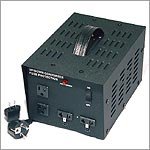
This image displays the VCT VT-1500 voltage transformer. The front panel features four universal outlets, an On/Off switch with an indicator light, and the VCT brand logo. The unit has a sturdy black metal casing with ventilation grilles on the sides and top, and a robust carrying handle on the top. A power cord with a European Shucko plug is visible, along with a separate 2-prong US adapter.
Familiarize yourself with the components of your VT-1500 transformer:
- Front Panel: Contains the universal output sockets and the power switch.
- Rear Panel: Houses the input voltage selector switch (110V/220V) and the fuse holder.
- Power Cord: Hard-wired cord for connecting to the main power supply.
- Carrying Handle: For easy transportation.
Setup
- Unpack the Unit: Carefully remove the transformer from its packaging. Inspect for any signs of damage.
- Placement: Place the transformer on a flat, stable, and dry surface with adequate ventilation around it. Avoid placing it near heat sources or in direct sunlight.
- Select Input Voltage: Locate the voltage selector switch on the rear of the unit. Set this switch to match the voltage of the wall outlet you will be plugging the transformer into.
- If your wall outlet is 110V/120V (e.g., USA, Canada), set the switch to 110V.
- If your wall outlet is 220V/240V (e.g., Europe, Asia), set the switch to 220V.
IMPORTANT: Incorrect voltage selection will damage the unit and connected appliances. Double-check this setting before proceeding.
- Connect to Power Outlet: Plug the transformer's power cord into the wall outlet. If using in the USA/Canada with a 2-prong non-grounded outlet, attach the provided 2-prong US adapter to the Shucko plug.
- Power On: Flip the On/Off switch on the front panel to the "On" position. The indicator lamp should illuminate, indicating the unit is receiving power.
Operating Instructions
Once the transformer is set up and powered on, you can connect your appliances.
- Determine Appliance Voltage: Identify the operating voltage of the appliance you wish to use. This is usually printed on the appliance itself or in its manual.
- Select Output Voltage: The transformer automatically converts the voltage based on the input voltage selected on the rear switch.
- If the input switch is set to 110V, the front outlets will provide 220V/240V output. Use this setting for 220V/240V appliances in a 110V/120V region.
- If the input switch is set to 220V, the front outlets will provide 110V/120V output. Use this setting for 110V/120V appliances in a 220V/240V region.
- Connect Appliance: Plug your appliance into one of the universal outlets on the front panel of the transformer.
- Power On Appliance: Turn on your appliance.
- Total Wattage: Ensure the total wattage of all connected appliances does not exceed the transformer's 1500-watt capacity.
- Power Off: When finished, turn off your appliance, then turn off the transformer using its front panel switch, and finally unplug the transformer from the wall outlet.
Maintenance
- Cleaning: Disconnect the transformer from the power source before cleaning. Use a soft, dry cloth to wipe the exterior. Do not use liquid cleaners or aerosols.
- Storage: Store the transformer in a cool, dry place away from direct sunlight and moisture when not in use.
- Fuse Replacement: The transformer is fuse protected. If the unit stops working, the fuse may have blown due to an overload.
- Unplug the transformer from the wall outlet.
- Locate the fuse holder on the rear panel.
- Twist or pull the fuse cap to remove the old fuse.
- Replace with a new fuse of the same type and rating (refer to specifications for fuse type).
- Securely reinsert the fuse cap.
- If the fuse blows repeatedly, discontinue use and consult a qualified technician.
Troubleshooting
| Problem | Possible Cause | Solution |
|---|---|---|
| Unit does not power on. | No power from wall outlet; Power switch off; Blown fuse. | Check wall outlet with another device; Ensure power switch is ON; Replace fuse (see Maintenance). |
| Appliance does not work when plugged into transformer. | Incorrect voltage selection; Appliance not compatible; Overload; Faulty appliance. | Verify input voltage switch setting; Ensure appliance voltage matches transformer output; Reduce total wattage of connected devices; Test appliance directly if possible. |
| Transformer makes unusual noise or hums loudly. | Normal operation (slight hum is common); Overload; Internal issue. | A slight hum is normal for transformers. If noise is excessive or accompanied by heat/smell, unplug immediately and discontinue use. Reduce load. |
| Unit feels hot. | Normal operation (some heat is expected); Overload; Insufficient ventilation. | Ensure adequate ventilation; Reduce load; If excessively hot, unplug and let cool. |
Specifications
| Model Number | AC-1500 |
| Capacity | 1500 Watts (Maximum) |
| Input Voltage | 110V/120V or 220V/240V (selectable) |
| Output Voltage | 220V/240V (from 110V input) or 110V/120V (from 220V input) |
| Outlets | 4 Universal Outlets (accepts US 2/3-prong, Euro/Asian 2-prong) |
| Dimensions (LxWxH) | 10 x 7 x 6 inches |
| Weight | 17.9 pounds |
| Fuse Type | (Not specified in provided data, typically a standard glass fuse) |
| Power Source | Corded Electric |
Note: Specifications are subject to change without notice.
Warranty and Support
For warranty information and technical support, please contact VCT customer service. Details regarding specific warranty periods and terms are typically provided with your purchase documentation or can be found on the manufacturer's official website.
Keep your purchase receipt as proof of purchase for any warranty claims.
For additional assistance, you may visit the VCT brand page on Amazon: VCT Brand Page
Ask a question about this manual
Ask about setup, troubleshooting, compatibility, parts, safety, or missing instructions. Manuals+ will review the question and use this page’s manual context to help answer it.