
Zoom ZOO G92TT
Zoom G9.2tt Guitar Effects Console
User Manual
Introduction
This manual provides comprehensive instructions for the setup, operation, maintenance, and troubleshooting of your Zoom G9.2tt Guitar Effects Console. Please read this manual thoroughly before using the unit to ensure proper and safe operation, and to fully utilize its extensive features.
The Zoom G9.2tt is a powerful multi-effects processor designed for guitarists, offering a wide range of effects, amplifier models, and advanced features to shape your sound. It features dual vacuum tubes for enhanced tone and dynamic response, along with a unique Z-pedal for multi-directional expression control.
Product Overview

Figure 1: Top view of the Zoom G9.2tt Guitar Effects Console. This image displays the main control surface, including the central display, various knobs for effects and pre-amp settings, five footswitches at the bottom, and two large expression pedals on either side.
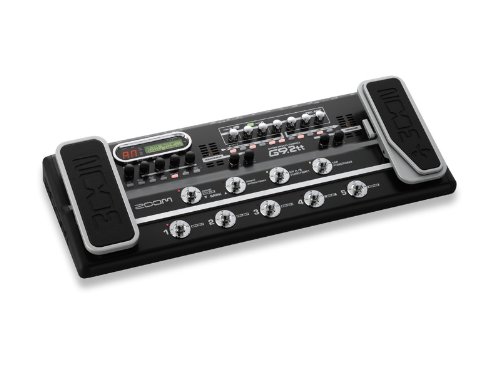
Figure 2: Angled view of the Zoom G9.2tt Guitar Effects Console. This perspective shows the unit's overall form factor, emphasizing the robust construction and the ergonomic placement of the expression pedals relative to the main control panel.
The G9.2tt features a robust metal chassis designed for durability. Key components include:
- Dual Expression Pedals: For volume, wah, pitch, and other real-time parameter control.
- Z-Pedal: A unique 3D expression pedal allowing control over three parameters simultaneously (X, Y, and Z axes).
- Footswitches: For patch selection, effect on/off, and tap tempo.
- Control Knobs: Dedicated knobs for various effect parameters and amplifier settings.
- LCD Display: Provides visual feedback for patch names, parameter values, and system settings.
- Tube Accelerators/Energizers: Integrated vacuum tubes for adding warmth and harmonic richness to your tone.
Setup
1. Unpacking and Inspection
Carefully remove the Zoom G9.2tt from its packaging. Inspect the unit for any signs of damage that may have occurred during transit. Retain the original packaging for future transport or storage.
2. Power Connection
Connect the supplied AC adapter to the DC IN jack on the rear panel of the G9.2tt. Plug the other end of the adapter into a standard AC power outlet. Ensure the power source matches the voltage requirements specified on the adapter (9 Volts).
3. Audio Connections
The G9.2tt offers various input and output options:
- Guitar Input: Connect your guitar to the INPUT jack using a standard 1/4-inch instrument cable.
- Output to Amplifier/PA: Connect the L/MONO and R OUTPUT jacks to your guitar amplifier, mixer, or PA system using 1/4-inch cables. For mono operation, use only the L/MONO jack.
- Headphone Output: For silent practice, connect headphones to the PHONES jack.
- External Loop: The unit includes an external effects loop (SEND/RETURN jacks) for integrating external pedals into your signal chain.
4. USB Connection (Optional)
Connect the G9.2tt to your computer via the USB port for direct recording, patch management, and firmware updates. Ensure you have the necessary drivers installed on your computer, available from the Zoom website.
Operating Instructions
1. Powering On and Off
To power on the unit, ensure all connections are secure, then plug in the AC adapter. There is no dedicated power switch; the unit powers on automatically when connected to power. To power off, disconnect the AC adapter.
2. Patch Selection
The G9.2tt organizes sounds into "patches." There are 100 user patches and 100 preset patches, totaling 200. Patches are grouped into banks. Use the BANK UP/DOWN footswitches to navigate between banks. Within each bank, use the numbered footswitches (1-5) to select individual patches.
3. Editing Patches
To edit a patch, select it, then use the various knobs and the LCD display to adjust parameters for effects, amplifier models, and cabinet simulations. The unit features 10 effect modules and 120 effect types. Up to 10 effects can be used simultaneously. Refer to the detailed parameter list in the full manual for specific adjustments.
- Saving Patches: After editing, press the "STORE" button (or equivalent, as indicated by the LED) to save your changes to a user patch location.
- Tube Controls: The "ACCELERATOR" and "ENERGIZER" tube controls (physical knobs) are global and affect the overall voicing. Note that their settings are not stored per patch and must be adjusted manually for different guitars, amps, or room acoustics.
4. Using the Z-Pedal
The Z-Pedal is a multi-dimensional expression pedal. It allows control over parameters not just by rocking forward and back (X-axis), but also by moving it left/right (Y-axis) and pressing down (Z-axis). Assign desired parameters to each axis within the patch editing mode for dynamic real-time control.
5. Bypass Functionality
The G9.2tt does not feature a true bypass. When the digital effects processor is bypassed, the signal still passes through analog components, including the solid-state preamp and tube exciters. This means the unit will always impart some coloration to your sound, even in "bypass" mode. This characteristic can be beneficial for solid-state amplifiers but may affect the clean tone of tube amplifiers.
Maintenance
1. Cleaning
Wipe the unit regularly with a soft, dry cloth. For stubborn dirt, use a slightly damp cloth and then dry thoroughly. Do not use abrasive cleaners, waxes, or solvents, as these can damage the finish and internal components.
2. Storage
When not in use for extended periods, store the G9.2tt in a cool, dry place, away from direct sunlight and extreme temperatures. If possible, use the original packaging or a dedicated carrying case to protect it from dust and physical damage.
3. General Care
- Avoid spilling liquids on the unit.
- Do not place heavy objects on top of the unit.
- Protect the unit from excessive vibrations or impacts.
- Ensure proper ventilation around the unit during operation.
Troubleshooting
If you encounter issues with your Zoom G9.2tt, refer to the following common problems and solutions:
| Problem | Possible Cause | Solution |
|---|---|---|
| No sound or low volume. | Incorrect cable connections; volume levels too low; patch settings. | Check all input/output cables. Ensure guitar volume is up. Adjust master volume on the G9.2tt and your amplifier. Verify patch volume levels. |
| Unwanted noise or hum. | Ground loop; faulty cables; high gain settings; external interference. | Use shielded cables. Try a different power outlet. Reduce gain settings on the G9.2tt. Utilize the built-in ZNR (Zoom Noise Reduction) function. |
| Footswitch or button unresponsive. | Debris under switch; internal contact issue. | Gently clean around the switch. If persistent, contact customer support for service. |
| Difficulty achieving desired tone with tube controls. | Misunderstanding of global nature of tube controls. | Remember that ACCELERATOR and ENERGIZER settings are global and not saved per patch. Adjust them manually to suit your current setup (guitar, amp, room). |
| Sound is "muddy" or lacks clarity with tube amp. | Unit's bypass coloring the signal. | The G9.2tt does not have a true bypass. Its analog components (preamp, tube exciters) are always in the signal path. Experiment with different output modes or consider using the unit primarily with solid-state amps if a completely uncolored signal is critical for your tube amp's clean tone. |
Specifications
- Model: ZOO G92TT
- Effect Types: 120
- Effect Modules: 10
- Maximum Simultaneous Effects: 10
- Patch Memory: User 100 + Preset 100 (Total 200)
- Sampling Frequency: 96kHz
- Signal Format: Analog
- Hardware Interface: 1/4-inch Audio, USB
- Power Source: Corded Electric
- Voltage: 9 Volts
- Amperage: 300 Milliamps
- Color: Black
- Item Weight: 2.72 kg (approx. 2 kg 720 g)
- Package Dimensions: 72.14 x 28.7 x 11.68 cm
- Manufacturer: Zoom
- First Available: 9 August 2012
Warranty and Support
For detailed warranty information, please refer to the warranty card included with your product or visit the official Zoom website. Warranty terms and conditions may vary by region.
For technical support, service, or to download the latest drivers and firmware updates, please visit the official Zoom support website or contact your local authorized Zoom dealer. Keep your purchase receipt as proof of purchase for warranty claims.
Official Zoom Website: www.zoom.co.jp (Note: Link provided as an example, actual product page may vary)
Related documentsZOO G92TT

Ask a question about this manual
Ask about setup, troubleshooting, compatibility, parts, safety, or missing instructions. Manuals+ will review the question and use this page’s manual context to help answer it.