1. Safety Information
Please read all instructions carefully before operating your Polk Audio PSW111 subwoofer. Retain this manual for future reference.
- Electrical Safety: Do not expose the subwoofer to rain or moisture. Ensure proper ventilation to prevent overheating.
- Placement: Place the subwoofer on a stable, level surface. Avoid placing it near heat sources or in direct sunlight.
- Cleaning: Disconnect power before cleaning. Use a soft, dry cloth. Do not use liquid cleaners or aerosol sprays.
- Proposition 65 Warning: This product may contain chemicals known to the State of California to cause cancer and birth defects or other reproductive harm.
2. Product Overview
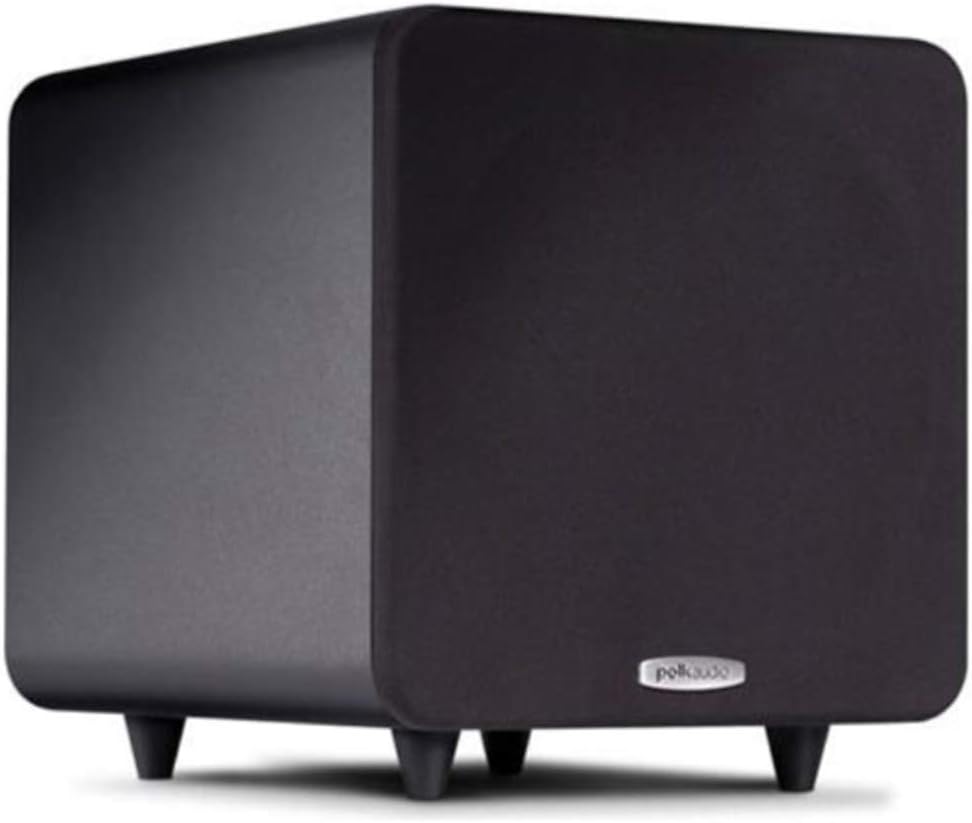
The Polk Audio PSW111 is an ultra-compact powered subwoofer designed to deliver powerful, accurate, and musical bass. Its 8-inch Dynamic Balance composite cone driver and specially-tuned downward-firing port enhance your audio experience with deep, detailed lows.
Key Features:
- 8-inch Dynamic Balance woofer for accurate bass.
- Specially-tuned downward-firing port for enhanced depth.
- Smart compression circuitry to limit distortion at high volumes.
- 150-watt amplifier (300W peak) for high efficiency.
- Compact design, occupying approximately one square foot of floor space.
- Timbre-matched with other Polk speakers for seamless integration.
- Multiple input options: LFE, line-level, and speaker-level.
- Detachable grille and solid feet for stability.
3. Setup
Unpacking:
Carefully remove all components from the packaging. Ensure all items are present:
- Black powered subwoofer
- Grille (installed)
- 8' Detachable power cord
- 4 Rubber insert feet
- Owner's Manual
- Online registration card
- Rubber feet installation diagram
Placement:
The placement of your subwoofer can significantly impact its performance. Experiment with different locations to find the best sound for your room.
- Corner Placement: Placing the subwoofer in a corner can maximize its output and impact.
- Near Front Speakers: Placing it near your main front speakers can create a more seamless soundstage.
- Avoid Enclosures: Do not place the subwoofer in an enclosed cabinet, as this can restrict airflow and affect sound quality.

Connecting Your Subwoofer:
The PSW111 offers flexible connection options to integrate with various home audio systems.
- LFE Input: For receivers with a dedicated LFE (Low-Frequency Effects) output, connect a single RCA cable from the receiver's LFE output to the subwoofer's LFE input.
- Line-Level Inputs: For receivers without an LFE output, connect RCA cables from the receiver's stereo pre-out (Left/Right) to the subwoofer's Line In (Left/Right) inputs.
- Speaker-Level Inputs/Outputs: For receivers without line-level outputs, connect speaker wires from your receiver's main speaker outputs to the subwoofer's speaker-level inputs, then connect speaker wires from the subwoofer's speaker-level outputs to your main speakers.

4. Operating
Controls:
The PSW111 features several controls on its rear panel for fine-tuning its performance:
- Volume Control: Adjusts the output level of the subwoofer. Start with a low setting and gradually increase until the bass blends seamlessly with your main speakers.
- Low-Pass Filter: This control sets the upper frequency limit for the subwoofer. Adjust it to match the low-frequency capabilities of your main speakers.
- Phase Toggle Switch (0°/180°): Adjusts the phase of the subwoofer output relative to your main speakers. Experiment with both settings to find the one that provides the most impactful and coherent bass.
- 3-Way Power Switch (On/Auto/Off):
- On: The subwoofer remains continuously on.
- Auto: The subwoofer automatically turns on when it detects an audio signal and enters standby mode after a period of inactivity.
- Off: The subwoofer is powered off.
Integration with Other Speakers:
The PSW111 is timbre-matched to seamlessly blend with other Polk Audio speakers, such as those from the TSI, RM, and R/T/M Series, ensuring a cohesive and balanced sound experience.

5. Maintenance
Proper care will ensure the longevity and optimal performance of your subwoofer.
- Cleaning the Cabinet: Use a soft, dry cloth to wipe the cabinet. For stubborn marks, lightly dampen the cloth with water or a mild, non-abrasive cleaner. Avoid harsh chemicals.
- Grille Care: The detachable grille can be gently vacuumed to remove dust.
- Environmental Conditions: Avoid exposing the subwoofer to extreme temperatures, humidity, or direct sunlight.
6. Troubleshooting
If you encounter issues with your PSW111 subwoofer, refer to the following common problems and solutions:
- No Sound:
- Ensure the subwoofer is plugged into a working power outlet and the power switch is set to 'On' or 'Auto'.
- Check all audio connections between the subwoofer and your receiver/amplifier.
- Verify the volume control on the subwoofer and your receiver is turned up.
- If using 'Auto' mode, ensure an audio signal is present.
- Distorted Sound:
- Reduce the volume level on the subwoofer and/or your receiver.
- Check the low-pass filter setting; an incorrect setting can cause distortion.
- Ensure the subwoofer is not placed in a resonant cavity or too close to a wall.
- Weak Bass:
- Increase the volume level on the subwoofer.
- Adjust the phase switch (0° or 180°) to see which setting provides stronger bass.
- Experiment with subwoofer placement in the room.
7. Technical Specifications
| Feature | Specification |
|---|---|
| Mounting Type | Floor Mount |
| Model Name | PSW111B |
| Speaker Type | Subwoofer |
| Special Feature | Bass Boost |
| Recommended Uses For Product | Compression, Volume |
| Subwoofer Diameter | 8 Inches |
| Unit Count | 1.0 Count |
| Color | Black |
| Product Dimensions | 13"D x 12.13"W x 14"H |
| Item Weight | 21 Pounds |
| Impedance | 1 Ohms |
| Water Resistance Level | Not Water Resistant |
| Number of Items | 1 |
| Control Method | Touch |
| Speaker Size | 8 Inches |
| Woofer Diameter | 8 Inches |
| Manufacturer | Polk Audio |
| Speaker Maximum Output Power | 300 Watts |
| Frequency Response | 250 Hz |
| Connectivity Technology | Wired |
| Audio Output Mode | Surround |
8. Warranty and Support
For warranty information and customer support, please refer to the documentation included with your product or visit the official Polk Audio website. The manufacturer provides support for product-related inquiries and service needs.


