
Polk Audio PSW110
Polk Audio PSW110 10-inch Powered Subwoofer User Manual
Model: PSW110 (AM1135-C|4)
1. Important Safety Instructions
Please read all instructions carefully before operating your Polk Audio PSW110 subwoofer. Retain this manual for future reference.
- Power Source: Connect the subwoofer only to the type of power source indicated on the unit. Ensure the voltage matches your local power supply.
- Ventilation: Do not block any ventilation openings. Install in accordance with the manufacturer's instructions.
- Heat: Do not install near any heat sources such as radiators, heat registers, stoves, or other apparatus (including amplifiers) that produce heat.
- Water & Moisture: Do not use this apparatus near water or expose it to dripping or splashing. Do not place objects filled with liquids, such as vases, on the apparatus.
- Cleaning: Clean only with a dry cloth.
- Servicing: Refer all servicing to qualified service personnel. Servicing is required when the apparatus has been damaged in any way, such as power-supply cord or plug is damaged, liquid has been spilled or objects have fallen into the apparatus, the apparatus has been exposed to rain or moisture, does not operate normally, or has been dropped.
2. Product Overview
The Polk Audio PSW110 is a high-performance 10-inch powered subwoofer designed to deliver deep, impactful bass to enhance your home audio system. It features a heavy-duty MDF enclosure and Polk's patented Dynamic Balance technology, ensuring clean, distortion-free low frequencies even at high volumes.

Figure 2.1: Front view of the Polk Audio PSW110 Subwoofer with its protective grille.
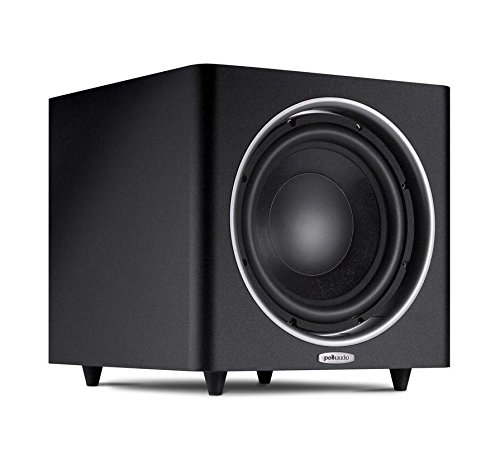
Figure 2.2: Front view of the Polk Audio PSW110 Subwoofer with the grille removed, revealing the 10-inch driver.
Key Features:
- Heavy-Duty MDF Enclosure: Engineered for optimal volume and tuned for distortion-free low frequencies, internally braced to eliminate resonances.
- Downward-Firing Port: A specially tuned and directed port produces maximum bass impact, utilizing the floor for enhanced feel.
- Dynamic Balance Process: Unique driver materials and construction techniques produce cleaner, clearer sound, ensuring effortless performance in high-stress bass situations.
- Klippel Distortion Analyzer Optimized: Woofer's motor structure, voice coil alignment, and suspension are optimized for smooth, unimpeded movement across lower frequencies, ensuring efficient performance at extreme listening levels.
- Versatile Inputs: Professional-grade LFE, line-level, and speaker-level inputs and outputs allow easy connection to any system.
- Smart Sensing Circuitry: Automatically turns the subwoofer on and off based on audio signal detection.
- Adjustable Controls: Features adjustable low-pass crossover, phase switch, and subwoofer volume controls for precise bass output and blending.
3. Setup
3.1 Unpacking
Carefully remove the PSW110 subwoofer from its packaging. Inspect the unit for any signs of damage during transit. If damage is present, contact your dealer immediately.
3.2 Placement
The placement of your subwoofer significantly impacts its performance. Experiment with different locations to find the best sound for your room.
- Corner Placement: Placing the subwoofer in a corner often maximizes its output and impact.
- Near Main Speakers: Placing the subwoofer near your front main speakers can improve blending and create a more cohesive soundstage.
- Stable Surface: Always place the subwoofer on a stable, level surface to prevent vibrations and ensure proper operation.
- Ventilation: Ensure there is adequate space around the subwoofer for proper ventilation. Do not place it in an enclosed cabinet without airflow.
3.3 Connections
The PSW110 offers multiple connection options to integrate with various home audio systems. Refer to the rear panel diagram below for connection points.

Figure 3.1: Rear panel of the Polk Audio PSW110 Subwoofer, detailing connection ports and control knobs.
- LFE Input (Recommended): If your AV receiver or processor has a dedicated 'Subwoofer Out' or 'LFE Out' jack, connect a single RCA cable from this output to the LFE input on the PSW110. This is the simplest and often best connection method.
- Line-Level Inputs: If your receiver does not have an LFE output but has stereo pre-amp outputs (e.g., 'Front Pre-Out'), connect RCA cables from these outputs to the 'LINE IN' (Left and Right) inputs on the PSW110.
- Speaker-Level Inputs/Outputs: If your receiver does not have any pre-amp outputs, you can use the speaker-level connections. Connect the speaker wires from your receiver's front left and right speaker outputs to the 'SPEAKER IN' terminals on the PSW110. Then, connect speaker wires from the 'SPEAKER OUT' terminals on the PSW110 to your front left and right speakers. Ensure correct polarity (+ to + and - to -).
- Power Connection: Once all audio connections are made, plug the subwoofer's power cord into a suitable AC outlet.
4. Operating Your Subwoofer
4.1 Rear Panel Controls
The rear panel of the PSW110 features several controls to fine-tune its performance and integrate it seamlessly with your main speakers.
- VOLUME: This knob controls the overall output level of the subwoofer. Adjust it to achieve the desired bass intensity relative to your main speakers.
- LOW-PASS CROSSOVER: This knob sets the upper frequency limit at which the subwoofer will operate. Frequencies above this setting will be rolled off. Adjust this to blend the subwoofer's bass output smoothly with the low-frequency capabilities of your main speakers. A common starting point is around 80Hz-100Hz, but it may vary depending on your main speakers.
- PHASE (0°/180°): This switch adjusts the phase of the subwoofer's output relative to your main speakers. Experiment with both 0° and 180° settings. The correct setting will result in the most impactful and cohesive bass response.
- POWER MODE (ON/AUTO/OFF):
- ON: The subwoofer will remain powered on continuously.
- AUTO: The subwoofer will automatically turn on when it detects an audio signal and enter a low-power standby mode after a period of inactivity (typically 15-20 minutes) without a signal.
- OFF: The subwoofer is completely powered off.
4.2 Blending the Subwoofer
Achieving a seamless blend between your subwoofer and main speakers is crucial for optimal sound. Adjust the VOLUME and LOW-PASS CROSSOVER controls while listening to various types of audio content. The goal is for the subwoofer to enhance the bass without drawing attention to itself as a separate sound source.
5. Maintenance
The Polk Audio PSW110 subwoofer requires minimal maintenance to ensure long-lasting performance.
- Cleaning: Wipe the cabinet with a soft, dry, lint-free cloth. Do not use harsh chemicals, cleaning sprays, or abrasive materials, as these can damage the finish.
- Ventilation: Periodically check that the ventilation openings on the rear panel are clear of dust and debris to prevent overheating.
- Placement: Ensure the subwoofer remains on a stable surface and is not exposed to extreme temperatures, direct sunlight, or excessive moisture.
6. Troubleshooting
If you experience issues with your PSW110 subwoofer, refer to the following common troubleshooting steps:
| Problem | Possible Cause | Solution |
|---|---|---|
| No power / Unit does not turn on | Power cord disconnected; Power outlet not active; Power switch in OFF position. | Ensure power cord is securely plugged in; Test outlet with another device; Set POWER MODE switch to ON or AUTO. |
| No sound from subwoofer | Incorrect input connection; Volume too low; Crossover set too low; Source device not sending signal. | Verify all audio connections are secure and correct; Increase VOLUME knob; Adjust LOW-PASS CROSSOVER to a higher frequency; Check source device output. |
| Distorted or muddy sound | Volume too high; Improper crossover/phase settings; Subwoofer placement. | Reduce VOLUME; Adjust LOW-PASS CROSSOVER and PHASE settings; Experiment with subwoofer placement. |
| Humming or buzzing noise | Ground loop; Cables too close to power lines; Faulty cable. | Try plugging the subwoofer into a different electrical outlet; Ensure audio cables are not running parallel to power cords; Try a different RCA cable. |
| Subwoofer turns off unexpectedly (in AUTO mode) | No audio signal detected for extended period; Input signal too low. | Increase the output level from your receiver/source; Switch POWER MODE to ON if continuous operation is desired. |
If the problem persists after trying these solutions, please contact Polk Audio customer support or your authorized dealer.
7. Specifications
Detailed technical specifications for the Polk Audio PSW110 10-inch Powered Subwoofer:
| Feature | Specification |
|---|---|
| Model Name | PSW110 |
| Item Model Number | AM1135-C|4 |
| Speaker Type | Subwoofer |
| Subwoofer Diameter | 10 Inches |
| Woofer Diameter | 10 Inches |
| Audio Driver Size | 10 Inches |
| Material | MDF |
| Colour | Black |
| Product Dimensions (LxWxH) | 43.18 x 36.32 x 36.83 cm |
| Item Weight | 15.42 kg |
| Power Source | AC |
| Voltage | 220 Volts |
| Audio Wattage | 100 Watts |
| Speakers Nominal Output Power | 75 Watts |
| Speaker Maximum Output Power | 150 Watts |
| Noise Level | 88 dB |
| Signal-to-Noise Ratio | 81 dB |
| Speaker Amplification Type | Active |
| Audio Input Compatible With | Auxiliary |
| Audio Output Mode | Stereo, Surround |
| Mounting Type | Tabletop Mount |
| Compatible Devices | Smartphone, Tablet, Laptop, Television, Desktop, Projector, Gaming Console, Home Theater, Karaoke Machine |
| Manufacturer | Polk Audio |
| Model Year | 2016 |
8. Warranty and Support
Polk Audio products are built to the highest quality standards. For information regarding your product's warranty, please refer to the warranty card included with your purchase or visit the official Polk Audio website.
For technical support, service, or replacement parts, please contact Polk Audio customer service through their official website or the contact information provided in your product documentation. When contacting support, please have your product model number (PSW110) and serial number ready.
Online Resources: For additional support, FAQs, and product registration, visit the official Polk Audio website: www.polkaudio.com
Related documentsPSW110


Ask a question about this manual
Ask about setup, troubleshooting, compatibility, parts, safety, or missing instructions. Manuals+ will review the question and use this page’s manual context to help answer it.