
1. Introduction
The CyberPower CP600LCD Intelligent LCD UPS System provides reliable battery backup and surge protection for your electronic devices. Designed with standby topology, this UPS system ensures continuous power to connected equipment during outages and protects against power fluctuations. It is suitable for desktop computers, workstations, networking devices, home entertainment systems, and other sensitive electronics.
2. Product Overview and Key Features
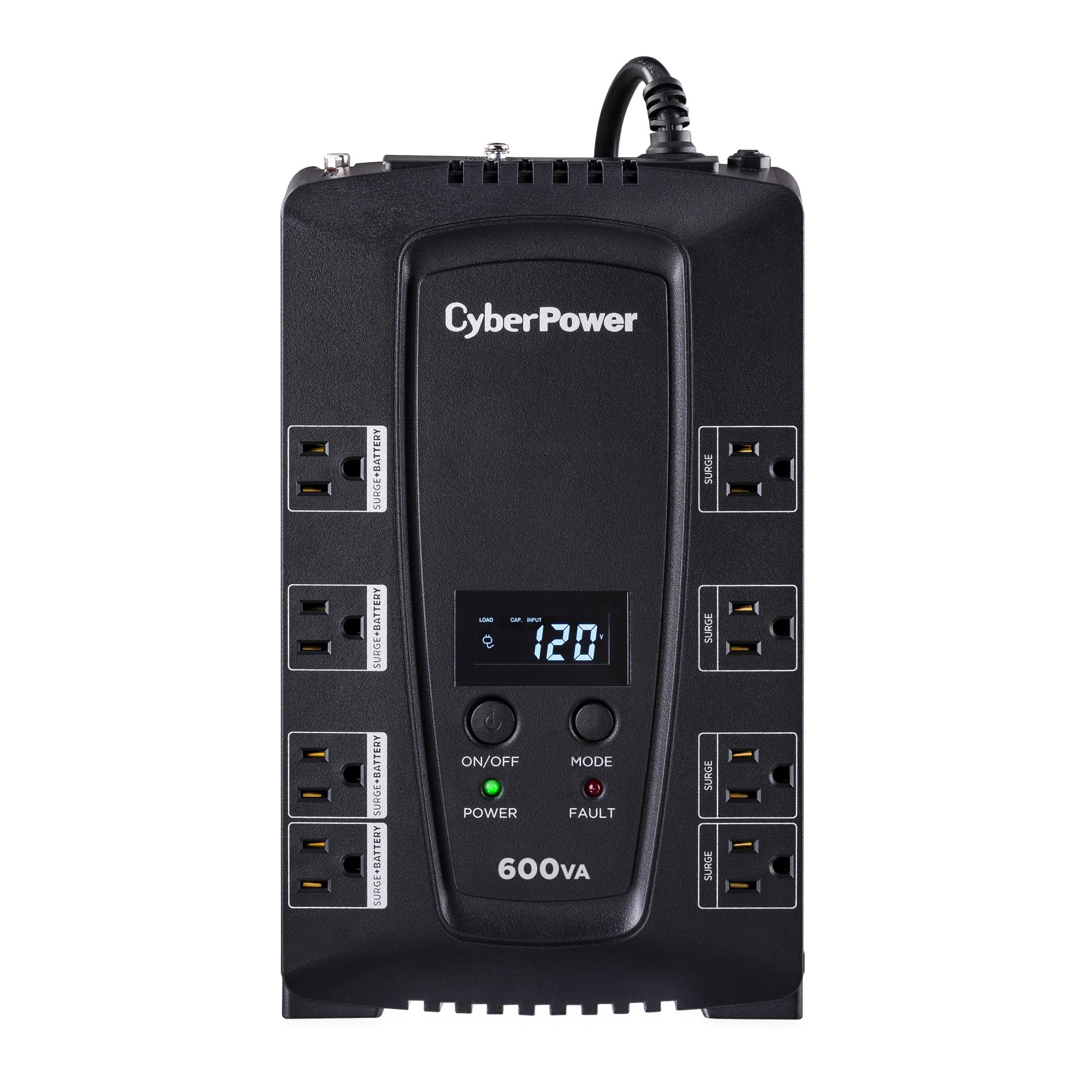
Figure 1: Front view of the CyberPower CP600LCD UPS System.
The CP600LCD is a compact and efficient Uninterruptible Power Supply (UPS) system. Its key features include:
- 600VA/340W Capacity: Provides sufficient power for essential electronics.
- Simulated Sine Wave Output: Ensures compatibility with most electronic devices during battery operation.
- 8 NEMA 5-15R Outlets:
- Four (4) outlets offer battery backup and surge protection.
- Four (4) outlets provide surge protection only.
- Multifunction LCD Panel: Displays real-time information on power and battery conditions.
- Automatic Voltage Regulation (AVR): Stabilizes incoming AC power to protect connected equipment from voltage fluctuations.
- Green Power UPS Bypass Circuitry: Reduces power consumption and energy costs.
- NEMA 5-15P Plug: Right-angle, 45-degree offset plug with a six-foot power cord for flexible placement.

Figure 2: Overview of the CP600LCD's features and outlets.
3. Setup Instructions
- Unpacking: Carefully remove the UPS from its packaging. Inspect for any shipping damage.
- Placement: Position the UPS in a cool, dry area, away from direct sunlight, heat sources, and excessive moisture. Ensure adequate ventilation around the unit. The compact design allows for versatile placement.
- Initial Battery Charge: The UPS battery is pre-installed. For optimal performance, charge the battery for at least 8 hours before initial use. Connect the UPS to a standard wall outlet.
- Connecting Equipment:

Figure 3: Rear view with input/output ports and outlets.
- Battery Backup & Surge Protected Outlets: Connect critical equipment such as your computer, monitor, and networking devices (modem, router) to these outlets. These devices will receive power from the UPS battery during an outage.
- Surge Protected Outlets: Connect non-critical equipment like printers, scanners, or speakers to these outlets. These outlets provide surge protection but do not offer battery backup.
- USB Connectivity: Connect the included USB cable from the UPS to your computer. This enables communication between the UPS and your computer for power management features via the PowerPanel Personal Software.
- Power On: Press the Power button on the front of the UPS to turn it on. The LCD panel will illuminate, and the unit will begin providing power to connected devices.
4. Operating Instructions
4.1 Powering On/Off
- To Power On: Press and hold the POWER button for approximately 2 seconds.
- To Power Off: Press and hold the POWER button for approximately 2 seconds. The UPS will emit a short beep, indicating it is shutting down.
4.2 LCD Panel Functions
The multifunction LCD panel provides real-time status updates. Use the MODE button to cycle through various display parameters:
- Input Voltage: Displays the current incoming utility voltage.
- Output Voltage: Shows the voltage being supplied by the UPS to connected equipment.
- Battery Capacity: Indicates the remaining charge level of the UPS battery.
- Load Capacity: Displays the percentage of the UPS's total capacity being used by connected equipment.
- Estimated Runtime: Provides an approximation of how long the UPS can power connected equipment during an outage, based on the current load.
- AVR Status: Indicates when Automatic Voltage Regulation is active.
4.3 Automatic Voltage Regulation (AVR)
The CP600LCD features Automatic Voltage Regulation (AVR) to correct minor power fluctuations without switching to battery power. This extends battery life and ensures a stable power supply to your devices. When incoming utility voltage is too high or too low, the AVR automatically adjusts it to a safe level.
4.4 Simulated Sine Wave Output
During a power outage, the UPS switches to battery power and provides a simulated sine wave output. This waveform is compatible with most electronic devices, ensuring they operate correctly until utility power is restored or a safe shutdown can be performed.
4.5 Green Power UPS Bypass Circuitry
This patented technology allows the UPS to bypass the transformer when utility power is stable, reducing energy consumption and heat generation. This contributes to lower energy costs and a longer lifespan for the UPS components.
5. PowerPanel Personal Software
The CyberPower CP600LCD is compatible with PowerPanel Personal Software, which allows for advanced power management and monitoring. This software can be downloaded from the CyberPower website.
With PowerPanel Personal Software, you can:
- Monitor power activity and UPS status.
- Configure automatic shutdown settings for connected computers during extended power outages.
- View detailed power event logs.
- Perform self-tests and schedule shutdowns.
Video 1: Overview of the CyberPower Intelligent LCD UPS Series, including features and software capabilities.
6. Maintenance
- Battery Replacement: The internal battery has a typical lifespan of 3-5 years. If the UPS indicates a battery fault or significantly reduced runtime, the battery may need replacement. Refer to the full product manual for specific battery replacement instructions. The battery is covered by a 3-year warranty.
- Cleaning: Keep the UPS clean and free of dust. Use a dry cloth to wipe the exterior. Do not use liquid cleaners or solvents.
- Storage: If storing the UPS for an extended period, ensure the battery is fully charged. Recharge the battery every three months to prevent permanent damage.
7. Troubleshooting
This section addresses common issues you might encounter with your CyberPower CP600LCD UPS System.
| Problem | Possible Cause | Solution |
|---|---|---|
| UPS does not turn on. | Battery not connected or discharged. | Ensure the UPS is plugged into a live AC outlet and allow the battery to charge for at least 8 hours. |
| UPS beeps continuously or frequently. | Overload, low battery, or power event. | Reduce the load on battery backup outlets. Check the LCD panel for specific error codes or status. If on battery, save work and shut down equipment. |
| Short runtime during power outage. | Overload or aging battery. | Reduce connected load. Consider replacing the battery if it's older than 3 years. |
| "Wiring Fault" indicator is lit. | Improper wiring in the wall outlet. | Consult a qualified electrician to inspect and correct the building wiring. |
For more detailed troubleshooting, refer to the complete user manual or contact CyberPower customer support.
8. Specifications
| Feature | Detail |
|---|---|
| Model Number | CP600LCD |
| Capacity (VA/Watts) | 600VA / 340W |
| Topology | Standby |
| Output Waveform | Simulated Sine Wave |
| Input Voltage | 125 Volts AC |
| Outlets | 8 NEMA 5-15R (4 Battery Backup & Surge, 4 Surge Only) |
| Plug Type | NEMA 5-15P (Right Angle, 45-degree offset) |
| Cord Length | 6 feet |
| Dimensions (D x W x H) | 3.5 x 11 x 6.8 inches |
| Weight | 11.51 pounds |
| Battery Type | 1 x 12V (included) |
| Color | Black |

Figure 4: Dimensions of the CP600LCD UPS System.
9. Warranty and Support
The CyberPower CP600LCD Intelligent LCD UPS System comes with comprehensive warranty coverage:
- 3-Year Product Warranty: This warranty covers the UPS system, including its internal batteries, for three years from the date of purchase.
- $175,000 Connected Equipment Guarantee: CyberPower provides a guarantee for connected equipment against damage due to power surges while properly connected to the UPS. Refer to the official warranty documentation for full terms and conditions.
For technical support, warranty claims, or additional information, please visit the official CyberPower website or contact their customer service department.


