
1. Introduction
Welcome to Guitar Hero Encore: Rocks the 80's! This game transports you back to the vibrant music scene of the 1980s, featuring iconic songs and characters dressed in retro outfits. Prepare to pick up your guitar controller and rock out to a killer soundtrack.

Figure 1: Front cover of Guitar Hero Encore: Rocks the 80's for PlayStation 2.
2. Setup Guide
2.1 System Requirements
- PlayStation 2 console (NTSC-U/C compatible)
- Guitar Hero compatible guitar controller (sold separately)
- Standard PlayStation 2 memory card (for saving game progress)
2.2 Connecting Your Guitar Controller
Ensure your PlayStation 2 console is powered off before connecting any peripherals. Insert the game disc into the console. Connect your Guitar Hero controller to an available controller port on your PlayStation 2. For optimal performance, ensure the controller is securely plugged in.

Figure 2: The Guitar Hero Encore: Rocks the 80's game disc and its case.
3. Operating the Game
3.1 Basic Gameplay
The core gameplay involves matching notes as they scroll down the screen. Press the corresponding fret buttons on your guitar controller and strum the strum bar in time with the music. Successfully hitting notes builds your score and rock meter.

Figure 3: In-game screenshot demonstrating the note highway and character performance.
3.2 Game Modes
- Career Mode: Progress through various venues, unlock new songs, characters, and items.
- Quick Play: Jump directly into any unlocked song.
- Multiplayer: Compete or cooperate with a friend.
- Practice Mode: Master difficult sections by slowing down songs or practicing specific parts.
3.3 Multiplayer Options
Guitar Hero Encore: Rocks the 80's offers two primary multiplayer experiences:
- Co-op Multiplayer: Two players can play together, with one on lead guitar and the second on bass or rhythm guitar, working towards a combined score.
- Competitive Multiplayer: Challenge a friend in head-to-head battles to see who can achieve the highest score.
Video 1: An overview of Guitar Hero Encore: Rocks the 80's gameplay and features.
3.4 Star Power
Accumulate Star Power by successfully hitting a series of glowing notes. Once your Star Power meter is full, tilt your guitar controller vertically or press the Select button to activate it. Star Power doubles your score multiplier, allowing for significantly higher scores and helping you pass challenging sections.
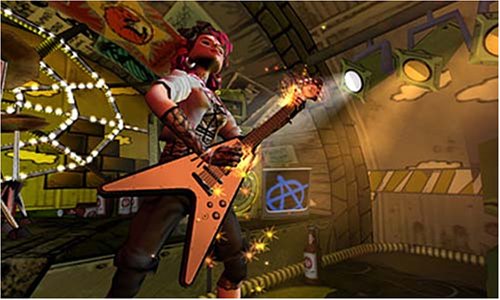
Figure 4: Star Power activated during gameplay, indicated by glowing notes and visual effects.
4. Game Features
This edition of Guitar Hero offers several exciting features:
- Killer 80s Soundtrack: Rock out to tracks ranging from New Wave to Hair Metal. Every song will have you tapping your feet and banging your head!
- Awesome Characters: Play as your favorite Guitar Hero characters decked out in awesome 80’s outfits.
- Co-op Multiplayer: Guitar Hero: Rocks the 80s puts 2 players closer to the rock experience, enabling players to play cooperatively with one person on lead guitar, and the 2nd on bass or rhythm guitar.
- Challenge a Friend: Jam against a friend in two competitive multiplayer modes.
- Practice Makes Perfect: Master those 80’s hits using the awesome Practice mode. Play any part of any song or even slow down the songs to really nail those difficult sections.
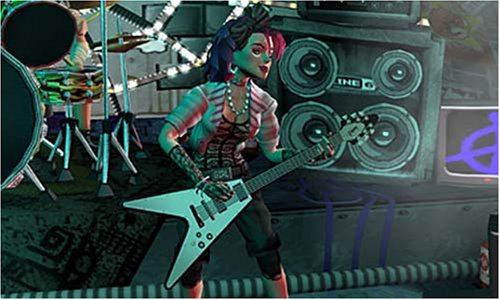
Figure 5: An in-game character, Izzy Sparks, performing on stage.
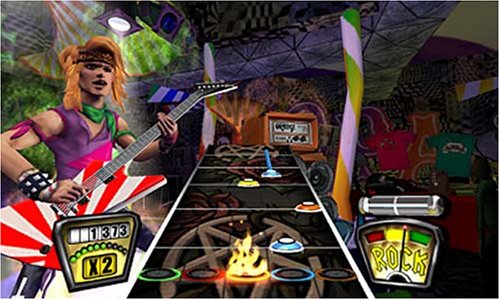
Figure 6: Another in-game character, Pandora, ready to rock.
5. Care and Maintenance
Proper care of your game disc and controller will ensure long-lasting enjoyment.
- Game Disc: Always handle the disc by its edges. Store it in its original case when not in use to prevent scratches. Clean the disc with a soft, lint-free cloth, wiping from the center outwards. Do not use abrasive cleaners.
- Guitar Controller: Keep the controller clean and free of dust. Avoid exposing it to extreme temperatures or moisture. Store it in a safe place where it won't be dropped or damaged.
6. Troubleshooting Common Issues
If you encounter any problems while playing, refer to the table below for common issues and their solutions.
| Problem | Solution |
|---|---|
| Game disc not reading. | Clean the disc with a soft cloth. Ensure the disc is inserted correctly. Check for visible scratches or damage. |
| Guitar controller not responding. | Ensure the controller is securely plugged into the PlayStation 2. Try a different controller port. Check the controller's cable for damage. |
| Audio or video issues. | Check all audio/video cables connected to your PlayStation 2 and television. Ensure your TV input is set correctly. |
| Game freezes or crashes. | Restart the PlayStation 2 console. Ensure the game disc is clean and undamaged. |
7. Product Specifications
| Specification | Detail |
|---|---|
| Title | Guitar Hero Encore: Rocks the 80's |
| Platform | PlayStation 2 |
| Publisher | ACTIVISION |
| Release Date | July 24, 2007 |
| ESRB Rating | Teen (T) |
| Item Model Number | 047875950719 |
| Product Dimensions | 7.5 x 5 x 0.75 inches |
| Item Weight | 4.8 ounces |
8. Warranty and Support
For information regarding product warranty, please refer to the documentation included with your game purchase or visit the official ACTIVISION website. For technical support or further assistance, please contact ACTIVISION customer support through their official channels.
Online Support: support.activision.com