
1. Product Overview
The Hager EV102 is a universal dimmer designed for comfortable control of various lighting loads up to 1000W. It features automatic detection of the load type and a digital display for showing brightness values directly on the device. This dimmer is suitable for controlling incandescent lamps, 230V halogen lamps, and low-voltage halogen lamps when used with electronic or wound transformers.
It supports remote control via push-buttons (with current draw up to 5 mA when illuminated) and offers additional manual operation directly on the dimmer. An integrated 1-10V control interface can be configured as either master (output) or slave (input). The device includes a switching output for status display (output variation > 0 V → closure). Up to three presettable brightness levels can be accessed via separate contacts connected to the device. Adjustable dimming speeds, recallable minimum and maximum brightness settings, and brightness value adjustments are all available via the display. The dimmer stores the last dimming position upon switching off or in the event of a power failure. It incorporates an integrated electronic fuse for protection against short circuits and overheating, along with automatic power limitation.
Key Features:
- Automatic load detection.
- Two-digit 7-segment display for function channel.
- Adjustable brightness limits and dimming speed via display.
- Integrated 1-10V control interface (master/slave configurable).
- Protection against short circuits and overheating.
2. Safety Information
WARNING: Electrical installation and wiring must be performed by a qualified electrician in accordance with all national and local electrical codes. Failure to follow these instructions can result in serious injury or death.
- Always disconnect power at the circuit breaker or fuse box before installing or servicing the dimmer.
- Do not exceed the maximum load rating of 1000W.
- Ensure proper grounding.
- Do not install in wet or damp locations.
- Keep out of reach of children.
3. Product Components and Diagram
The following diagram illustrates the key components and connection points of the Hager EV102 Universal Dimmer.
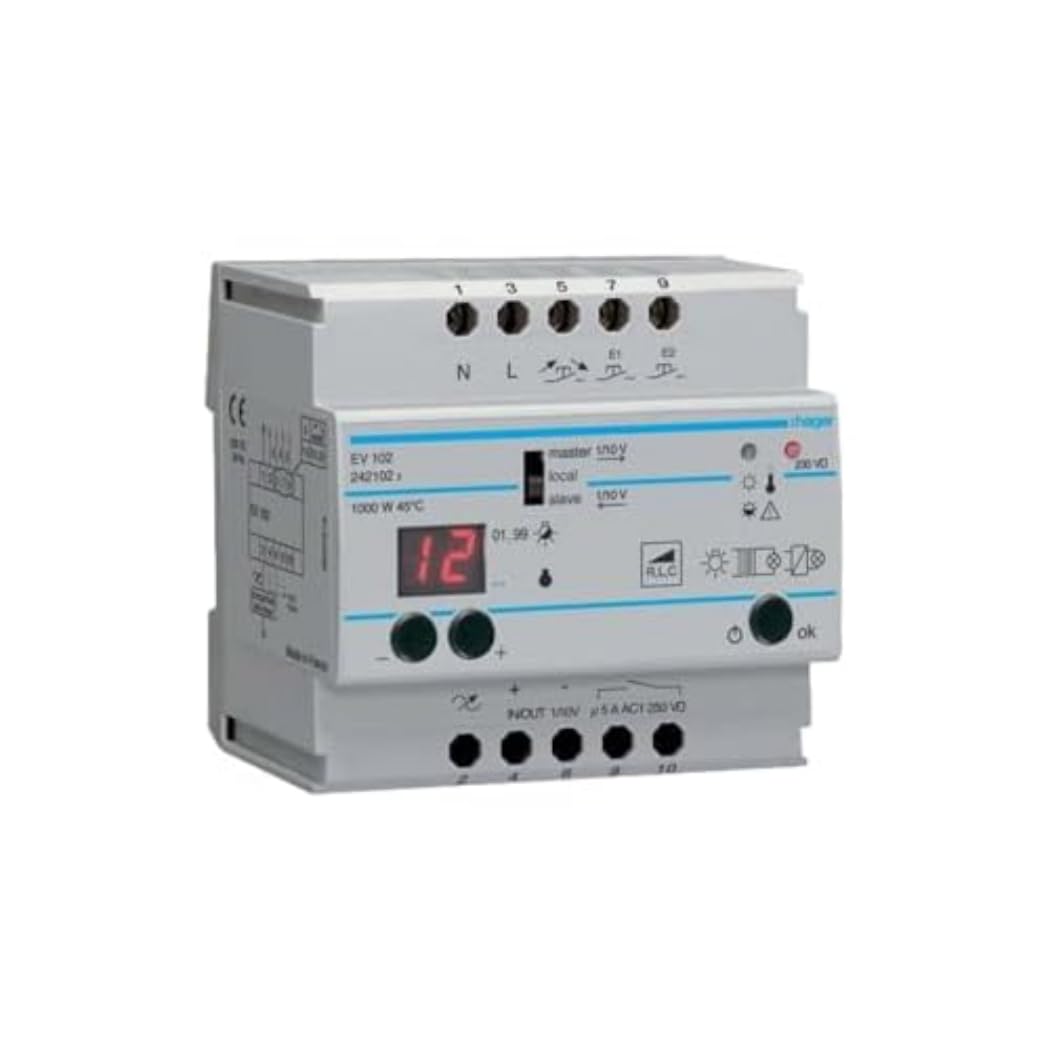
Image Description: This image displays the Hager EV102 universal dimmer module. Key components visible include the terminal blocks for power input (N, L) and output, control inputs (1-10V, push-button), a two-digit 7-segment display showing '12', and control buttons labeled '-' and '+' and 'ok'. Indicators for master/slave 1-10V, local control, and load type (RLC) are also present. The model number EV102 and power rating 1000W 45°C are printed on the side.
4. Setup and Installation
This device is designed for DIN rail mounting. Ensure adequate ventilation around the unit.
Wiring Instructions:
- Power Disconnection: Before any wiring, ensure the main power supply is disconnected at the circuit breaker.
- Input Power: Connect the neutral (N) and live (L) wires to the corresponding input terminals.
- Load Connection: Connect the lighting load to the output terminals. Ensure the total load does not exceed 1000W.
- Control Inputs:
- Push-button Control: Connect external push-buttons for remote dimming control.
- 1-10V Interface: Connect 1-10V control lines if using an external 1-10V master or slave device. Configure the dimmer's 1-10V mode (master/slave) as required.
- Preset Contacts: Connect separate contacts for accessing presettable brightness levels.
- Conductor Cross-sections:
- Rigid conductors: 1.5 mm² to 10 mm²
- Flexible conductors: 1 mm² to 16 mm²
- Power Reconnection: Once all connections are secure, restore power.
5. Operating Instructions
Manual Operation:
- Use the '+' and '-' buttons on the device to manually adjust the brightness level.
- The digital display will show the current brightness value.
- Press the 'ok' button to confirm settings or cycle through options.
Remote Control (Push-button):
Short press the connected push-button to switch the light ON/OFF. Long press to dim up or down. Release the button at the desired brightness level.
1-10V Control Interface:
Depending on the configuration (master or slave), the dimmer will respond to or generate a 1-10V control signal for integrated lighting systems.
Advanced Settings (via Display):
The display allows for configuration of various parameters:
- Dimming Speed: Adjust the rate at which the light dims or brightens.
- Minimum/Maximum Brightness: Set the lowest and highest achievable brightness levels.
- Preset Brightness Levels: Program up to three specific brightness levels for quick recall via external contacts.
- Load Type Detection: The device automatically detects the load type (e.g., RLC).
The dimmer automatically stores the last set dimming position, even after power interruptions.
6. Maintenance
The Hager EV102 Universal Dimmer is designed for maintenance-free operation. No user-serviceable parts are inside.
- Cleaning: Disconnect power before cleaning. Use a dry, soft cloth to wipe the surface. Do not use liquid cleaners or solvents.
- Inspection: Periodically check for any signs of damage or loose connections. If any issues are found, disconnect power and consult a qualified electrician.
7. Troubleshooting
If you experience issues with your Hager EV102 dimmer, refer to the following common troubleshooting steps:
- No Light Output:
- Check if the circuit breaker is tripped.
- Verify all wiring connections are secure and correct.
- Ensure the lamp(s) are functional.
- Confirm the dimmer is receiving power.
- Lights Flicker or Hum:
- Ensure the load type is compatible with the dimmer.
- Check if the total load exceeds the dimmer's maximum capacity (1000W).
- Adjust minimum brightness settings via the display.
- For low-voltage halogen lamps, ensure the transformer is compatible (electronic or wound).
- Dimmer Not Responding to Control:
- Check connections for push-buttons or 1-10V interface.
- Verify the 1-10V interface is correctly configured (master/slave).
- Ensure the device is not in a locked or error state (check display for error codes if applicable).
If the problem persists after following these steps, contact a qualified electrician or Hager customer support.
8. Specifications
| Parameter | Value |
|---|---|
| Brand | Hager |
| Model Number | EV102 |
| Operating Voltage | 230 V ~ +/-10% |
| Frequency | 50 Hz |
| Power Consumption (Operation) | 15 W |
| Load Capacity (Incandescent & 230V Halogen) | 20 - 1000 W |
| Load Capacity (Conventional Transformers) | 20 - 1000 VA |
| Load Capacity (Electronic Transformers) | 25 - 1000 W |
| Operating Temperature | -10 to 45 °C |
| Conductor Cross-section (Rigid) | 1.5 - 10 mm² |
| Conductor Cross-section (Flexible) | 1 - 16 mm² |
| Potential-free Switching Contact | 5 A, 230 V ~ AC1 |
| Weight | 380 grams |
9. Warranty and Support
Specific warranty information for the Hager EV102 is typically provided at the point of purchase or can be found on the official Hager website. Please retain your proof of purchase for warranty claims.
For technical support, installation assistance, or troubleshooting beyond the scope of this manual, please contact Hager customer service or a certified electrician.


