
Introduction
Thank you for choosing the Neiko 40282 Super-Bright 28-LED Aluminum Flashlight. This compact and durable flashlight is designed to provide reliable illumination for various tasks. Featuring 28 high-efficiency LED lights, an anodized aluminum body, and water and shock resistance, it is built for longevity and performance. This manual provides essential information for the proper setup, operation, maintenance, and troubleshooting of your flashlight.
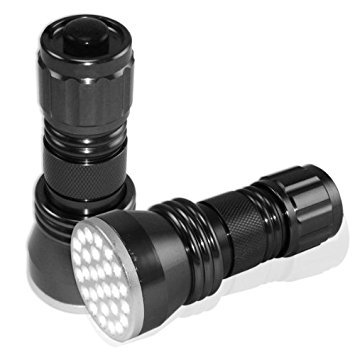
Figure 1: Neiko 40282 Super-Bright 28-LED Aluminum Flashlight. This image shows the overall design of the flashlight, highlighting its gunmetal silver finish and compact size.
Setup
Battery Installation
Your Neiko 40282 flashlight requires three (3) AAA batteries, which are included with the product. Follow these steps to install or replace the batteries:
- Unscrew the Tail Cap: Hold the flashlight body firmly and twist the tail cap counter-clockwise until it detaches.
- Insert Batteries: Locate the battery holder inside the flashlight. Insert three AAA batteries into the holder, ensuring that the positive (+) and negative (-) terminals align correctly with the markings on the holder.
- Reattach Tail Cap: Carefully slide the battery holder back into the flashlight body. Align the tail cap with the body and twist it clockwise until it is securely tightened. Do not overtighten.
Figure 2: Illustrative image of the flashlight's tail cap and battery compartment. This image represents where the tail cap is located and how it can be removed to access the battery holder for installation or replacement.
Holster Attachment
A poly canvas belt holster pouch is included for convenient carrying. Simply slide your flashlight into the pouch and attach the pouch to your belt or gear using its loop.
Operating Instructions
Turning On/Off
To operate the flashlight, use the push-button switch located on the tail cap:
- To Turn On: Press the tail cap switch firmly until it clicks. The 28 LED lights will illuminate.
- To Turn Off: Press the tail cap switch firmly again until it clicks. The lights will turn off.
Figure 3: Close-up view of the flashlight's tail cap, indicating the location of the power switch. This image helps users identify the switch for turning the flashlight on and off.
General Use
The Neiko 40282 flashlight is suitable for a wide range of applications, including household use, outdoor activities, emergency situations, and professional tasks where bright, reliable light is needed.
Maintenance
Cleaning
To clean your flashlight, wipe the exterior with a soft, damp cloth. Do not use abrasive cleaners or solvents, as these may damage the finish or internal components.
Battery Replacement
When the light output begins to dim, it is an indication that the batteries need to be replaced. Refer to the "Battery Installation" section for instructions on how to replace the AAA batteries.
Storage
For prolonged periods of non-use (e.g., more than one month), it is recommended to remove the batteries from the flashlight to prevent potential leakage and damage to the device.
Water and Shock Resistance
The flashlight features a water-resistant design, meaning it can withstand splashes and light rain. It is not designed for submersion in water. Its aluminum construction also provides shock resistance against minor impacts.
Troubleshooting
If you encounter issues with your Neiko 40282 flashlight, please refer to the following common problems and solutions:
- Flashlight Does Not Turn On:
- Ensure the batteries are installed correctly with the correct polarity (+/-).
- Check if the batteries are depleted and replace them with fresh AAA batteries.
- Verify that the tail cap is securely tightened. A loose tail cap can prevent electrical contact.
- Light Flickers or Dims Intermittently:
- This often indicates low battery power. Replace all three AAA batteries with new ones.
- Ensure the battery holder and contacts are clean and free of debris.
- Confirm the tail cap is fully tightened to ensure consistent electrical connection.
If these steps do not resolve the issue, please contact customer support for further assistance.
Specifications
| Model Number | 40282 |
| Light Source | 28 LED |
| Power Source | 3 x AAA Batteries (included) |
| Material | Anodized Aluminum |
| Dimensions (L x W x H) | 4 x 1 x 1 inches |
| Item Weight | 7.2 ounces |
| Battery Life | Approximately 5 hours (continuous use) |
| LED Lifespan | Up to 100,000 hours |
| Special Features | Durable, Water Resistant, Shock Resistant |
Warranty and Support
For information regarding the product warranty, please refer to the documentation provided at the time of purchase or contact your retailer. NEIKO stands behind its products, and for any support inquiries, please visit the official NEIKO website or contact their customer service department.
Manufacturer: Grace Marketing- HI
Brand: NEIKO