
1. Introduction
This manual provides comprehensive instructions for the installation, operation, and maintenance of your Steinel IS 180-2 Infrared Motion Detector. Designed for both indoor and outdoor applications, this device offers reliable motion detection and automatic light control. Please read these instructions carefully before beginning installation or operation to ensure safe and efficient use.
2. Safety Instructions
Warning: Incorrect installation can lead to electric shock, fire, or other hazards. Always ensure that installation is performed by a qualified electrician in accordance with national wiring regulations and local electrical codes.
- Disconnect power at the main circuit breaker before installation or maintenance.
- Do not open the product casing unless specifically instructed. There are no user-serviceable parts inside.
- Ensure the product is securely mounted to prevent it from falling.
- Keep children away from electrical devices.
3. Product Overview
The Steinel IS 180-2 is an elegant infrared motion detector combining advanced sensor technology with a modern design. It is equipped with two highly sensitive infrared detectors to provide reliable, uninterrupted all-round protection.

Figure 3.1: Front view of the Steinel IS 180-2 Infrared Motion Detector, showcasing its sleek silver finish and integrated sensor lens.

Figure 3.2: The Steinel IS 180-2 package contents, including the motion detector, quick start guide, mounting screws, and a corner wall mount accessory.

Figure 3.3: Key features of the IS 180-2, including its 180° infrared sensor, maximum 12m range, IP54 weather protection, and adjustable time and twilight settings. For an augmented reality view of the product, scan the QR code or visit this link.

Figure 3.4: Rear view of the motion detector, illustrating the mounting points and the area for electrical connections.
4. Installation and Mounting
The Steinel IS 180-2 is designed for wall mounting and includes a corner wall mount for flexible installation. Ensure the mounting surface is stable and suitable for the device's weight.
4.1 Mounting Location
Choose a location that provides the desired detection coverage. The sensor offers a 180° detection angle and a maximum range of 12 meters. Avoid mounting near heat sources or objects that might cause false triggers (e.g., moving branches, direct sunlight).

Figure 4.1: The IS 180-2 mounted on an exterior wall, demonstrating a typical installation scenario.
4.2 Detection Zone
The detection zone can be adjusted to suit specific requirements. The sensor provides coverage for areas as large as 200 m².

Figure 4.2: Overhead view of the 180° detection zone, showing how the sensor covers a broad area in front of a building.

Figure 4.3: Illustration of detection patterns for both flat wall and corner mounting, highlighting the 180° coverage and 12m range.
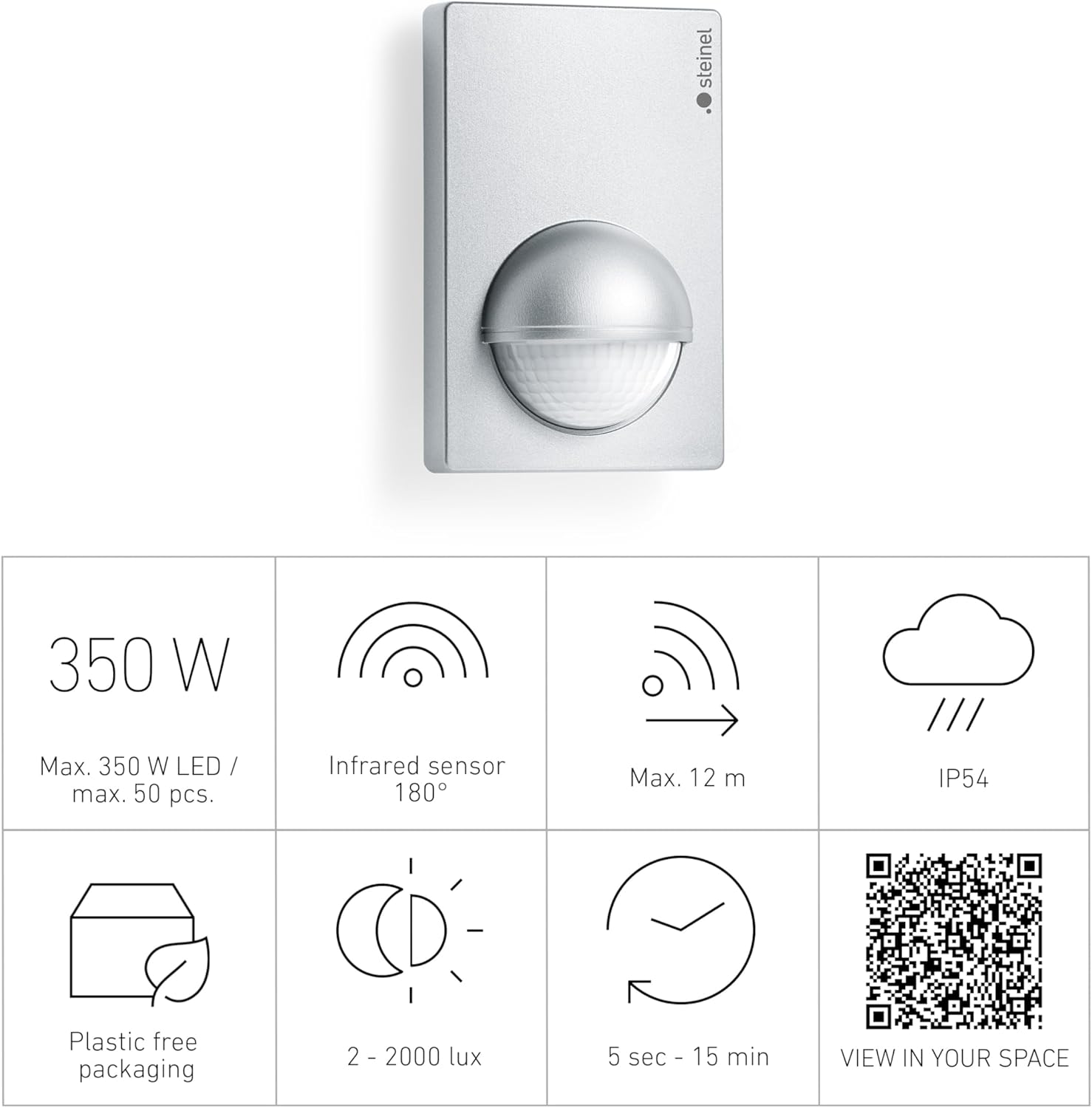
Figure 4.4: Side view diagram detailing the sensor's detection range, showing its ability to detect movement across various distances and vertical angles.
5. Operating Instructions
The Steinel IS 180-2 operates by detecting infrared radiation (heat) emitted by moving objects. When motion is detected within its adjustable range and the ambient light level falls below the set twilight threshold, the connected light source will activate for the set duration.
6. Adjustments
The motion detector features control dials for fine-tuning its operation. These dials are typically located behind the sensor lens or on the underside of the unit.
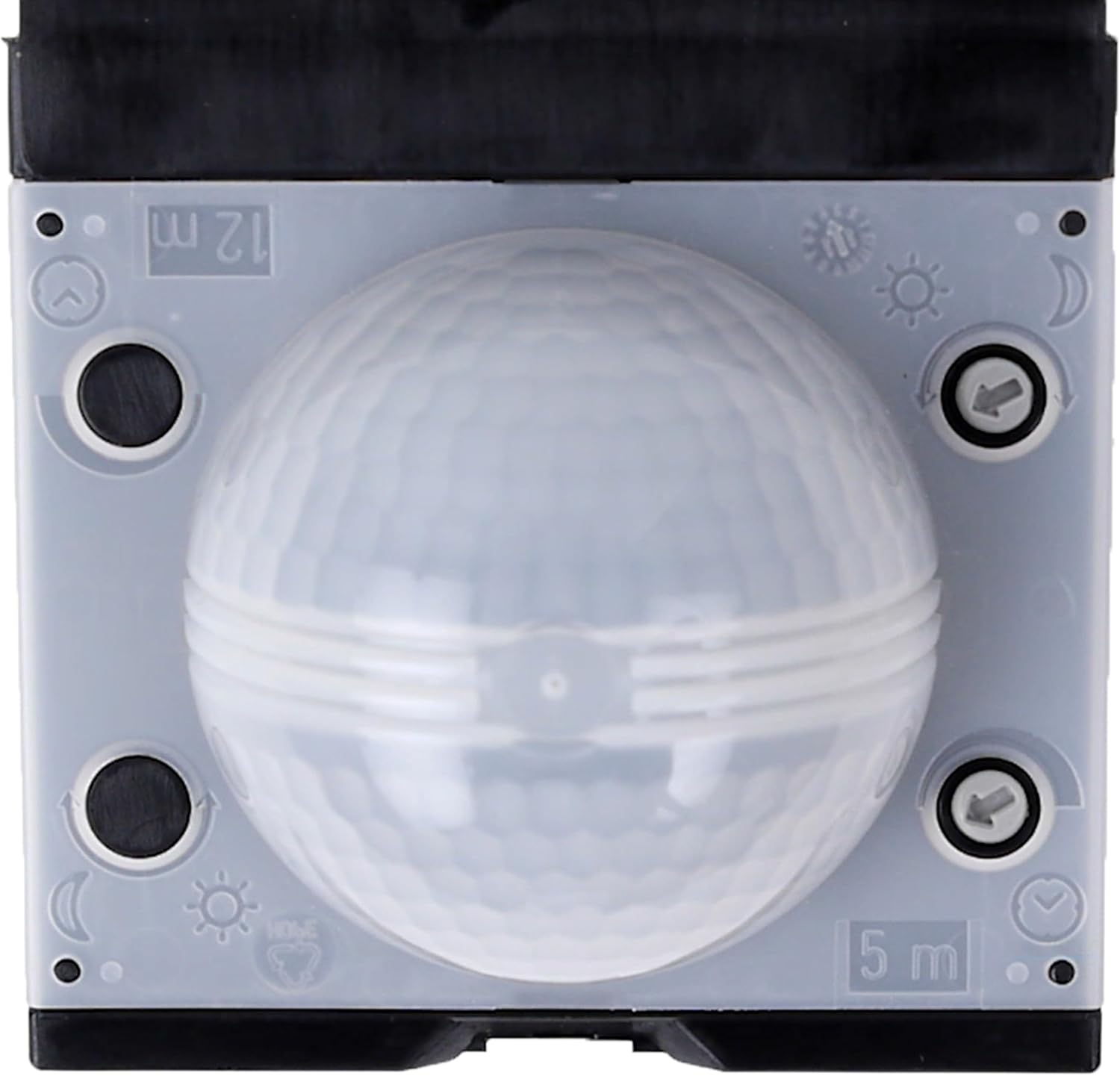
Figure 6.1: Control dials for adjusting the time and twilight threshold settings of the motion detector.
- Time Setting: This dial adjusts how long the light remains on after motion is detected. It can be infinitely varied from approximately 5 seconds to 15 minutes.
- Twilight Threshold: This dial sets the ambient light level at which the sensor becomes active. It can be adjusted from approximately 2 lux (dark) to 2000 lux (daylight).
- Reach Adjustment: The reach of the motion sensor can be set to a maximum of 12 meters or reduced to 5 meters by turning the multi-lens. Shrouds are also provided to limit the detection zone and match it to specific situations, preventing unwanted triggers.
7. Maintenance
The Steinel IS 180-2 motion detector requires minimal maintenance. To ensure optimal performance:
- Periodically clean the sensor lens with a soft, damp cloth to remove dust or dirt that may obstruct detection. Do not use abrasive cleaners or solvents.
- Ensure the area around the sensor remains clear of obstructions that could block its field of view or cause false triggers.
- No internal maintenance or lubrication is required.
8. Troubleshooting
If your Steinel IS 180-2 is not functioning as expected, consult the following table for common issues and solutions:
| Problem | Possible Cause | Solution |
|---|---|---|
| Light stays on continuously. | Continuous motion in detection zone; Time setting too long; Wiring fault. | Remove obstructions; Adjust time setting; Check wiring. |
| Light does not switch on. | No power; Twilight setting too high; Sensor lens obstructed; Faulty bulb. | Check power supply; Adjust twilight setting; Clean lens; Replace bulb. |
| False triggers. | Heat sources (e.g., vents, animals); Detection zone too wide. | Relocate sensor; Adjust reach using shrouds or multi-lens. |
9. Specifications

Figure 9.1: Technical drawing showing the dimensions of the Steinel IS 180-2 in millimeters.
| Feature | Detail |
|---|---|
| Brand | Steinel |
| Model | IS 180-2 |
| Power Source | Corded Electric |
| Voltage | 230 Volts |
| Max. Switching Capacity | 1000 Watts (Max. 350 W LED) |
| Detection Angle | 180° |
| Max. Range | 12 Meters |
| Twilight Setting | 2 – 2000 Lux |
| Time Setting | 5 seconds – 15 minutes |
| Mounting Type | Wall Mount |
| Protection Rating | IP54 |
| Item Weight | 170 Grams (approx. 6 ounces) |
| Product Dimensions | 4.72 x 2.99 x 2.2 inches (approx. 120 x 77 x 55 mm) |
10. Warranty and Support
The Steinel IS 180-2 Infrared Motion Detector comes with a 3-year manufacturer's warranty. For warranty claims or technical support, please contact Steinel customer service or visit their official website.
For more information, please visit: www.steinel.de/garantie


