
Hot Wheels M1306
Hot Wheels Dragon Fire Track Set
Model: M1306
1. Product Overview
The Hot Wheels Dragon Fire Track Set offers an exhilarating racing experience where you challenge a fierce dragon. This set features a launcher, multiple inverted jumps, crash zones, and motorized boosters designed to send your Hot Wheels vehicles through a dynamic course. The ultimate goal is to time your launch perfectly to hit the dragon's fire breath and behead the mighty beast.
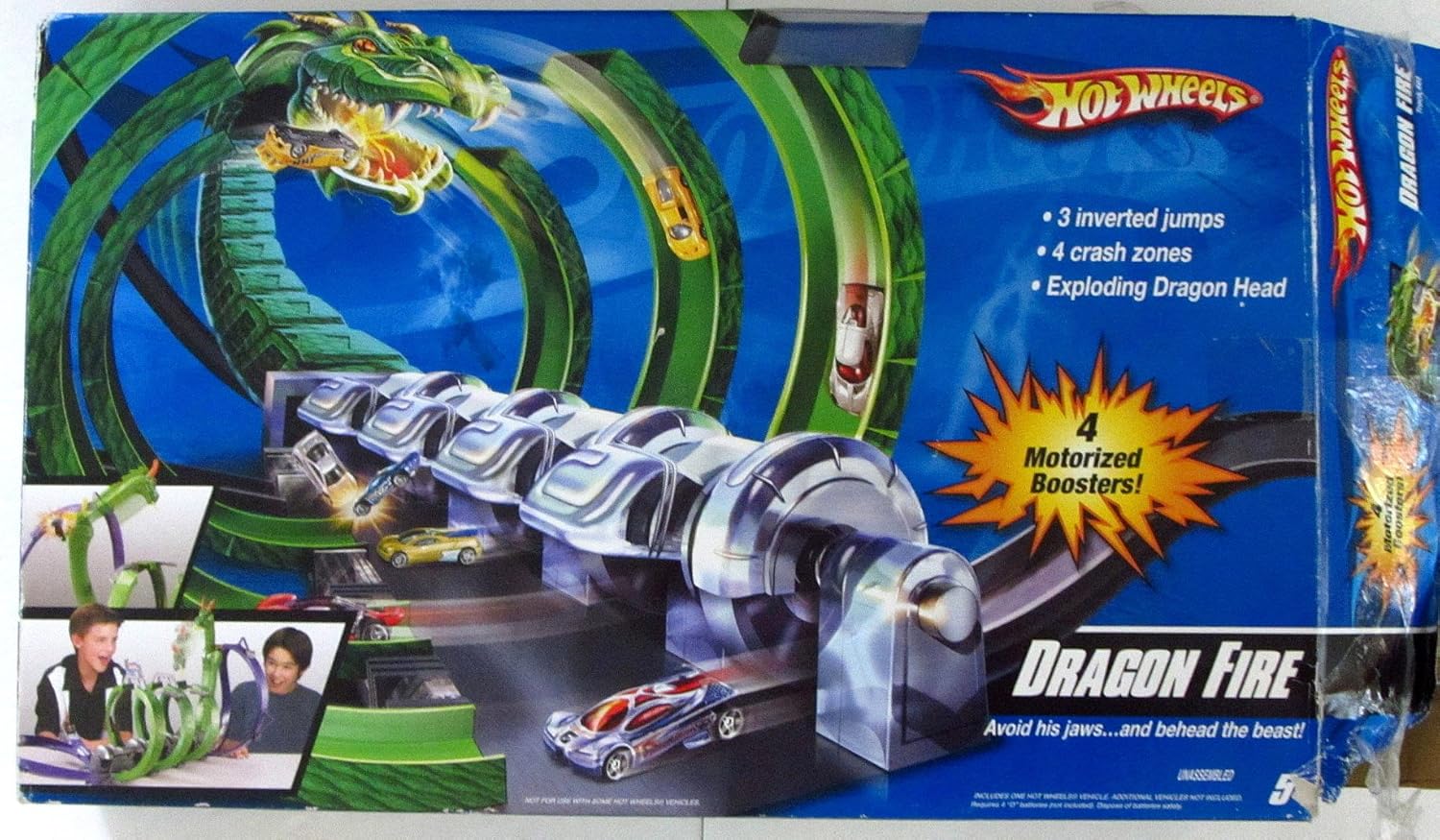
Figure 1.1: Packaging of the Hot Wheels Dragon Fire Track Set, showcasing the assembled track with a dragon figure and cars in action.
2. Safety Information
WARNING: CHOKING HAZARD -- Small parts. Not for children under 3 years.
- Always supervise children during play.
- Keep small parts away from young children to prevent choking.
- Do not aim vehicles or track pieces at eyes or face.
- Ensure all track connections are secure before play to prevent collapse.
- Use only recommended batteries for motorized components.
3. Package Contents
Carefully unpack all components and verify that all parts are present before beginning assembly. The package includes the following items:

Figure 3.1: All components of the Hot Wheels Dragon Fire Track Set laid out, including track pieces, the dragon figure, launcher, and motorized booster unit.
- Track pieces (various shapes and sizes for loops, curves, and straight sections)
- Dragon figure with fire breath mechanism
- Launcher mechanism
- Motorized booster unit
- Support structures and connectors
- One Hot Wheels vehicle (additional vehicles sold separately)
4. Setup and Assembly
While the product is listed as 'No Assembly Required' in some specifications, setting up the track involves connecting various pieces to form the complete play circuit. Follow these general steps for assembly:
- Unpack Components: Carefully remove all track pieces, the dragon, launcher, and booster unit from the packaging.
- Install Batteries (for Motorized Boosters): The motorized booster unit requires 4 'C' batteries (not included). Open the battery compartment on the booster unit, insert the batteries according to the polarity indicators (+/-), and securely close the compartment.
- Connect Track Pieces: Begin by connecting the main booster unit to the initial track sections. Follow the visual guide on the product packaging or included diagrams (if any) to connect all track pieces, forming the loops, curves, and crash zones. Ensure each connection clicks securely into place.
- Attach Dragon Figure: Securely attach the dragon figure to its designated position on the track, typically at the end of the main loop where the 'fire breath' target is located.
- Position Launcher: Place the launcher at the start of the track, ensuring it is firmly connected and aligned to propel cars into the booster section.
- Check Stability: Once assembled, gently lift and shake the track to ensure all connections are secure and the structure is stable.
5. Operating Instructions
Once the track is fully assembled and batteries are installed in the motorized boosters, you are ready to play:
- Power On Boosters: Locate the power switch on the motorized booster unit and turn it to the 'ON' position. You should hear the motors whirring.
- Place Vehicle: Place a Hot Wheels vehicle onto the launcher at the starting point of the track.
- Launch Vehicle: Activate the launcher to propel the vehicle into the track. The motorized boosters will then take over, sending the car through the track's various features.
- Navigate the Track: The vehicle will travel through 3 inverted jumps and 4 crash zones. The motorized boosters maintain the car's speed.
- Challenge the Dragon: The ultimate objective is to time your launch just right to hit the dragon's fire breath target. A successful hit will 'behead' the mighty beast, signifying victory. If you miss, the car may crash or be 'fried' by the dragon.
- Continuous Play: Retrieve your vehicle and repeat the process for continuous action-packed racing.
6. Maintenance
Proper maintenance ensures the longevity and optimal performance of your Hot Wheels Dragon Fire Track Set:
- Cleaning: Wipe down track pieces and components with a dry or slightly damp cloth. Do not immerse motorized parts in water. Avoid harsh chemicals.
- Storage: When not in use, store the track set in a clean, dry place away from direct sunlight and extreme temperatures. You may disassemble the track for more compact storage.
- Battery Care: If the set will not be used for an extended period, remove batteries from the motorized booster unit to prevent leakage and corrosion.
- Check Connections: Periodically inspect track connectors for wear or damage. Replace any broken pieces if possible.
7. Troubleshooting
If you encounter issues with your Hot Wheels Dragon Fire Track Set, refer to the following common problems and solutions:
| Problem | Possible Cause | Solution |
|---|---|---|
| Car not moving or moving slowly through boosters. | Low or dead batteries in the motorized booster unit. | Replace the 4 'C' batteries in the booster unit. Ensure correct polarity. |
| Car derails frequently. | Loose track connections or misaligned track pieces. | Check all track connections to ensure they are securely snapped together. Verify track alignment. |
| Dragon head not 'beheading' when hit. | Insufficient car speed or incorrect impact angle. | Ensure boosters are powered and functioning. Try different Hot Wheels vehicles as some may perform better. Adjust launch timing. |
| Launcher not propelling car effectively. | Launcher mechanism jammed or worn. | Check for any obstructions in the launcher. Ensure the car is placed correctly. |
8. Specifications
| Feature | Detail |
|---|---|
| Model Number | M1306 |
| Product Dimensions (LxWxH) | 11.5 x 60.5 x 38 cm |
| Item Weight | 2.86 kg |
| Colour | Multicolor |
| Manufacturer Recommended Age | 3 years and up |
| Batteries Required | Yes (4 'C' batteries for motorized boosters, not included) |
| Included Components | Race Track (various pieces), Dragon Figure, Launcher, Motorized Booster Unit, 1 Hot Wheels Vehicle |
9. Warranty and Support
Hot Wheels products are manufactured to high-quality standards. For information regarding warranty coverage, product support, or replacement parts, please refer to the official Hot Wheels website or contact their customer service directly.
You can visit the official Hot Wheels Store for more information and product updates: Hot Wheels Official Store
Related documentsM1306


Ask a question about this manual
Ask about setup, troubleshooting, compatibility, parts, safety, or missing instructions. Manuals+ will review the question and use this page’s manual context to help answer it.