
1. Introduction
This manual provides detailed instructions for the safe and effective use of your Nikon D40 Digital SLR Camera Kit, including the 18-135mm f/3.5-5.6G ED-IF AF-S DX Zoom-Nikkor Lens. Please read this manual thoroughly before using your camera to ensure proper operation and to maximize its performance.
2. Safety Information
To prevent injury or damage to your camera, always observe the following safety precautions:
- Do not disassemble or modify the camera or lens.
- Keep the camera away from water and moisture.
- Avoid exposing the camera to extreme temperatures or direct sunlight for extended periods.
- Use only Nikon-approved accessories and power sources.
- Keep out of reach of small children.
3. Parts of the Camera
Familiarize yourself with the various components of your Nikon D40 camera.

Figure 3.1: Front View of Nikon D40 Camera Body. This image shows the front of the Nikon D40 camera body, highlighting the lens mount, flash, and grip area. The Nikon logo is visible at the top, and the D40 model designation is on the right side of the body.

Figure 3.2: Top View of Nikon D40 Camera Body. This image displays the top panel of the Nikon D40, featuring the mode dial, shutter release button, command dial, and hot shoe for external flash units. The power switch is integrated around the shutter button.
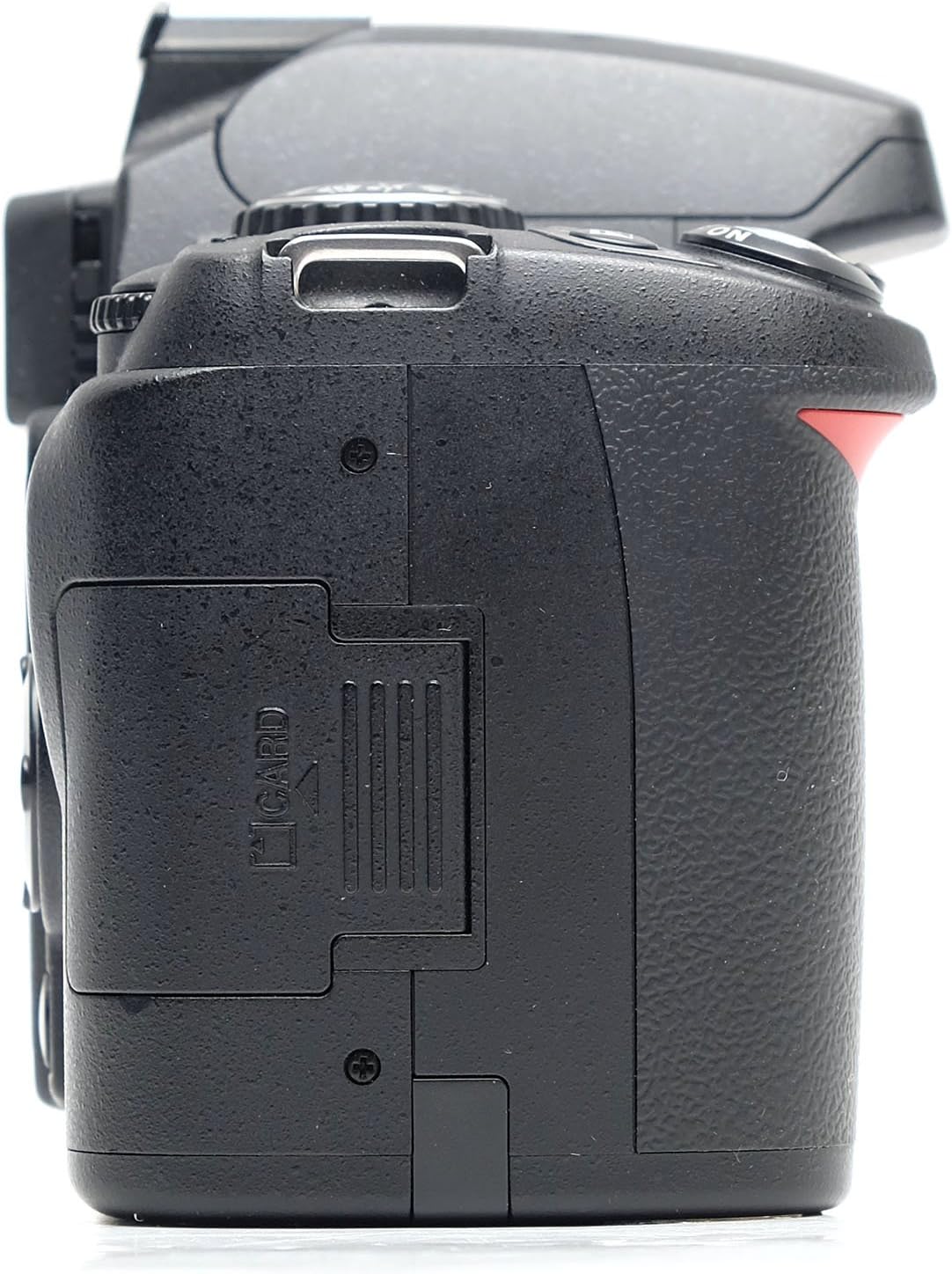
Figure 3.3: Bottom View of Nikon D40 Camera Body. This image shows the underside of the Nikon D40, including the battery compartment door, tripod socket, and product information labels such as the model number and manufacturing details.

Figure 3.4: Side View of Nikon D40 Camera Body (Memory Card Slot). This image illustrates the left side of the Nikon D40 camera body, clearly showing the memory card slot cover. The slot is designed for SD memory cards.
4. Setup
4.1 Unpacking
Carefully remove all components from the packaging. Verify that all items listed in the product contents are present.
4.2 Battery Installation and Charging
- Open the battery chamber cover on the bottom of the camera.
- Insert the supplied EN-EL9 Li-ion battery, ensuring correct orientation.
- Close the battery chamber cover.
- Connect the battery to the supplied charger and plug the charger into a power outlet. The charging lamp will indicate charging status.
4.3 Memory Card Insertion
- Open the memory card slot cover on the side of the camera.
- Insert an SD memory card into the slot with the label facing the back of the camera until it clicks into place.
- Close the memory card slot cover.
4.4 Attaching the Lens
- Remove the body cap from the camera and the rear lens cap from the lens.
- Align the mounting mark on the lens with the mounting mark on the camera body.
- Rotate the lens counter-clockwise until it clicks into place.
4.5 Initial Settings
Upon first power-on, you may be prompted to set the date, time, and language. Follow the on-screen instructions using the multi-selector and OK button.
5. Operating the Camera
5.1 Power On/Off
Rotate the power switch around the shutter release button to the 'ON' position to power on the camera. Rotate to 'OFF' to power off.
5.2 Shooting Modes
The D40 offers various shooting modes accessible via the mode dial:
- Auto: Fully automatic mode for general photography.
- Auto (Flash Off): Automatic mode with flash disabled.
- Programmed Auto (P): Camera sets aperture and shutter speed for optimal exposure.
- Shutter-Priority Auto (S): You set shutter speed, camera sets aperture.
- Aperture-Priority Auto (A): You set aperture, camera sets shutter speed.
- Manual (M): You control both aperture and shutter speed.
- Scene Modes: Portrait, Landscape, Child, Sports, Close Up, Night Portrait. These modes optimize settings for specific scenes.
5.3 Focusing
The camera features autofocus (AF) and manual focus (MF) capabilities. The 18-135mm lens supports AF-S for fast and quiet autofocus.
- Autofocus: Press the shutter-release button halfway to activate autofocus. The camera has 3 autofocus points.
- Manual Focus: Set the lens to MF and rotate the focus ring to adjust focus manually.
5.4 Exposure Control
The D40 uses 3D Color Matrix Metering II for accurate exposure. ISO sensitivity can be set from 200 to 1600, with an AUTO ISO feature.
5.5 Flash Usage
The built-in flash can be used in various modes (Auto, Off). Ensure the flash is popped up if required for the selected mode.
5.6 Image Review and Retouch Menu
After shooting, images can be reviewed on the 2.5-inch high-resolution color LCD monitor. The camera also features an in-camera Retouch menu with options such as D-Lighting, Red-eye Correction, Image Trim, Image Overlay, Small Picture, Monochrome (Black-and-white, Sepia, Cyanotype), and Filter Effects (Skylight, Warm filter, Color balance).
6. Maintenance
6.1 Cleaning the Camera and Lens
- Use a soft, lint-free cloth to clean the camera body.
- For the lens, use a lens brush to remove dust, then a lens cleaning cloth with a specialized lens cleaning solution.
- Never use organic solvents like paint thinner or benzene to clean the camera or lens.
6.2 Sensor Cleaning
Dust on the image sensor can appear as spots in your photos. If dust is visible, it is recommended to have the sensor cleaned by a qualified Nikon service center.
6.3 Storage
When not in use for extended periods, remove the battery and store the camera in a cool, dry place, away from direct sunlight and chemicals.
7. Troubleshooting
If you encounter issues with your Nikon D40, refer to the following common problems and solutions:
| Problem | Possible Cause / Solution |
|---|---|
| Camera does not power on. | Battery is depleted or incorrectly inserted. Ensure battery is charged and correctly seated. |
| Images are blurry. | Check focus mode (AF/MF). Ensure sufficient light for autofocus. Use a faster shutter speed or tripod in low light. |
| Flash does not fire. | Flash may be set to 'Off' or in a mode where flash is suppressed. Ensure flash is popped up. |
| Memory card error. | Card may be full, corrupted, or incompatible. Try formatting the card (this will erase all data) or use a different card. |
For more complex issues, please contact Nikon customer support.
8. Specifications
Key technical specifications for the Nikon D40 Digital SLR Camera:
- Effective Pixels: 6.1 Megapixels
- Image Sensor: APS-C size CCD
- Lens Mount: Nikon F-mount (with AF coupling and AF contacts)
- Compatible Lenses: AF-S and AF-I NIKKOR lenses (autofocus supported)
- Included Lens: 18-135mm f/3.5-5.6G ED-IF AF-S DX Zoom-Nikkor lens
- ISO Sensitivity: ISO 200 to 1600 (expandable to ISO 3200 equivalent)
- Shutter Speed: 30 to 1/4000 sec. in steps of 1/3 EV; Bulb, Time
- Flash Sync Speed: Up to 1/500 sec.
- Continuous Shooting Speed: Approx. 2.5 frames per second
- Monitor: 2.5-in., approx. 230k-dot, low-temperature polysilicon TFT LCD
- Storage Media: SD memory cards
- Battery: One rechargeable Li-ion battery EN-EL9
- Dimensions (W x H x D): Approx. 126 x 94 x 64 mm (5.0 x 3.7 x 2.5 in.)
- Weight: Approx. 475 g (1 lb. 0.8 oz.) (camera body only)
9. Warranty and Support
Your Nikon D40 camera is covered by a manufacturer's warranty. Please refer to the warranty card included with your product for specific terms and conditions.
For further assistance, technical support, or service, please visit the official Nikon website or contact Nikon customer service. You can find more information at the Nikon Store.


