
Introduction
Thank you for choosing a Timex watch. This manual provides essential information for the proper setup, operation, and maintenance of your Timex T2M428 Analog Black Dial Men's Watch. Please read these instructions carefully to ensure optimal performance and longevity of your timepiece.
Setup
Setting the Time
- Pull the Crown: Gently pull the crown (the small knob on the side of the watch case) outwards to the first position. You may feel a slight click.
- Adjust the Time: Rotate the crown clockwise or counter-clockwise to move the hour and minute hands until the desired time is displayed.
- Push the Crown Back: Once the time is set, push the crown firmly back into its original position against the watch case. This will start the watch movement.
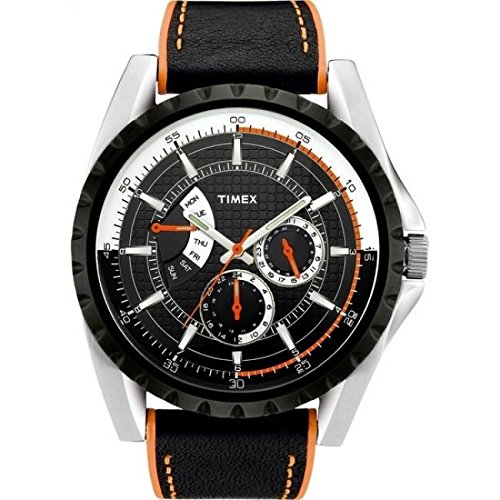
Image: The Timex T2M428 Analog Black Dial Men's Watch. The crown, located on the right side of the watch case, is used for setting the time.
Operating
Wearing Your Watch
Place the watch on your wrist and adjust the strap or bracelet to a comfortable fit. It should be snug enough not to slide freely but not so tight as to restrict circulation.
Reading the Time
The watch features a classic analog display with three hands: an hour hand, a minute hand, and a second hand. The hour hand indicates the hour, the minute hand indicates the minutes, and the second hand sweeps to indicate seconds.
Maintenance
Cleaning
To maintain the appearance of your watch, wipe the case and crystal regularly with a soft, dry cloth. For the strap, follow specific cleaning instructions based on its material (e.g., leather, metal). Avoid using harsh chemicals or abrasive materials.
Battery Replacement
Your Timex T2M428 watch is powered by a quartz movement that requires a battery. When the watch stops running, it indicates that the battery needs replacement. It is recommended to have the battery replaced by a qualified watch technician to ensure proper sealing and water resistance.
Troubleshooting
Watch Not Running
- Check if the crown is pushed all the way in. If it is pulled out, the watch will not run.
- The battery may need replacement. Consult a professional watch repair service.
Time is Inaccurate
- Ensure the crown is fully pushed in after setting the time.
- Extreme temperatures or strong magnetic fields can affect accuracy.
- If the issue persists, the watch may require servicing by a qualified technician.
Specifications
- Brand: Timex
- Model Number: T2M428
- Movement: Analog Quartz
- Dial Color: Black
- Case Material: (Typically Brass or Stainless Steel, refer to product packaging for exact details)
- Strap Material: (Refer to product packaging for exact details, often Leather or Stainless Steel)
- Water Resistance: (Refer to product packaging for specific ATM rating and usage guidelines)
- Display Type: Analog
Warranty and Support
Warranty Information
Timex watches typically come with a limited warranty covering manufacturing defects. Please refer to the warranty card included with your purchase or visit the official Timex website for detailed terms and conditions specific to your region and model.
Customer Support
For further assistance, technical support, or service inquiries, please visit the official Timex website or contact their customer service department. Contact information can usually be found on the Timex website or in your product packaging.


