
U`King ZQ03011US
U`King Stage Laser Light DJ Light Instruction Manual
Model: ZQ03011US | Brand: U`King
1. Introduction
This manual provides detailed instructions for the safe and effective operation of your U`King Stage Laser Light DJ Light. Please read this manual thoroughly before use and retain it for future reference.
1.1 Safety Information
- Laser Safety: This product is a Class 1 laser light. Output power is less than 0.3mW. Avoid direct eye exposure to the laser beam.
- Power Supply: Ensure the power supply matches the specified voltage (AC100-240V, 50/60Hz) before connecting the device.
- Ventilation: Do not block ventilation openings. Ensure adequate airflow around the unit to prevent overheating.
- Environment: This device is intended for indoor use only. Avoid exposure to water, moisture, or extreme temperatures.
- Maintenance: Refer to the maintenance section for cleaning and care instructions. Do not attempt to service the unit yourself.
2. Package Contents
Upon unpacking, please verify that all items listed below are present and undamaged:
- U`King Stage Laser Light DJ Light Unit(s) (Quantity as purchased, e.g., 2 units for (22.6*6*2.8in)X2 model)
- Power Cable
- Remote Control
- User Manual (This document)
3. Product Overview
The U`King Stage Laser Light DJ Light features a robust design with multiple light sources and control options for dynamic stage and party lighting.

Figure 3.1: Two U`King Stage Laser Light DJ Light units with their respective remote controls. Each unit features multiple laser and LED RGBYC outputs.
3.1 Key Features
- 5 Beam Effect: Projects red, green, blue, yellow, and cyan colors, along with mixed colorful lights.
- RGBYC LED Projector: Integrated LEDs for additional lighting effects.
- Sound Activated Mode: Patterns and colors change to the beat of music.
- DMX Control: Compatible with DMX512 systems for professional control.
- Remote Control: Convenient wireless operation.
- Advanced Motor Technology: High-speed, large-angle precision motor for fan-shaped, wave, zoom, dot, and flip effects.
- Durable Construction: Made from aluminum with a powder-coated finish.
3.2 Components and Dimensions

Figure 3.2: Product dimensions (approximately 22.6 inches long, 6.0 inches wide, 2.8 inches high), adjustable mounting bracket (180-degree rotation), and cooling fan for heat dissipation.
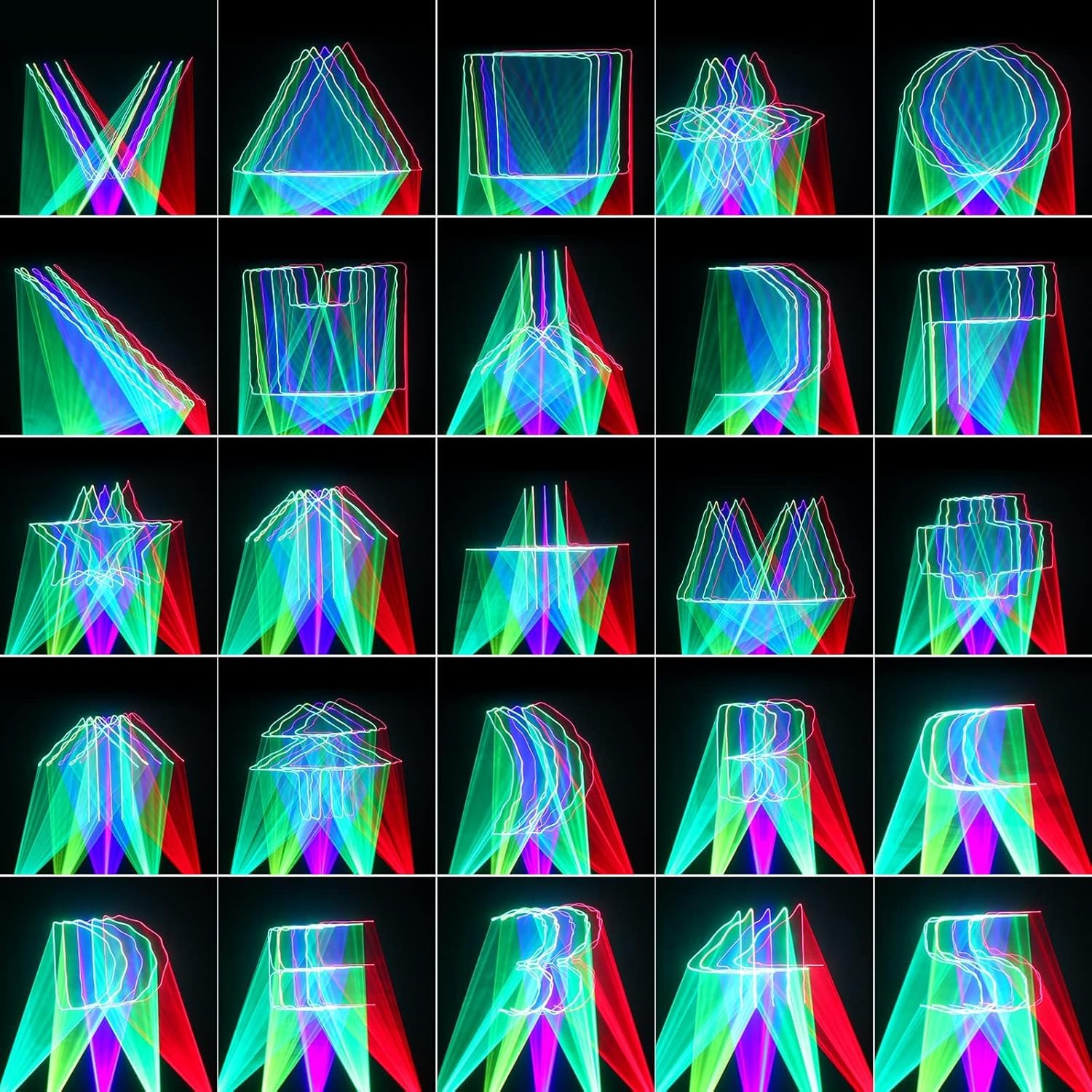
Figure 3.3: Detailed view of the rear panel, showing the power switch, digital display control panel (MENU, UP, DOWN, ENTER buttons), DMX IN and DMX OUT ports, power input (AC100-240V, 50/60Hz), and built-in microphone for sound activation.
4. Setup
4.1 Placement
Choose a stable and secure location for the light. Ensure it is placed on a flat surface or securely mounted to a truss or ceiling using appropriate clamps and safety cables (not included). The unit features two handles/mounts with holes for ceiling mounting.
4.2 Power Connection
- Ensure the power switch on the unit is in the "OFF" position.
- Connect the provided power cable to the power input port on the rear of the unit.
- Plug the other end of the power cable into a suitable power outlet (AC100-240V, 50/60Hz).
4.3 DMX Connection (Optional)
If using DMX control, connect a DMX cable from your DMX controller's output to the DMX IN port on the light. For multiple units, daisy-chain them by connecting the DMX OUT of the first unit to the DMX IN of the next.
5. Operating Modes
The U`King Stage Laser Light offers several operating modes, which can be selected via the control panel on the unit or the remote control.
5.1 Auto Mode
In Auto mode, the light cycles through its pre-programmed patterns and effects automatically. There are typically multiple auto modes (e.g., AUTO 1, AUTO 2, AUTO 3) offering different sequences.

Figure 5.1: Examples of various laser patterns and animations that can be generated by the light in auto mode.
5.2 Sound Activated Mode
In Sound Activated mode, the light's patterns and colors respond to the rhythm of music or ambient sound detected by its built-in microphone. Adjust sound sensitivity for optimal performance.

Figure 5.2: The 5-beam effect creating dynamic light shows. For best visual effects, especially dynamic beams and scanning, operation in a smoky environment is recommended.
5.3 DMX Control Mode
For professional control, connect the unit to a DMX512 controller. Refer to the DMX section for channel assignments and programming details. This mode allows for precise control over patterns, colors, and effects.
6. Remote Control Operation
The included remote control provides convenient access to various functions of the laser light.

Figure 6.1: Layout of the remote control. Buttons include ON/OFF, DMX, AUTO modes (1, 2, 3), SOUND activated modes (1, 2), SOUND SENSITIVITY adjustment (UP/DOWN), MOTOR STOP, LED color selection (R/G/B, Red, Green, Blue), STROBE modes (SLOW, FAST, MODE), and individual beam control (Thebeam Light 1-5).
6.1 Remote Functions
- ON/OFF: Powers the unit on or off.
- DMX: Activates DMX control mode.
- AUTO 1/2/3: Selects different automatic program sequences.
- SOUND 1/2: Activates sound-activated mode with different sensitivities or patterns.
- UP/DOWN: Navigates menus or adjusts parameters (e.g., sound sensitivity).
- MOTOR STOP: Pauses the motor movement, holding the current pattern.
- LED R/G/B, LED Red, LED Green, LED Blue: Controls the LED colors.
- STROBE SLOW/FAST/MODE: Adjusts the strobe effect speed or mode.
- Thebeam Light 1-5: Controls individual laser beams or their combinations.
7. DMX Control
The U`King Stage Laser Light is DMX512 compatible, allowing for integration into professional lighting setups. The unit typically uses a standard DMX channel assignment. Please refer to the specific DMX channel chart provided with your unit or available online from the manufacturer for detailed programming.
Basic DMX Setup:
- Connect your DMX controller to the DMX IN port of the first light.
- Set the DMX address for each light using the control panel on the unit. Ensure each unit has a unique address if you wish to control them independently.
- Use DMX cables to daisy-chain additional lights from the DMX OUT port of the previous unit to the DMX IN port of the next.
- Terminate the DMX chain with a 120-ohm DMX terminator on the last unit's DMX OUT port for stable signal transmission (not included).
8. Maintenance
8.1 Cleaning
- Disconnect the power before cleaning.
- Use a soft, lint-free cloth to wipe the exterior of the unit.
- For optical components (lenses), use a specialized lens cleaning solution and cloth to avoid scratches.
- Regularly clean the cooling fan vents to ensure proper airflow.
8.2 Storage
When not in use, store the light in a cool, dry place, away from direct sunlight and excessive dust. It is recommended to keep the original packaging for storage and transport.
9. Troubleshooting
| Problem | Possible Cause | Solution |
|---|---|---|
| No power | Power cable disconnected; Power outlet fault; Unit switch off. | Check power cable connection; Test power outlet; Ensure power switch is ON. |
| No laser output | Unit in standby; Mode not selected; Laser diode fault. | Press ON on remote or unit; Select an operating mode (Auto, Sound, DMX); Contact support if issue persists. |
| No sound activation | Sound sensitivity too low; No sound input; Microphone blocked. | Increase sound sensitivity via remote or control panel; Ensure music is playing near the unit; Check microphone for obstructions. |
| DMX not working | Incorrect DMX address; Faulty DMX cable; No DMX terminator; DMX controller issue. | Verify DMX address setting; Test DMX cables; Use a DMX terminator; Check DMX controller settings. |
| Effects not visible / weak beams | Lack of atmospheric haze/smoke; Bright ambient light. | For optimal visibility of dynamic beams and scanning effects, use the light in a dark room with a fog or haze machine. Reduce ambient light. |
| Unit is noisy | Normal operation of internal motors/fans. | Some mechanical noise from the internal motors and cooling fan is normal. This is typically masked by music in a party environment. |
10. Specifications
| Feature | Detail |
|---|---|
| Model Number | ZQ03011US |
| Laser Level | Class 1 (Output power: less than 0.3mW) |
| Light Source Type | RGBYC LED Projector, Laser |
| Power Source | Corded Electric (AC100-240V, 50/60Hz) |
| Material | Aluminum |
| Finish Type | Powder Coated |
| Product Dimensions | Approximately 22.6"L x 6.0"W x 2.8"H (for the (22.6*6*2.8in)X2 variant) |
| Mounting Type | Rack Mount / Ceiling Mount |
| Features | Sound Activated, 5 Beam Effect, Remote Control Compatible, DMX Compatible |
11. Warranty and Support
For warranty information and technical support, please refer to the contact details provided with your purchase or visit the official U`King website. Keep your purchase receipt as proof of purchase for any warranty claims.
Note: There are no official product videos from the seller available for embedding in this manual. Customer review videos are not included as per instructions.
Related documentsZQ03011US

Ask a question about this manual
Ask about setup, troubleshooting, compatibility, parts, safety, or missing instructions. Manuals+ will review the question and use this page’s manual context to help answer it.