
1. Introduction
The Winegard RV-7542 is a white wall plate power supply designed for recreational vehicles (RVs). This unit provides 12V DC power to an amplified RV antenna and includes integrated hookups for satellite and cable signals. It features a built-in two-set splitter, allowing connection to multiple televisions. The RV-7542 enables seamless switching between your RV antenna and an external satellite or cable source.
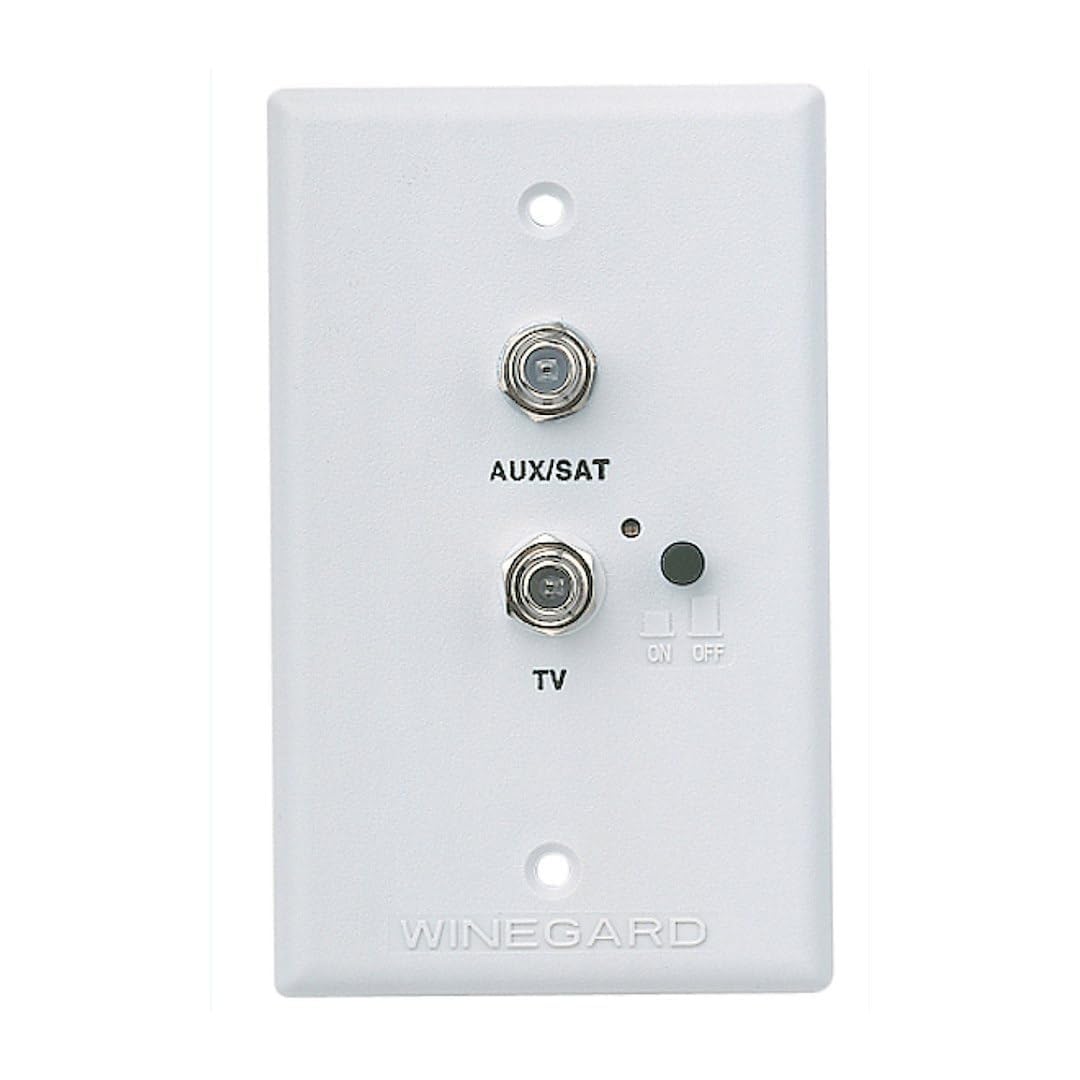
Image: The Winegard RV-7542 White Wall Plate Power Supply. This image shows the front of the white wall plate, featuring a power button, an indicator light, and coaxial connections for TV and satellite/cable inputs.
2. Setup and Installation
Safety First: Before beginning installation, ensure all power to the RV's 12V DC system is disconnected to prevent electrical shock or damage to the unit.
- Prepare Mounting Location: Identify a suitable location for the wall plate, typically where an existing antenna power supply is located or where 12V DC power and coaxial cables are accessible.
- Disconnect Power: Turn off the main 12V DC power switch in your RV and disconnect the battery if necessary.
- Remove Existing Plate (if applicable): Carefully remove any existing wall plate, noting the wiring connections.
- Connect Wiring:
- Connect the 12V DC positive (+) wire to the designated terminal on the RV-7542.
- Connect the 12V DC negative (-) or ground wire to the designated terminal.
- Connect the coaxial cable from the RV antenna to the 'ANTENNA IN' port.
- Connect the coaxial cable from the external satellite or cable hookup to the 'SAT/CABLE IN' port.
- Connect coaxial cables from your televisions to the 'TV1' and 'TV2' output ports.
- Mount the Wall Plate: Secure the RV-7542 wall plate to the wall using appropriate screws. Ensure all wires are neatly tucked into the wall cavity.
- Restore Power: Reconnect the RV's 12V DC power.
3. Operation
The Winegard RV-7542 provides power to your amplified RV antenna and allows you to select between the antenna signal and an external satellite or cable input.
- Powering the RV Antenna: Press the small black button on the front of the wall plate. When the green LED indicator light is illuminated, the RV antenna is powered, and its signal is being sent to the connected televisions.
- Switching to Satellite/Cable: To use an external satellite or cable source, press the black button again. The green LED indicator light will turn off, disabling the RV antenna power and allowing the external satellite or cable signal to pass through to the televisions.
- Signal Distribution: The built-in two-set splitter distributes the selected signal (either RV antenna or satellite/cable) to both 'TV1' and 'TV2' output ports.
4. Maintenance
The Winegard RV-7542 is designed for minimal maintenance. Follow these guidelines to ensure optimal performance:
- Cleaning: Clean the exterior of the wall plate with a soft, dry cloth. Avoid using abrasive cleaners or solvents, which may damage the finish.
- Fuse Replacement: The unit contains a protective fuse. If the unit stops functioning (e.g., no LED light, no signal from antenna), check the fuse. To replace, carefully remove the wall plate from its mounting. The fuse holder is typically located on the back of the unit. Replace with a fuse of the same type and rating (e.g., 2 Amp fast-blow). Always disconnect 12V DC power before checking or replacing the fuse.
- Cable Connections: Periodically check all coaxial and power connections to ensure they are secure and free from corrosion.
5. Troubleshooting
If you encounter issues with your Winegard RV-7542, refer to the table below for common problems and solutions.
| Problem | Possible Cause | Solution |
|---|---|---|
| No green LED light when button is pressed. | No 12V DC power to the unit, or blown fuse. | Check RV's 12V DC power supply. Verify 12V DC wiring connections. Check and replace fuse if blown (see Maintenance section). |
| No TV signal from RV antenna. | Antenna not powered (LED off), loose coaxial connection, antenna issue. | Ensure green LED is on. Check coaxial cable from antenna to wall plate. Inspect RV antenna for damage or proper orientation. |
| No TV signal from satellite/cable input. | Wall plate is in antenna mode (LED on), loose coaxial connection, external source issue. | Ensure green LED is off. Check coaxial cable from external source to wall plate. Verify external satellite/cable equipment is functioning correctly. |
| Poor signal quality (fuzzy picture, pixelation). | Weak signal, loose connections, damaged cables. | Ensure all coaxial connections are tight. Check cables for damage. For antenna, try repositioning the RV or antenna. For satellite/cable, verify external source signal strength. |
6. Specifications
| Feature | Detail |
|---|---|
| Model Number | RV-7542 |
| Brand | Winegard |
| Color | White |
| Material | Plastic |
| Input Voltage | 12V DC |
| Form Factor | Wall Plate |
| Item Dimensions (L x W x H) | 5.8 x 3.9 x 1.9 inches |
| Item Weight | 3.2 ounces |
| Output Ports | 2 (TV1, TV2) |
| Input Ports | Antenna In, Sat/Cable In |
| UPC | 615798102227 |
7. Warranty Information
The Winegard RV-7542 Wall Plate Power Supply comes with a Limited Warranty. For specific details regarding warranty coverage, duration, and terms, please refer to the official warranty documentation included with your product or visit the Winegard website. Keep your proof of purchase for warranty claims.
8. Customer Support
For further assistance, technical support, or to inquire about replacement parts, please contact Winegard customer service. You can find contact information and additional resources on the official Winegard website:
When contacting support, please have your product model number (RV-7542) and any relevant purchase information ready.


