
Celestron 21062
Celestron AstroMaster 70EQ Refractor Telescope User Manual
Model: 21062 | Brand: Celestron
Introduction
The Celestron AstroMaster 70EQ Refractor Telescope is designed for both beginners and experienced enthusiasts, offering a user-friendly experience for exploring celestial and terrestrial objects. It features fully-coated glass optics, a sturdy yet lightweight frame, and a manual German Equatorial mount for precise tracking.
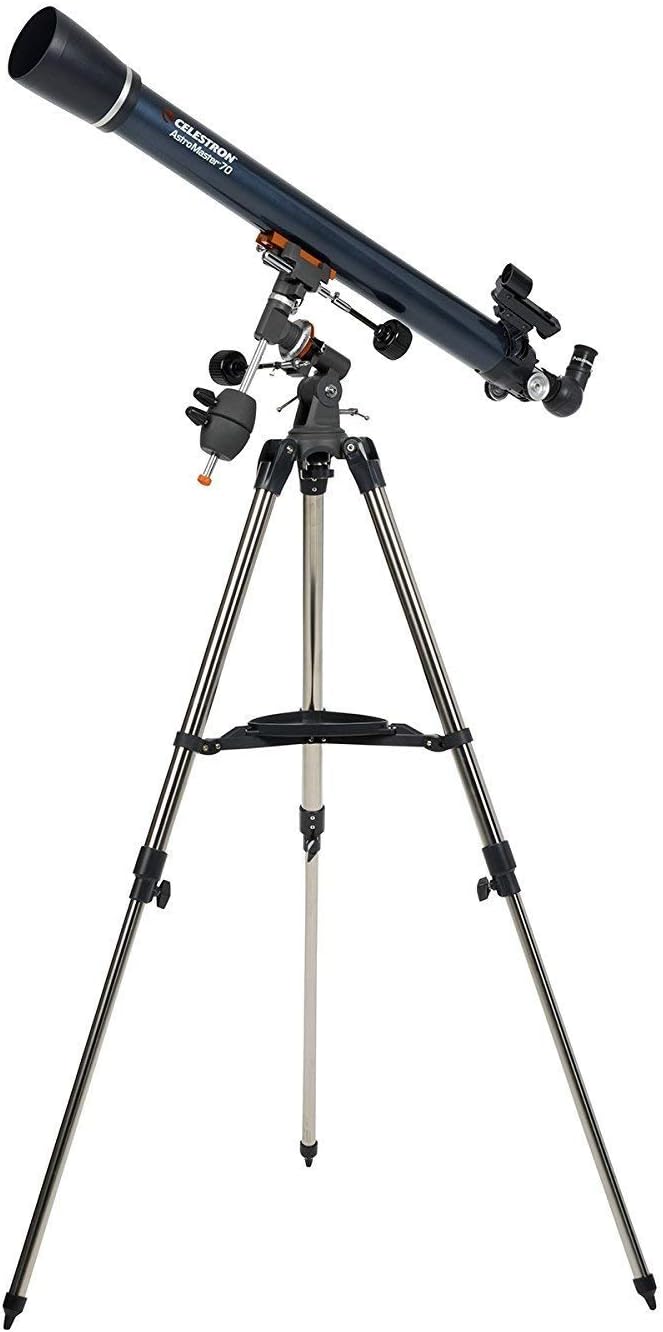
Figure 1: The Celestron AstroMaster 70EQ Refractor Telescope.
What's in the Box
Your Celestron AstroMaster 70EQ package includes all the essential components to begin your astronomical observations:
- Optical tube
- Tripod and mount (preassembled)
- 20mm eyepiece
- 10mm eyepiece
- Erect Image Diagonal
- Red-dot finderscope
- User Manual

Figure 2: Included 20mm and 10mm eyepieces.
Setup
Setting up your AstroMaster 70EQ telescope is designed to be quick and tool-free. Follow these general steps:
- Extend the tripod legs to your desired height and secure them.
- Attach the optical tube to the pre-assembled German Equatorial mount. Ensure all knobs are tightened securely.
- Insert the erect image diagonal into the focuser.
- Insert the desired eyepiece (e.g., 20mm for wider views) into the diagonal.
- Attach the StarPointer red dot finderscope to its mounting bracket on the optical tube.

Figure 3: Detail of the equatorial mount.
Operating Your Telescope
The AstroMaster 70EQ features a German Equatorial mount, which is ideal for tracking celestial objects as they move across the night sky. Use the slow-motion control knobs for fine adjustments. The StarPointer red dot finderscope assists in quickly locating objects before viewing them through the main telescope.
For enhanced observation, utilize the Celestron SkyPortal mobile app (available for iOS and Android). This free app helps you locate objects in the night sky and provides audio descriptions for popular celestial bodies, enriching your stargazing experience.
Video 1: An overview of Celestron AstroMaster EQ Telescopes, demonstrating key features and usage.
Maintenance
To ensure the longevity and optimal performance of your telescope, follow these maintenance guidelines:
- Keep the optics clean. Use a soft, lint-free cloth specifically designed for optical surfaces. Avoid touching the lenses or mirrors directly.
- Store the telescope in a dry, dust-free environment when not in use. Use the lens caps to protect the optical surfaces.
- Periodically check all screws and knobs to ensure they are secure, but do not overtighten.
Troubleshooting
If you encounter issues with your telescope, consider the following common solutions:
- Blurred Images: Ensure the focuser is properly adjusted. Atmospheric conditions can also affect image clarity.
- Difficulty Locating Objects: Verify that your StarPointer red dot finderscope is properly aligned with the main telescope. This is a crucial first step for accurate aiming.
- Unstable View: Ensure the tripod legs are fully extended and locked, and the telescope is on a stable, level surface.
Specifications
| Feature | Detail |
|---|---|
| Product Dimensions | 40.75 x 14.96 x 9.65 inches |
| Item Weight | 17.99 pounds |
| Item Model Number | 21062 |
| Optical Tube Length | 36 Inches |
| Objective Lens Diameter | 70 Millimeters |
| Telescope Mount Description | Equatorial Mount |
| Focus Type | Manual Focus |
| Finderscope | Reflex |
Warranty and Support
Celestron stands by the quality of its products. The AstroMaster 70EQ Refractor Telescope comes with a two-year warranty. For any technical assistance or support, you have unlimited access to our team of US-based experts.
Visit the official Celestron Store for more information and resources.
Related documents21062


Ask a question about this manual
Ask about setup, troubleshooting, compatibility, parts, safety, or missing instructions. Manuals+ will review the question and use this page’s manual context to help answer it.