
Laney A1
Laney A1 65-Watt Acoustic Amplifier User Manual
Model: A1
1. Introduction
Thank you for purchasing the Laney A1 65-Watt Acoustic Amplifier. This amplifier is designed to provide clear, natural amplification for acoustic instruments and vocals, featuring versatile input options, digital effects, and a robust build. Please read this manual thoroughly to understand all features and ensure safe operation.
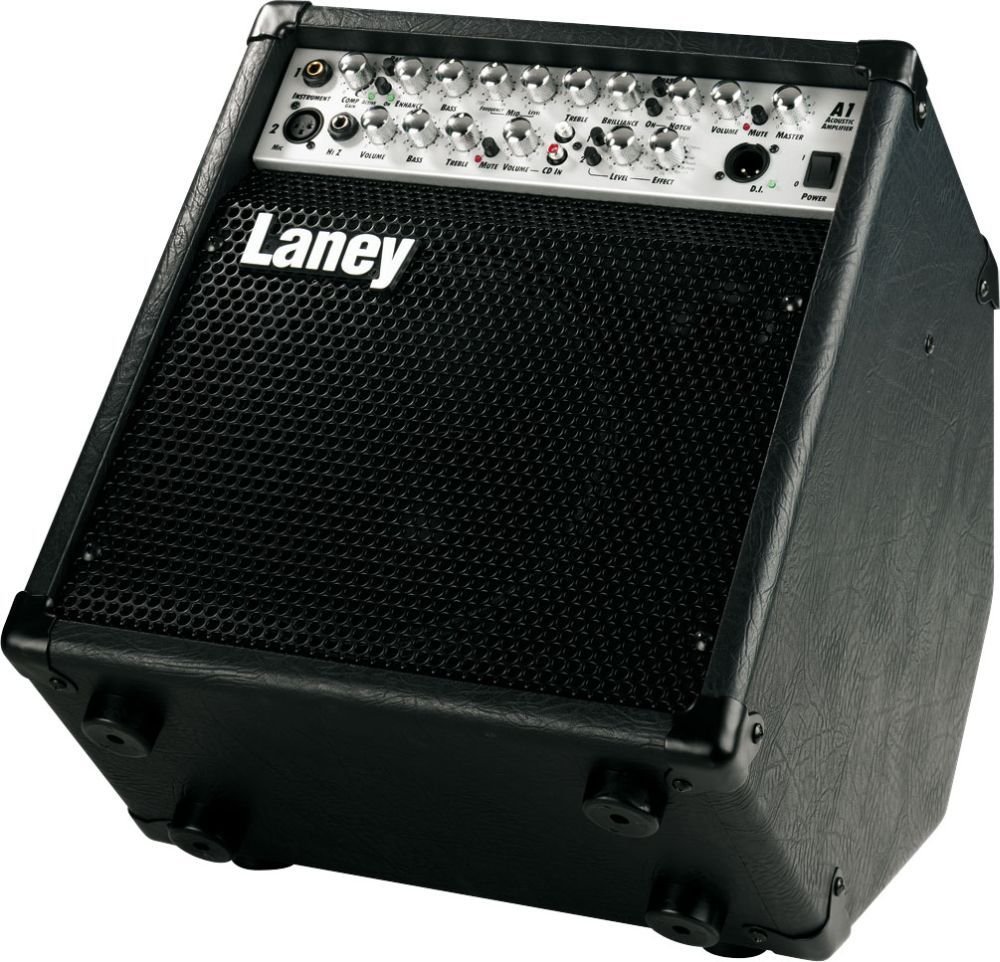
Figure 1: Front view of the Laney A1 Acoustic Amplifier, showcasing its control panel and speaker grille.
2. Important Safety Instructions
- Read these instructions.
- Keep these instructions.
- Heed all warnings.
- Follow all instructions.
- Do not use this apparatus near water.
- Clean only with a dry cloth.
- Do not block any ventilation openings. Install in accordance with the manufacturer's instructions.
- Do not install near any heat sources such as radiators, heat registers, stoves, or other apparatus (including amplifiers) that produce heat.
- Do not defeat the safety purpose of the polarized or grounding-type plug. A polarized plug has two blades with one wider than the other. A grounding type plug has two blades and a third grounding prong. The wide blade or the third prong are provided for your safety. If the provided plug does not fit into your outlet, consult an electrician for replacement of the obsolete outlet.
- Protect the power cord from being walked on or pinched particularly at plugs, convenience receptacles, and the point where they exit from the apparatus.
- Only use attachments/accessories specified by the manufacturer.
- Use only with the cart, stand, tripod, bracket, or table specified by the manufacturer, or sold with the apparatus. When a cart is used, use caution when moving the cart/apparatus combination to avoid injury from tip-over.
- Unplug this apparatus during lightning storms or when unused for long periods of time.
- Refer all servicing to qualified service personnel. Servicing is required when the apparatus has been damaged in any way, such as power-supply cord or plug is damaged, liquid has been spilled or objects have fallen into the apparatus, the apparatus has been exposed to rain or moisture, does not operate normally, or has been dropped.
3. Setup
Follow these steps to set up your Laney A1 amplifier:
- Placement: Place the amplifier on a stable, flat surface. The Laney A1 features a tilt-back design, allowing it to be angled upwards for better sound projection towards the performer. Ensure adequate ventilation around the unit.
- Power Connection: Ensure the amplifier's power switch is in the OFF position. Connect the supplied power cord to the AC inlet on the rear of the amplifier and then to a suitable grounded electrical outlet.
- Instrument Connection:
- For acoustic instruments with a standard 1/4" output, connect your instrument to the Instrument Input (Jack).
- For microphones, connect an XLR cable from your microphone to the XLR Jack (Mic Channel).
- For high-impedance sources, connect to the HiZ Jack (Mic Channel).
- External Devices (Optional):
- To connect an external audio player (e.g., CD player, smartphone) for backing tracks, use the CD Input.
- For connecting external effects pedals, use the FX Loop Send and Return jacks.
- For direct connection to a mixing console or PA system, use the DI Socket.
- Headphones: For silent practice, connect headphones to the Headphone Output. This will mute the main speaker.
- Power On: Once all connections are made, switch the amplifier's power to the ON position.
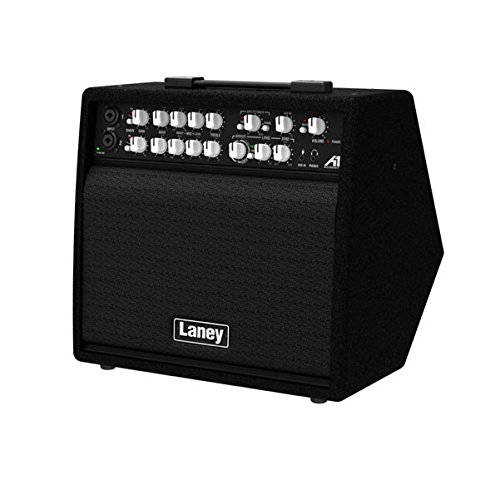
Figure 2: Angled view of the Laney A1, highlighting the input jacks and control knobs for various channels.
4. Controls and Functions
The Laney A1 features a comprehensive control panel designed for intuitive operation:
4.1. Instrument Channel (Channel 1)
- Instrument Input: 1/4" jack for connecting acoustic guitars, violins, mandolins, etc.
- Volume: Controls the overall output level of the instrument channel.
- Bass: Adjusts the low-frequency response of the instrument channel.
- Middle: Adjusts the mid-frequency response of the instrument channel.
- Treble: Adjusts the high-frequency response of the instrument channel.
4.2. Mic Channel (Channel 2)
- XLR Jack: For connecting dynamic or condenser microphones.
- HiZ Jack: For connecting high-impedance sources, such as passive pickups or certain line-level devices.
- Volume: Controls the overall output level of the microphone channel.
- Bass: Adjusts the low-frequency response of the microphone channel.
- Middle: Adjusts the mid-frequency response of the microphone channel.
- Treble: Adjusts the high-frequency response of the microphone channel.
4.3. Effects Section
- Effect Type: Rotary switch to select one of the 16 custom digital effects.
- Effect Level: Controls the amount of the selected effect applied to the signal.
4.4. Master Section
- Master Volume: Controls the overall output volume of the amplifier.
- Mute Switch: Mutes the main speaker output. Useful for silent tuning or switching instruments.
- DI Socket: XLR output for direct connection to a mixing console or recording interface. Provides a balanced signal.
- CD Input: Stereo RCA input for connecting external audio sources like CD players or MP3 players.
- Headphone Output: 1/4" stereo jack for connecting headphones. Mutes the main speaker when in use.
- FX Loop (Send/Return): 1/4" jacks for integrating external effects processors into the signal chain.
- Send: Outputs the signal to your external effect.
- Return: Receives the processed signal back from your external effect.
- Power Switch: Turns the amplifier ON or OFF.
5. Key Features
- Tilt-Back Design: The cabinet is designed to be tilted back, allowing the sound to project upwards towards the performer, improving monitoring in live situations.
- Three Channels: Dedicated channels for Instrument (1/4" Jack), XLR Microphone, and HiZ Microphone inputs provide versatile connectivity for various acoustic setups.
- 16 Custom Digital Effects: A range of high-quality digital effects are built-in, including reverbs, delays, chorus, and more, allowing you to enhance your sound without external pedals.
- Comprehensive Connectivity: Includes a DI socket for direct output to a PA or recording device, a CD input for backing tracks, a headphone output for silent practice, and an FX loop for integrating external effects.
6. Maintenance
- Cleaning: Use a soft, dry cloth to clean the exterior of the amplifier. Do not use abrasive cleaners, solvents, or waxes. Ensure no liquids enter the amplifier.
- Storage: When not in use, store the amplifier in a dry, cool place away from direct sunlight and extreme temperatures.
- Ventilation: Always ensure the ventilation openings are clear and not obstructed to prevent overheating.
- Transportation: When transporting the amplifier, ensure it is securely packed to prevent physical damage.
7. Troubleshooting
| Problem | Possible Cause | Solution |
|---|---|---|
| No sound from amplifier. |
|
|
| Distorted or poor sound quality. |
|
|
| Effects not working. |
|
|
8. Specifications
| Feature | Detail |
|---|---|
| Model | A1 |
| Output Wattage | 65 Watts |
| Channels | 3 (Instrument Jack, XLR Mic, HiZ Mic) |
| Effects | 16 Custom Digital Effects |
| Connectivity | DI Socket, CD Input, Headphone Output, FX Loop |
| Dimensions (LxWxH) | 38.7 x 36.4 x 39.6 Centimeters |
| Item Weight | 13.5 kg (29.76 Pounds) |
| Power Source | Corded Electric |
| Color | Black |
9. Warranty and Support
The Laney A1 65-Watt Acoustic Amplifier comes with a 1 Year Warranty from the date of purchase. This warranty covers manufacturing defects and faulty components under normal use.
For warranty claims, technical support, or service inquiries, please contact your authorized Laney dealer or visit the official Laney website for contact information in your region. Please retain your proof of purchase for warranty validation.
Related documentsA1


Ask a question about this manual
Ask about setup, troubleshooting, compatibility, parts, safety, or missing instructions. Manuals+ will review the question and use this page’s manual context to help answer it.