
Altec Lansing BX1020
Altec Lansing BX1020 2-Piece Music and Gaming Speaker System
Instruction Manual
Introduction
Thank you for purchasing the Altec Lansing BX1020 2-Piece Music and Gaming Speaker System. This system is designed to provide clear and powerful audio for your CD player, MP3 player, video gaming system, or personal computer. This manual provides essential information for setting up, operating, and maintaining your new speaker system.
Package Contents
Please verify that all items listed below are present in your package:
- Two (2) Altec Lansing BX1020 Satellite Speakers
- One (1) Power Adapter
- Audio Input Cable (attached to one speaker)
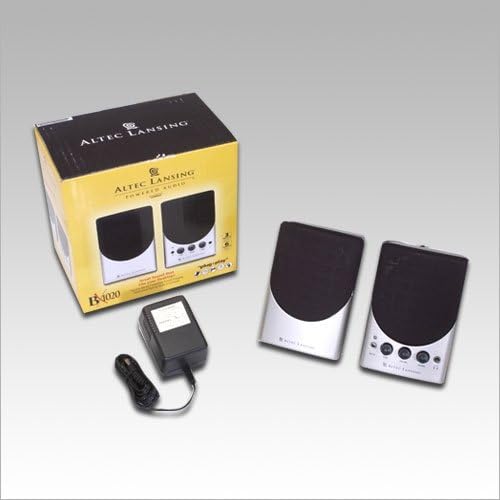
Image: Contents of the Altec Lansing BX1020 package, showing the two speakers, power adapter, and the product box.
Setup Instructions
- Speaker Placement: Position the two satellite speakers on either side of your computer monitor or audio source for optimal stereo separation. Ensure they are on a stable, flat surface.
- Connect Speakers: The left speaker connects to the right speaker via an integrated cable. Ensure this connection is secure.
- Connect Audio Source: Locate the audio input cable (3.5mm stereo jack) attached to one of the speakers. Plug this cable into the headphone jack or audio output port of your computer, MP3 player, CD player, or gaming console.
- Connect Power: Insert the power adapter cable into the DC input jack on the back of the main speaker (the one with controls). Plug the power adapter into a standard electrical outlet.

Image: The Altec Lansing BX1020 speaker system, showing the primary speaker with its control panel and the secondary speaker.
Operating Instructions
- Power On/Off: The power button is located on the front panel of the main speaker. Press it to turn the speakers on or off. A blue LED indicator will illuminate when the speakers are powered on.
- Volume Control: Rotate the "Volume" knob clockwise to increase the audio output and counter-clockwise to decrease it.
- Tone Control: Adjust the "Tone" knob to modify the bass and treble response of the audio. Turning it clockwise generally increases treble, while counter-clockwise increases bass.
- Headphone Jack: A 3.5mm headphone jack is provided on the front panel. Plugging headphones into this jack will mute the speakers and route audio to your headphones.
- Auxiliary Input: An "Aux In" port (3.5mm) is available on the front panel for connecting an additional audio device without disconnecting the primary audio source.
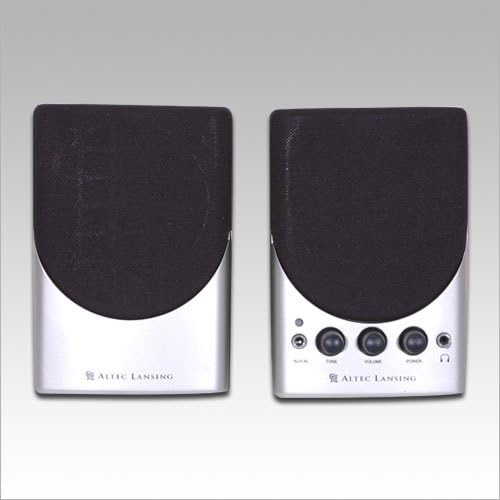
Image: A direct front view of both Altec Lansing BX1020 speakers, highlighting the control knobs and ports on the right speaker.
Maintenance
To ensure the longevity and optimal performance of your Altec Lansing BX1020 speaker system, follow these maintenance guidelines:
- Cleaning: Use a soft, dry cloth to wipe down the speaker surfaces. Do not use liquid cleaners, aerosols, or abrasive chemicals, as these may damage the finish or internal components.
- Dust Removal: Periodically use a soft brush or compressed air to gently remove dust from the speaker grilles and control knobs.
- Storage: If storing the speakers for an extended period, disconnect them from power and audio sources, and store them in a cool, dry place away from direct sunlight and extreme temperatures.
- Avoid Liquids: Keep the speakers away from water and other liquids. Do not place beverages or liquid containers on or near the speakers.
Troubleshooting
If you encounter issues with your speaker system, please refer to the following common problems and solutions:
| Problem | Possible Cause | Solution |
|---|---|---|
| No sound from speakers. |
|
|
| Distorted or unclear sound. |
|
|
| Power indicator light is off. |
|
|
Specifications
Key technical specifications for the Altec Lansing BX1020 speaker system:
| Product Type | Speaker System |
| Model Number | BX1020 |
| System Components | 2 Speakers (2.0 Stereo System) |
| Total Power Output | 6 Watts |
| Driver Size (per Satellite) | One 2.5-inch full range driver |
| Connectivity | Wired (3.5mm audio input) |
| Color | Black/Silver |
| Dimensions (LxWxH) | 7.6 x 12.7 x 10.2 Centimeters (approx. 3 x 5 x 4 inches) |
| Item Weight | 885 grams (approx. 1.95 lbs) |
| Power Source | Corded Electric |
Warranty and Support
For information regarding warranty coverage, technical support, or service for your Altec Lansing BX1020 speaker system, please refer to the official Altec Lansing website or contact their customer service directly. Keep your purchase receipt as proof of purchase for warranty claims.
Official Altec Lansing Website: www.alteclansing.com
Ask a question about this manual
Ask about setup, troubleshooting, compatibility, parts, safety, or missing instructions. Manuals+ will review the question and use this page’s manual context to help answer it.