
1. Introduction
This manual provides essential information for the safe and efficient operation of your Canton AS 85 Active Front-Firing Subwoofer. Please read it thoroughly before installation and use, and retain it for future reference.
2. Product Overview
The Canton AS 85 is an active front-firing subwoofer designed to enhance the low-frequency performance of your audio system. Key features include:
- Active subwoofer design for powerful bass reproduction.
- Discreet and modest design to integrate seamlessly into various environments.
- Solid cabinet construction to minimize resonance and improve sound clarity.
- Long-excursion woofer with wave technology for deep and precise bass.
- Bluetooth connectivity for versatile audio input.
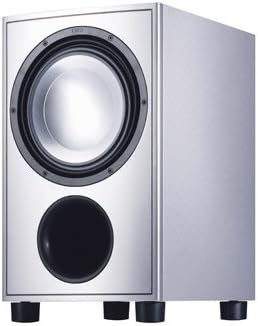
Figure 1: Canton AS 85 Active Front-Firing Subwoofer. This image shows the silver-finished subwoofer from an angled front view, highlighting the main speaker cone and the bass reflex port below it. The unit stands on four feet.
3. Safety Instructions
Observe the following safety precautions to prevent electric shock, fire, or damage to the unit:
- Do not expose the unit to rain or moisture.
- Do not open the cabinet. Refer all servicing to qualified personnel.
- Ensure proper ventilation; do not block ventilation openings.
- Place the unit on a stable, level surface.
- Disconnect the power cord during lightning storms or when unused for long periods.
- Avoid placing near heat sources or direct sunlight.
4. Package Contents
Verify that all items are present:
- Canton AS 85 Active Front-Firing Subwoofer
- Power Cord
- User Manual (this document)
5. Setup
5.1 Placement
Optimal placement of the subwoofer is crucial for sound quality. Consider the following:
- Corner Placement: Often provides the most bass output, but can sometimes sound boomy.
- Front Wall Placement: Near your main speakers can improve integration.
- "Subwoofer Crawl" Method: Place the subwoofer in your primary listening position, then crawl around the room to find where the bass sounds best. Place the subwoofer in that location.
- Ensure adequate space for ventilation around the unit.
5.2 Connections
Before making any connections, ensure the subwoofer and all connected audio components are turned off and unplugged from the power outlet.
- Audio Input: Connect an RCA cable from the LFE (Low-Frequency Effects) output or subwoofer pre-out of your AV receiver/amplifier to the LFE input on the Canton AS 85. If your receiver does not have an LFE output, use the stereo RCA inputs.
- Power Connection: Once all audio connections are made, connect the supplied power cord to the subwoofer's power inlet and then to a suitable wall outlet.
6. Operating Instructions
6.1 Initial Power On
After connecting, turn on your AV receiver/amplifier first, then the subwoofer. The subwoofer typically has an auto-on/standby feature that activates when an audio signal is detected.
6.2 Controls and Adjustments
The Canton AS 85 features several controls to integrate it seamlessly with your main speakers and room acoustics:
- Volume/Gain: Adjusts the output level of the subwoofer. Start with a low setting and gradually increase until the bass blends well with your main speakers without overpowering them.
- Crossover Frequency: Determines the highest frequency the subwoofer will reproduce. Set this based on the low-frequency capabilities of your main speakers. A common starting point is 80 Hz. Consult your main speaker's specifications.
- Phase Control: Adjusts the phase of the subwoofer's output relative to your main speakers. Experiment with 0° and 180° settings to find the one that produces the most coherent and impactful bass at your listening position.
6.3 Bluetooth Connectivity
The Canton AS 85 supports Bluetooth connectivity for wireless audio input. Refer to the specific instructions for pairing your device with the subwoofer. Typically, this involves:
- Activating Bluetooth pairing mode on the subwoofer (consult the unit's physical controls or indicator lights).
- Enabling Bluetooth on your source device (smartphone, tablet, etc.).
- Selecting "Canton AS 85" (or similar) from the list of available devices to pair.
7. Maintenance
To ensure the longevity and optimal performance of your subwoofer:
- Cleaning: Use a soft, dry cloth to wipe the cabinet. Do not use liquid cleaners or abrasive materials.
- Ventilation: Keep ventilation openings clear of dust and obstructions.
- Storage: If storing the unit for an extended period, unplug it and store it in a cool, dry place.
8. Troubleshooting
| Problem | Possible Cause | Solution |
|---|---|---|
| No Sound from Subwoofer | Power not connected; Subwoofer not turned on; Input cable loose or faulty; Volume too low; Crossover set too low. | Check power connection and outlet; Ensure subwoofer is powered on (auto-on or manual switch); Re-seat or replace audio cable; Increase subwoofer volume; Adjust crossover frequency. |
| Boomy or Distorted Bass | Subwoofer volume too high; Improper placement; Incorrect phase setting. | Reduce subwoofer volume; Experiment with different placement locations; Adjust phase control (0° or 180°). |
| Subwoofer Not Pairing via Bluetooth | Subwoofer not in pairing mode; Device too far; Interference. | Ensure subwoofer is in Bluetooth pairing mode; Move device closer; Reduce potential interference sources. |
9. Specifications
| Feature | Detail |
|---|---|
| Brand | Canton |
| Model Name | AS 85 SC |
| Speaker Type | Subwoofer |
| Maximum Speaker Power Output | 85 Watts |
| Connectivity Technology | Bluetooth |
| Audio Output Mode | Surround |
| Mounting Type | Floor Standing |
| Compatible Devices | Gaming Console, High-end Audio System, Home Theater |
| Unit Count | 1 Count |
| Surround Sound Channel Configuration | 1.0 |
10. Warranty and Support
Canton products are manufactured to high-quality standards. For warranty information and technical support, please refer to the warranty card included with your product or visit the official Canton website. Keep your proof of purchase for warranty claims.

