
Product Overview
The Yellow Jacket 5139N is a heavy-duty 6-outlet metal power strip designed for demanding environments such as workshops and garages. It features a durable steel casing, a highly visible 6-foot yellow power cord, and sliding safety covers on each outlet to protect against dust and debris. This power strip also includes a built-in 15 Amp circuit breaker for overload protection, ensuring the safety of your connected equipment.

Image: The Yellow Jacket 5139N 6-Outlet Metal Power Strip, showcasing its yellow metal housing and six black outlets.

Image: An angled view of the Yellow Jacket 5139N power strip, highlighting the durable yellow casing and the attached 6-foot power cord.
Video: An official product video demonstrating the features of the Yellow Jacket 5139N 6-Outlet Metal Power Strip, including its durable construction, safety covers, and circuit breaker.
Important Safety Information
- Electrical Rating: Do not exceed the maximum electrical rating of 120 Volts, 15 Amps, or 1800 Watts for this power strip. Overloading can cause damage to the unit and connected devices, and may pose a fire hazard.
- Overload Protection: The power strip is equipped with a built-in 15 Amp circuit breaker. If the total current draw exceeds 15 Amps, the circuit breaker will trip, cutting power to the outlets. To reset, unplug some devices, then press the red reset button on the power strip.
- Indoor Use Only: This power strip is designed for indoor use in dry locations. Do not expose it to moisture, rain, or wet conditions.
- Grounding: Always connect the power strip to a properly grounded 3-prong outlet.
- Children and Pets: Keep the power strip and connected cords out of reach of children and pets. The sliding safety covers help prevent accidental contact with live parts.
- Ventilation: Ensure adequate ventilation around the power strip. Do not cover it with clothing, blankets, or other materials that could impede airflow.
Setup and Installation
- Unpacking: Carefully remove the power strip from its packaging. Inspect the unit and power cord for any signs of damage. Do not use if damaged.
- Placement: Choose a suitable location for the power strip, ensuring it is in a dry area and away from heat sources or flammable materials.
- Wall Mounting (Optional): The power strip features keyhole slots on its back for convenient wall mounting.
- Measure the distance between the keyhole slots on the back of the power strip.
- Mark the desired mounting location on the wall.
- Install two screws (not included) into the wall at the marked positions, leaving a small portion of the screw head exposed. Ensure the screws are appropriate for your wall material and can support the weight of the power strip and connected devices.
- Align the keyhole slots with the screw heads and slide the power strip down to secure it.
- Connecting to Power: Plug the power strip's 6-foot cord into a standard 120V AC grounded wall outlet.

Image: The underside of the Yellow Jacket 5139N power strip, illustrating the keyhole slots for wall mounting.
Operating Instructions
- Powering On/Off: Use the red rocker switch located on the power strip to turn power to all outlets ON or OFF. Press the side marked 'ON' to supply power and 'OFF' to cut power.
- Connecting Devices: Plug your electrical devices into any of the six grounded outlets. The power strip features two widely spaced outlets to accommodate larger adapter plugs without blocking adjacent outlets.
- Sliding Safety Covers: Each outlet is equipped with a sliding safety cover. To insert a plug, slide the cover to the side to expose the receptacle. Ensure the cover is closed when the outlet is not in use to prevent dust and debris entry.
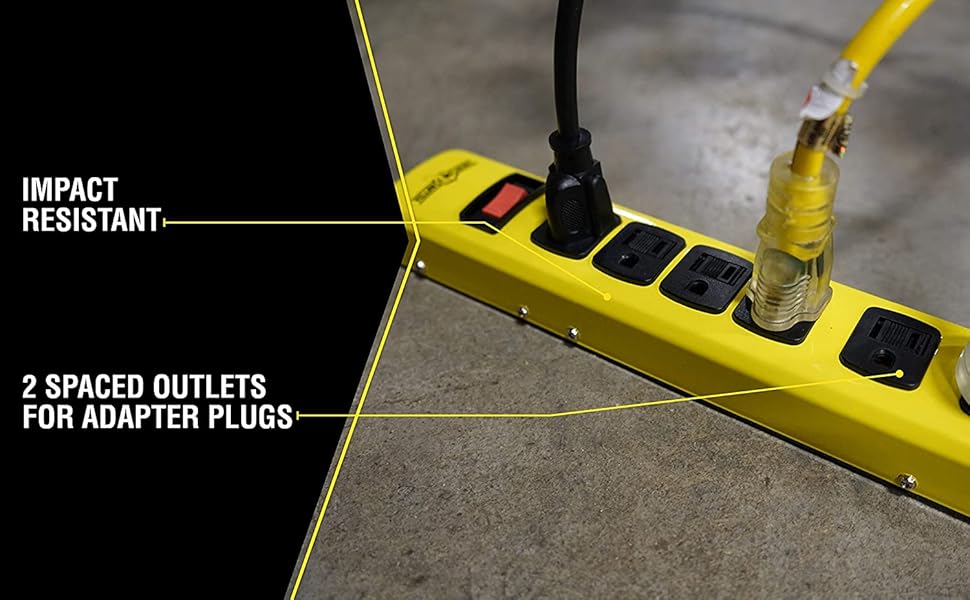
Image: A close-up of the Yellow Jacket 5139N power strip, showing the two widely spaced outlets designed for larger adapter plugs.
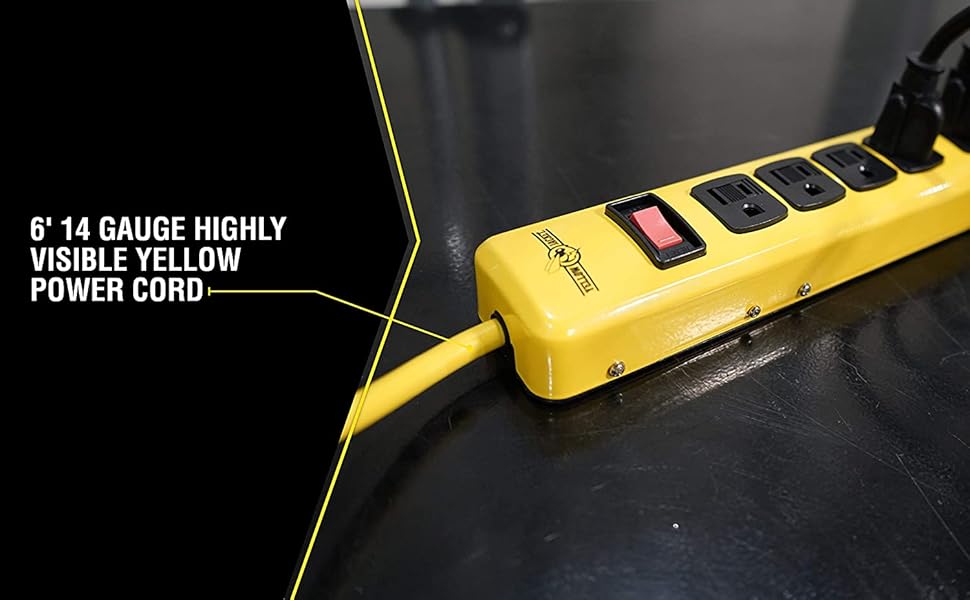
Image: A detailed view of the power strip's robust 6-foot, 14-gauge yellow power cord, emphasizing its high visibility and durability.
Maintenance
- Cleaning: Disconnect the power strip from the wall outlet before cleaning. Use a dry, soft cloth to wipe the exterior. Do not use liquid cleaners or immerse the unit in water.
- Outlet Covers: Periodically check the sliding safety covers to ensure they move freely and effectively block unused outlets. Keep them free of obstructions.
- Cord Inspection: Regularly inspect the power cord for any cuts, fraying, or damage. If the cord is damaged, discontinue use immediately and replace the unit.
- Storage: When not in use, store the power strip in a dry, clean environment.

Image: A close-up view of the power strip's outlets, demonstrating the sliding safety covers in both open and closed positions.
Troubleshooting
- No power to devices:
- Check Power Switch: Ensure the red rocker switch on the power strip is in the 'ON' position.
- Check Circuit Breaker: If the power strip suddenly loses power, the built-in 15 Amp circuit breaker may have tripped due to an overload. Unplug some devices from the power strip, then press the red reset button on the power strip to restore power.
- Check Wall Outlet: Verify that the wall outlet the power strip is plugged into is functioning correctly by testing it with another device.
- Inspect Cord: Check the power strip's cord for any visible damage. If damaged, discontinue use.
- Plugs do not fit into outlets:
- Sliding Safety Covers: Ensure the sliding safety covers are fully open before attempting to insert a plug.
- Plug Orientation: Verify the plug is oriented correctly with the outlet's prongs.
Specifications
| Model Number | 5139N |
| Total Power Outlets | 6 Grounded Outlets (2 widely spaced) |
| Voltage | 120 Volts |
| Amperage | 15 Amps |
| Wattage | 1800 Watts |
| Cord Length | 6 feet |
| Cord Gauge | 14/3 SJT |
| Housing Material | Durable Steel Casing |
| Product Dimensions | 15.5 x 1.63 x 5.75 inches |
| Item Weight | 1 pound |
| Special Feature | Sliding Safety Covers, Overload Protection |

Image: A visual representation of the Yellow Jacket 5139N power strip's dimensions, including length and width.
Warranty and Support
For product support, technical assistance, or warranty inquiries, please contact Southwire customer service. Refer to the product packaging or the official Southwire website for the most current contact information and warranty details.
Manufacturer: Southwire
Brand: Yellow Jacket

