
1. Introduction
The VCT VT-300 is a heavy-duty voltage transformer designed for converting electrical voltage between 110V/120V and 220V/240V. This device allows you to use electronic appliances from one region in another region with a different standard voltage. It supports both step-up (converting 110V to 220V/240V) and step-down (converting 220V/240V to 110V) operations, with a maximum capacity of 300 watts.
2. Important Safety Instructions
Please read and understand all safety instructions before operating this voltage transformer. Failure to follow these instructions may result in electric shock, fire, or damage to the unit or connected appliances.
- Do not exceed the rated wattage: Ensure the total wattage of all connected appliances does not exceed 300 watts. Overloading can cause overheating and damage.
- Ventilation: Place the transformer in a well-ventilated area. Do not block ventilation openings.
- Indoor use only: This unit is designed for indoor use. Do not expose it to rain, moisture, or extreme temperatures.
- Grounding: Always connect the transformer to a grounded electrical outlet.
- Children and pets: Keep the transformer out of reach of children and pets.
- Unplug when not in use: Disconnect the transformer from the power source when not in use or before cleaning.
- Avoid liquids: Do not immerse the unit in water or any other liquid.
- Professional service: Do not attempt to open or repair the unit yourself. Refer all servicing to qualified personnel.
3. Package Contents
Upon opening the package, please verify that the following items are included:
- VCT VT-300 Voltage Transformer
- Power Cord (attached)
- Spare Fuses (typically 2)
- Instruction Manual (this document)
If any items are missing or damaged, please contact customer support.
4. Product Overview
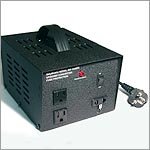
Image 1: Front view of the VCT VT-300 Voltage Transformer. The image displays the compact, black unit with a carrying handle on top. The front panel features two 110V output sockets, one 220V output socket, a voltage selector switch, a power switch, and a fuse holder. A power plug is visible extending from the side.
The VCT VT-300 features a robust design for reliable voltage conversion. Key components include:
- Voltage Selector Switch: Located on the front panel, this switch allows you to select the input voltage (110V or 220V/240V) based on your power source.
- 110V Output Sockets: Standard North American type outlets for connecting 110V appliances.
- 220V/240V Output Socket: A universal type outlet for connecting 220V/240V appliances.
- Power Switch: Controls the power supply to the transformer.
- Fuse Holder: Contains the protective fuse.
- Carrying Handle: For easy portability.
5. Setup Instructions
Follow these steps for proper setup of your VCT VT-300 transformer:
- Determine Input Voltage: Identify the voltage of the wall outlet you will be plugging the transformer into (e.g., 110V in North America, 220V/240V in many other regions).
- Select Correct Input Voltage: On the front panel of the transformer, locate the voltage selector switch. Set this switch to match the input voltage of your wall outlet. Incorrect selection can damage the transformer and connected appliances.
- Determine Appliance Voltage: Identify the voltage requirement of the appliance you wish to power (e.g., a 110V appliance for use in a 220V region, or a 220V appliance for use in a 110V region).
- Connect Appliance: Plug your appliance into the corresponding output socket on the transformer (e.g., if stepping down from 220V to 110V, plug your 110V appliance into the 110V output socket).
- Plug in Transformer: With the appliance connected and the voltage selector set correctly, plug the transformer's power cord into the wall outlet.
- Power On: Flip the power switch on the transformer to the 'ON' position.
Important: Always ensure the wattage of your appliance is within the 300-watt capacity of the transformer. For continuous use, it is recommended to use an appliance that draws no more than 80% of the transformer's rated capacity (240 watts for the VT-300).
6. Operating Instructions
Once the VCT VT-300 is properly set up as described in Section 5, operation is straightforward:
- Power On: Ensure the power switch on the transformer is in the 'ON' position. The power indicator light (if present) should illuminate.
- Appliance Operation: Turn on your connected appliance as you normally would.
- Power Off: When you are finished using the appliance, turn off the appliance first, then flip the power switch on the transformer to the 'OFF' position.
- Disconnect: For extended periods of non-use, unplug the transformer from the wall outlet.
Monitor the transformer during initial use to ensure stable operation and no signs of overheating.
7. Maintenance
Regular maintenance helps ensure the longevity and safe operation of your VCT VT-300 transformer.
- Cleaning: Disconnect the transformer from the power source before cleaning. Use a dry, soft cloth to wipe down the exterior. Do not use liquid cleaners or abrasive materials.
- Ventilation: Periodically check that the ventilation slots are clear of dust and debris. Use a soft brush or compressed air to clean them if necessary.
- Fuse Replacement: If the transformer suddenly stops working, the fuse may have blown due to an overload or short circuit. To replace the fuse:
- Unplug the transformer from the wall outlet and disconnect all appliances.
- Locate the fuse holder on the front panel.
- Unscrew the fuse cap (usually by twisting counter-clockwise).
- Remove the old fuse and insert a new fuse of the same type and rating (e.g., 2A for 220V input, 5A for 110V input, or as specified on the unit).
- Screw the fuse cap back into place.
- Reconnect and test the transformer.
- Storage: Store the transformer in a cool, dry place away from direct sunlight and extreme temperatures when not in use.
8. Troubleshooting
If you encounter issues with your VCT VT-300, refer to the following troubleshooting guide:
| Problem | Possible Cause | Solution |
|---|---|---|
| No power to transformer or appliance |
|
|
| Transformer or appliance overheating |
|
|
| Appliance not working correctly |
|
|
9. Specifications
- Model Number: VT 300DE
- Brand: VCT
- Power Source: Corded Electric
- Maximum Wattage: 300 Watts
- Input Voltage: 110V/120V or 220V/240V (selectable)
- Output Voltage: 110V/120V and 220V/240V
- Product Dimensions: 4.7 x 6 x 4.2 inches
- Item Weight: 6 pounds
- Specification Met: UL
- UPC: 894076000893
10. Warranty and Support
The VCT VT-300 Voltage Transformer is designed for durability and performance. For specific warranty details, please refer to the warranty card included with your purchase or contact the retailer.
If you require technical assistance, troubleshooting beyond this manual, or have questions regarding your product, please contact VCT customer support through their official website or the contact information provided with your purchase documentation.
