
1. Introduction
This manual provides essential information for the safe and effective operation of your Behringer Xenyx 1202FX Mixer with Effects. The Xenyx 1202FX is an 8-channel mixer featuring four Xenyx mic preamps, one FX/Aux send per channel, four stereo channels, 100 effects presets, and a 3-band EQ. Please read this manual thoroughly before using the device.
2. Safety Instructions
Always follow basic safety precautions when using this product to reduce the risk of fire, electric shock, or injury to persons. Keep this manual for future reference.
- Do not expose this appliance to rain or moisture.
- Do not use this apparatus near water.
- Clean only with a dry cloth.
- Do not block any ventilation openings. Install in accordance with the manufacturer's instructions.
- Do not install near any heat sources such as radiators, heat registers, stoves, or other apparatus (including amplifiers) that produce heat.
- Protect the power cord from being walked on or pinched, particularly at plugs, convenience receptacles, and the point where they exit from the apparatus.
- Only use attachments/accessories specified by the manufacturer.
- Unplug this apparatus during lightning storms or when unused for long periods of time.
3. Package Contents
Upon unpacking, ensure all items are present and in good condition:
- Behringer Xenyx 1202FX Mixer
- Power Adapter
- User Manual (this document)
Note: Additional accessories may be included; please refer to your product packaging for a complete list.
4. Setup
4.1 Connecting Power
Connect the included power adapter to the mixer's power input and then to a suitable electrical outlet. The mixer does not have a dedicated power switch; it powers on when connected to an active outlet.
4.2 Audio Connections
The Xenyx 1202FX offers a variety of input and output options for flexible audio routing.
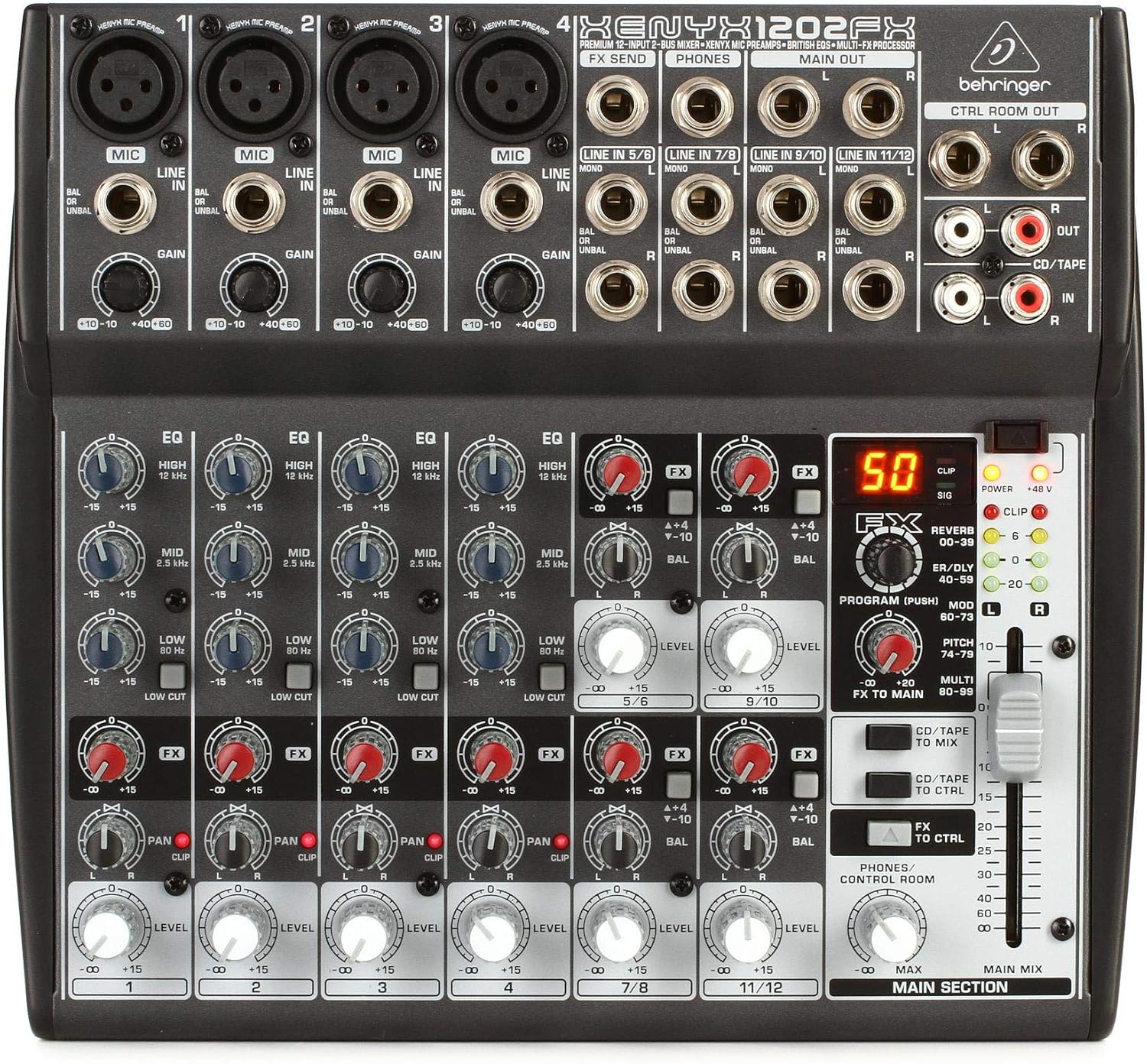
Figure 4.1: Top view of the Behringer Xenyx 1202FX mixer, highlighting its comprehensive input and output panel.
- Microphone Inputs (Channels 1-4): Use XLR cables for microphones. These channels feature Xenyx mic preamps and can provide +48V phantom power for condenser microphones.
- Line Inputs (Channels 1-4): Use 1/4" TRS or TS cables for line-level instruments or devices.
- Stereo Line Inputs (Channels 5/6, 7/8, 9/10, 11/12): Use 1/4" TRS or TS cables for stereo line-level sources. These can also be used as mono inputs.
- FX Send: A 1/4" TS output for sending audio to external effects processors.
- Main Out: 1/4" TRS outputs (L/R) for connecting to powered speakers or an amplifier.
- Control Room Out: 1/4" TRS outputs (L/R) for connecting to studio monitors.
- CD/Tape In/Out: RCA inputs/outputs for connecting CD players, tape decks, or other consumer audio devices.
- Phones: A 1/4" TRS output for connecting headphones.

Figure 4.2: Angled view of the Behringer Xenyx 1202FX, illustrating its compact form factor and accessible controls.
4.3 Phantom Power (+48V)
The Xenyx 1202FX provides +48V phantom power on its XLR microphone inputs (Channels 1-4). This is essential for operating condenser microphones. Ensure phantom power is only activated when needed and that dynamic microphones are not damaged by it.
5. Operating the Mixer
5.1 Channel Controls
- GAIN: Adjusts the input sensitivity for each channel. Set this to achieve a strong signal without clipping.
- EQ (High, Mid, Low): Three-band equalizer for shaping the tone of each channel. Adjust these knobs to boost or cut specific frequency ranges.
- FX: Controls the amount of signal sent from each channel to the internal effects processor or external FX send.
- PAN (Mono Channels): Adjusts the stereo position of the mono channels (left to right).
- BALANCE (Stereo Channels): Adjusts the balance between the left and right signals for stereo channels.
- LEVEL: Controls the output volume of each channel to the main mix.
5.2 Main Section
- FX Processor: The Xenyx 1202FX includes 100 built-in digital effects presets. Use the PROGRAM knob to select an effect and the FX knob to adjust its intensity.
- FX to Main: Controls the overall level of the effects signal sent to the main mix.
- Main Mix Fader: Adjusts the overall output volume of the main stereo mix.
- Phones/Control Room Level: Controls the volume for both the headphone output and the control room outputs.
Video 5.1: A detailed overview of the Behringer Xenyx 1202FX mixer's various input and output connections, demonstrating how different cables and adapters can be used for amplified speakers, headphones, and other audio devices. The video also highlights the power adapter and the integrated sound processor for FX models.
6. Maintenance
To ensure the longevity and optimal performance of your Behringer Xenyx 1202FX mixer, follow these maintenance guidelines:
- Cleaning: Use a soft, dry cloth to clean the exterior of the mixer. Avoid using abrasive cleaners, solvents, or waxes.
- Storage: When not in use, store the mixer in a cool, dry place away from direct sunlight and extreme temperatures.
- Ventilation: Ensure that the mixer's ventilation openings are not obstructed to prevent overheating.
- Cable Management: Organize cables neatly to prevent damage and reduce strain on connectors.
7. Troubleshooting
If you encounter issues with your mixer, refer to the following common problems and solutions:
| Problem | Possible Cause | Solution |
|---|---|---|
| No sound output | Incorrect cable connections, low volume levels, phantom power off for condenser mics. | Check all cable connections. Increase channel LEVEL and Main Mix fader. Activate +48V phantom power if using condenser microphones. |
| Hum or Hiss | Ground loop, faulty cables, high gain settings. | Ensure proper grounding. Try different cables. Reduce GAIN settings if input signal is too strong. |
| Effects not working | FX knob turned down, incorrect effect selected, FX to Main level low. | Increase the channel's FX knob. Select a different effect preset. Increase the FX to Main level. |
If the problem persists, consult a qualified service technician.
8. Specifications
- Model: 1202FX
- Number of Channels: 12
- Item Weight: 4.58 pounds (2.08 Kilograms)
- Product Dimensions: 9.53 x 8.66 x 1.85 inches
- Voltage: 240 Volts (AC)
- Body Material: Composite
- Color: Black
- Connector Type: 3-Pin XLR, Auxiliary
9. Warranty and Support
For detailed warranty information and technical support, please refer to the official Behringer website or the comprehensive User Guide (PDF) available for download. The User Guide contains additional diagrams and in-depth explanations of all features and functions.
For further assistance, you may also contact Behringer customer service directly.


