
1. Safety Information
Please read this entire instruction manual before installation and assembly. If you have any questions regarding these instructions or the installation, please contact Vanguard customer support. Improper assembly or installation may cause damage or serious injury.
- Weight Capacity: This wall mount is designed for displays weighing up to 150 lbs (68 kg). Do not exceed this weight limit. Exceeding the weight limit may result in serious injury or property damage.
- Screen Size: Compatible with displays from 32 to 50 inches.
- Wall Type: Ensure the mounting surface can safely support the combined weight of the equipment and all attached hardware. This mount is suitable for solid concrete walls, brick walls, or wood stud walls.
- Professional Installation: For optimal safety and performance, professional installation is recommended.
- UL Listed: This product is UL Listed, indicating compliance with safety standards.
2. Package Contents
Verify that all components are present and undamaged before installation. If any parts are missing or defective, contact Vanguard for assistance.
- Wall Mount Assembly (VM-561)
- TV Brackets (2 pcs)
- Wall Plate
- Mounting Hardware Kit (various screws, washers, spacers for TV and wall attachment)
- Bubble Level
- Hex Wrench
- Instruction Manual
3. Setup and Installation
Follow these steps carefully for secure installation.
3.1 Tools Required (Not Included)
- Drill
- Stud Finder (for wood stud installation)
- Phillips Head Screwdriver
- Tape Measure
- Pencil
3.2 Pre-Installation Checks
- Determine the desired height and location for your TV.
- Locate wall studs if mounting to wood studs. For concrete/brick, ensure the wall is solid.
- Confirm your TV's weight does not exceed 150 lbs (68 kg).
3.3 Attaching TV Brackets to Display
- Carefully place your TV face down on a soft, clean surface to prevent screen damage.
- Identify the VESA mounting holes on the back of your TV. This mount supports VESA 100x100mm and 200x200mm patterns.
- Select the appropriate screws, washers, and spacers from the hardware kit that fit your TV's mounting holes.
- Attach the two TV brackets to the back of your TV, ensuring they are level and securely fastened. Do not overtighten.
3.4 Mounting the Wall Plate
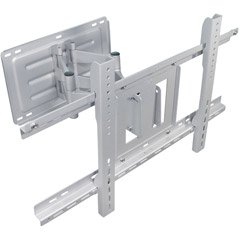
Image: The Vanguard VM-561 articulating wall mount, showing its main components including the wall plate and articulating arm. This image illustrates the overall structure of the mount before installation.
- Hold the wall plate against the wall at your desired height and use the integrated bubble level to ensure it is perfectly horizontal.
- Mark the drill hole locations through the wall plate onto the wall with a pencil.
- Drill pilot holes at the marked locations. Use appropriate drill bits and anchors for your wall type (e.g., wood studs, concrete).
- Secure the wall plate to the wall using the provided lag bolts and washers. Tighten all bolts firmly, but do not overtighten.
3.5 Mounting TV to Wall Plate
- With assistance, carefully lift the TV with the attached brackets.
- Hook the TV brackets onto the wall plate. Ensure both brackets are securely seated on the wall plate.
- Locate and tighten the safety screws on the bottom of the TV brackets to prevent accidental dislodging.
4. Operating the Mount
The Vanguard VM-561 offers flexible viewing options.
- Articulating Movement: Gently pull or push the TV to extend or retract the arm, allowing you to position the screen further from or closer to the wall.
- Tilt Adjustment: The mount allows for a tilt adjustment of -5° up and +15° down. Loosen the tilt adjustment knobs on the TV brackets, adjust the screen to the desired angle, and then re-tighten the knobs securely.
- Swivel: The articulating arm allows for left and right swivel movement to achieve optimal viewing angles from various positions in the room.
5. Maintenance
Regular maintenance ensures the longevity and safe operation of your wall mount.
- Periodic Checks: Every few months, check all screws and bolts to ensure they remain tight. Re-tighten if necessary.
- Cleaning: Wipe the mount with a soft, dry cloth. Avoid using abrasive cleaners or solvents, as they may damage the finish.
- Lubrication: If the articulating arm movement becomes stiff over time, a small amount of silicone-based lubricant can be applied to the pivot points.
6. Troubleshooting
If you encounter issues, refer to the following common problems and solutions.
- TV is not level:
Solution: Ensure the wall plate was installed level. If the TV brackets allow for post-installation leveling, adjust them accordingly. Otherwise, you may need to re-adjust the wall plate. - Mount feels loose or unstable:
Solution: Immediately remove the TV from the mount. Check all wall plate mounting bolts and TV bracket screws for tightness. Ensure the wall structure is sound and capable of supporting the weight. - Difficulty adjusting tilt or swivel:
Solution: For tilt, ensure the tilt adjustment knobs are sufficiently loosened before attempting to change the angle. For swivel, check for any obstructions or apply a small amount of lubricant to the pivot points if movement is stiff.
7. Specifications
| Model Number | VM-561 |
| Brand | VANGUARD |
| Mounting Type | Wall Mount |
| Movement Type | Articulating, Tilt |
| Compatible Screen Sizes | 32" to 50" |
| Weight Capacity | 150 lbs (68 kg) |
| VESA Compatibility | 100x100mm, 200x200mm |
| Tilt Adjustment | -5° up to +15° down |
| Item Weight (Mount) | 35 lbs (15.9 kg) |
| Certifications | UL Listed |
8. Warranty and Support
For warranty information or technical support, please contact Vanguard customer service. Keep your purchase receipt as proof of purchase.
Vanguard Customer Support:
Please refer to the official Vanguard website or product packaging for the most current contact information.
